Chad Rubin
April 25, 2026 · Updated May 11, 2026 · 16 min read
Operator notes by email
Short, opinionated takes on AI agents, Amazon PPC, pricing, and inventory. No fluff. About once a week.
Most Amazon sellers who turn on AI PPC management get the same disappointing result. The tool generates a lot of activity. Bids go up. Bids go down. Search terms get added. Search terms get negated. Reports get emailed. Dashboards light up. And at the end of the month, the profit has not moved.
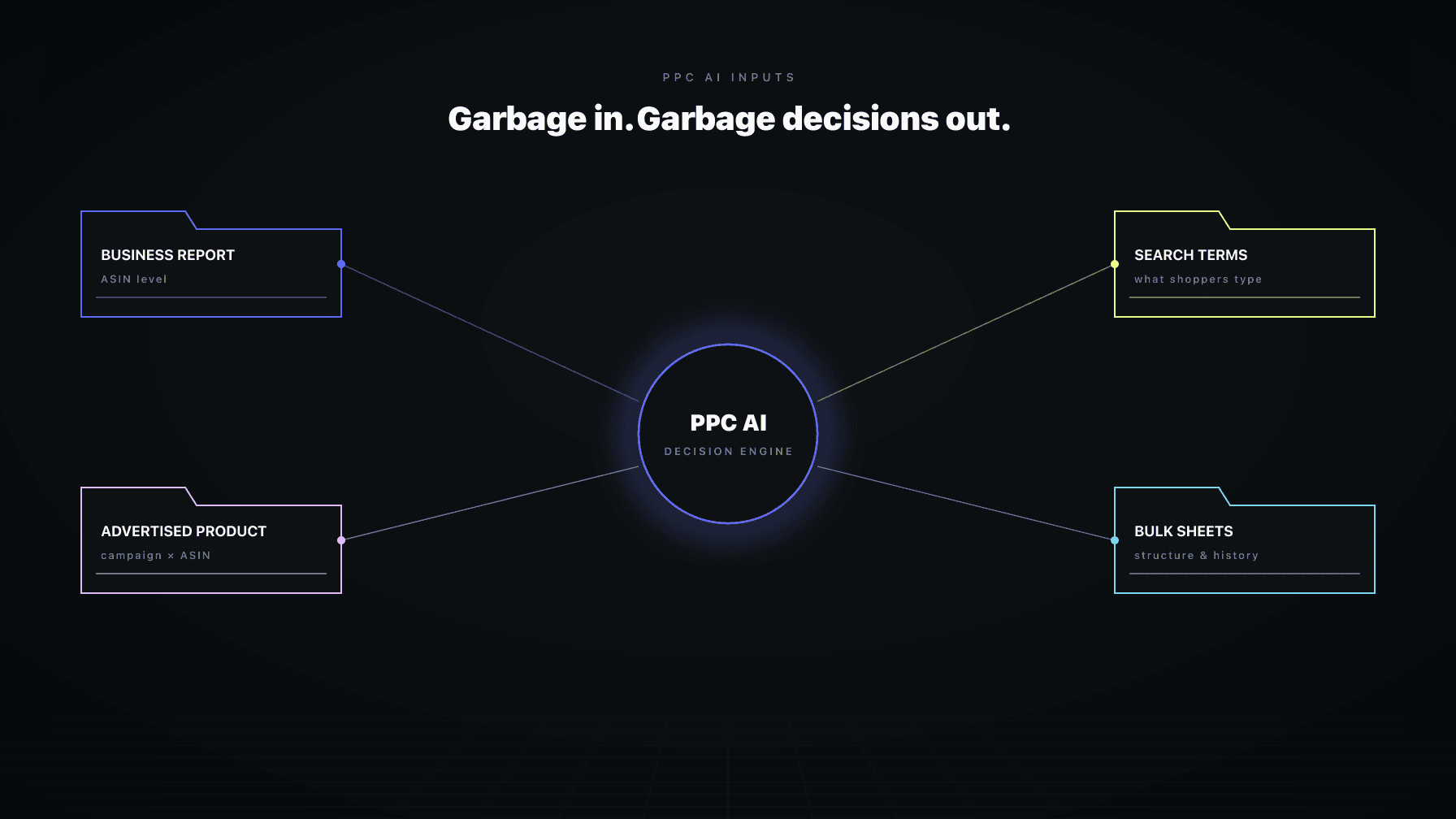
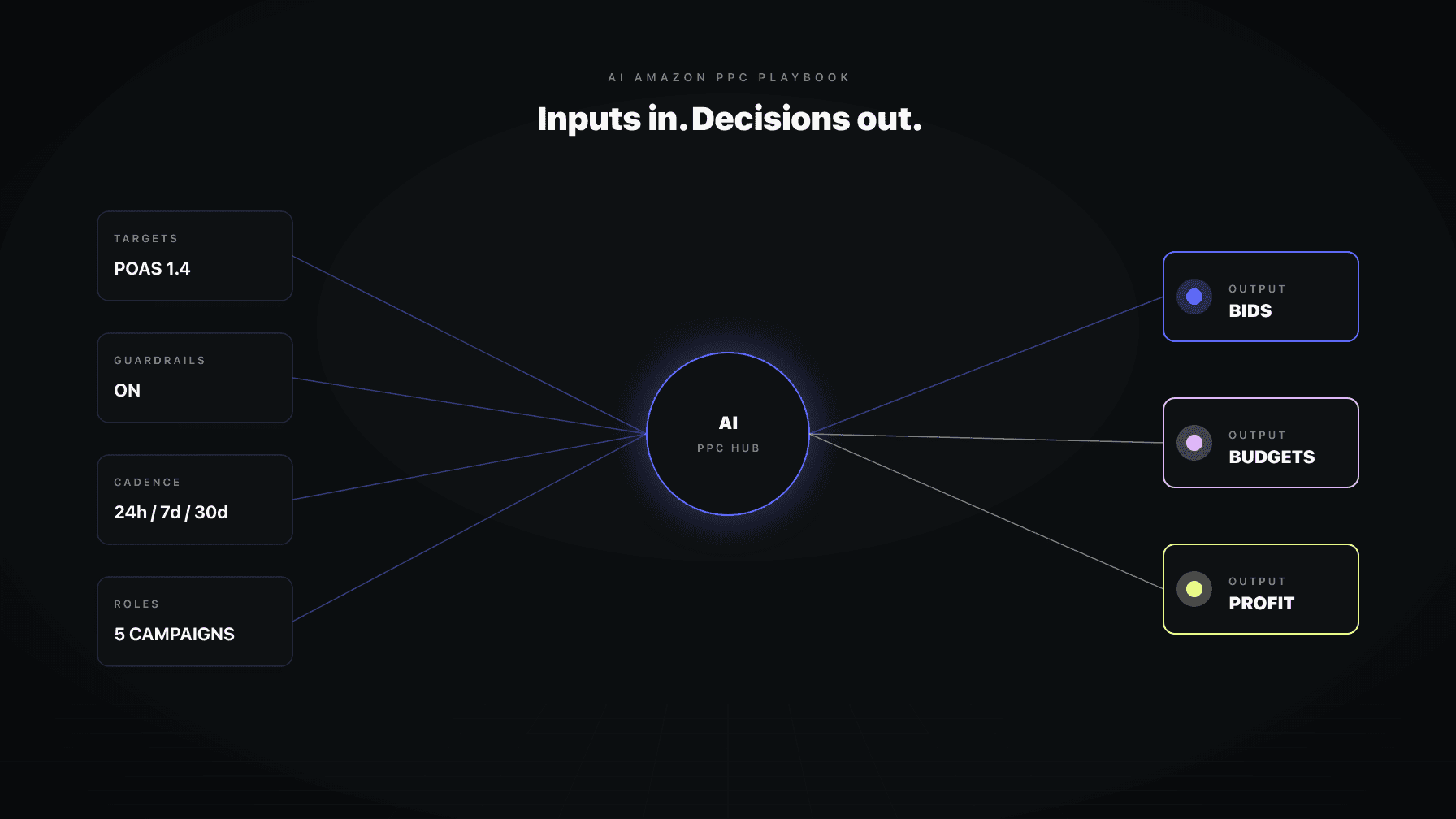
That is not an AI problem. That is a setup problem. AI Amazon PPC management works when you give the system clean data, clear rules, clear product priorities, and enough autonomy to handle the boring work every single day. Without those four inputs, even the best automation is just expensive noise.
I have run a 7-figure Amazon brand for over a decade and now run Profasee, a platform of coordinated AI employees built for sellers who care about profit, not just volume. This post is the operator playbook we use. It covers the full framework: how to connect, how to configure, which settings actually move money, how to decide between manual and automatic, and how to tell whether your AI is earning its subscription.
This is long. It is comprehensive. If you are shopping for an Amazon PPC AI tool, or if you already pay for one and the profit has not shown up yet, read the whole thing. There is a reason every good section has a link out to a deeper post, and why this is positioned as the pillar of how we think about AI Amazon PPC management.
Key Takeaways
The first job is not turning on automation. The first job is giving the AI truthful data and profit-aware context. Without that, even the smartest optimization engine is optimizing against the wrong numbers.
Three connections unlock the real value:
Amazon Ads. Every AI PPC tool needs this. It is the source of impressions, clicks, spend, and sales-attributed-to-ads. Without it, nothing happens.
From reading to action
If the framework above sounds familiar, your Amazon account is probably carrying the same drag. Apply and we will show what Marko, Oracle, and Bruno would change in your first week.

Ran a 7-figure Amazon brand for a decade. Founded Skubana (acquired). Co-founded Prosper Show. 15+ years on Amazon.
Head-to-head comparisons between Profasee and the tools most Amazon sellers already use.
Join the brands that replaced agencies and tools with AI employees.
SP-API. This is the Selling Partner API. It gives the AI visibility into your actual catalog, your inventory levels, your session and conversion data, your fees, and your operational signals. Many AI PPC tools stop at Amazon Ads. That is a mistake. Bid decisions made without knowing your real inventory runway or your real session data are decisions made with half the picture.
Cost of goods sold. This is the one most sellers skip. If you only give the AI your ad-spend and sales data, it can optimize for ACoS. But ACoS can be healthy while profit quietly erodes through ad spend that exceeds your actual margin. Upload your COGS. That is what turns an ACoS optimizer into a profit optimizer.
This is a distinction that costs sellers weeks of confusion.
Your connectors can all show green while the system is still syncing historical data, rebuilding foundation context, or missing important decision inputs. "Connectors healthy" means the pipes are open. "Operational readiness" means the AI actually has enough context to make good decisions.
A good AI Amazon PPC system exposes readiness states clearly:
If your AI tool does not surface these states clearly, you are flying blind. You have no idea whether that bid change was based on three days of data or three months.
AI Amazon PPC management is not a binary "on or off" decision. The right mental model is a gradient, from cautious to autonomous, that you graduate through as trust builds.
There are three stops on that gradient:
Ask me first. The AI analyzes your account, proposes actions, but waits for your approval before executing anything live. This is where every seller should start. It lets you watch the AI's judgment in real time. What it wants to bid on, what it wants to exclude, where it wants to push spend. If the proposals match what you would have done yourself, trust builds. If they do not, you can course-correct before anything goes live.
Review only. The AI reads your data, produces reports and insights, but makes zero live changes. This mode is useful when you are evaluating the AI, running a trial period, or temporarily freezing changes during a high-stakes launch or Q4.
Handling it. The AI executes approved patterns autonomously within defined guardrails. No hand-holding required for routine work. You still get full decision provenance for every change, but you are not clicking approve on every bid update.
The right rollout for most brands:
The structural-work point matters. Campaign creation and structural changes should never be fully autonomous, even in a mature account. They are rare, high-leverage, and easy to get wrong in ways that are hard to unwind. Good AI Amazon PPC management respects that distinction. Routine is autonomous. Strategic is approval-gated.
Not every setting is equal. A handful drive most of the profit impact. These are the ones you should spend time tuning.
This is the single most consequential setting. Your performance targets tell the AI what "good" means.
Two targets matter:
Target ACoS. Ad spend divided by sales. Most PPC tools optimize for this by default. It is simple and familiar.
Target POAS. Profit on ad spend, calculated as sales margin divided by ad spend after product costs. This is what actually matches most sellers' real business goal: profit, not volume.
If you only set one target, set the one that matches how you actually judge success. If you care about top-line growth at any margin, target ACoS is fine. If you care about profit after fees and COGS, target POAS is the better anchor. The two lead to genuinely different bidding behavior, and the difference compounds fast.
These are the settings that stop good automation from becoming reckless automation. Set them once, tune them rarely, and they quietly protect you from budget shocks.
The ones that matter most:
If you want AI Amazon PPC management to move fast without creating budget shock, these are the first fields to dial in. Skip them and you are trusting the algorithm's worst day more than your own judgment. We cover the full set of guardrails and how to calibrate each one in the Amazon PPC Guardrails deep-dive.
This is one of the highest-leverage areas in any AI Amazon PPC system, and it is where most tools fall apart. They treat every campaign the same.
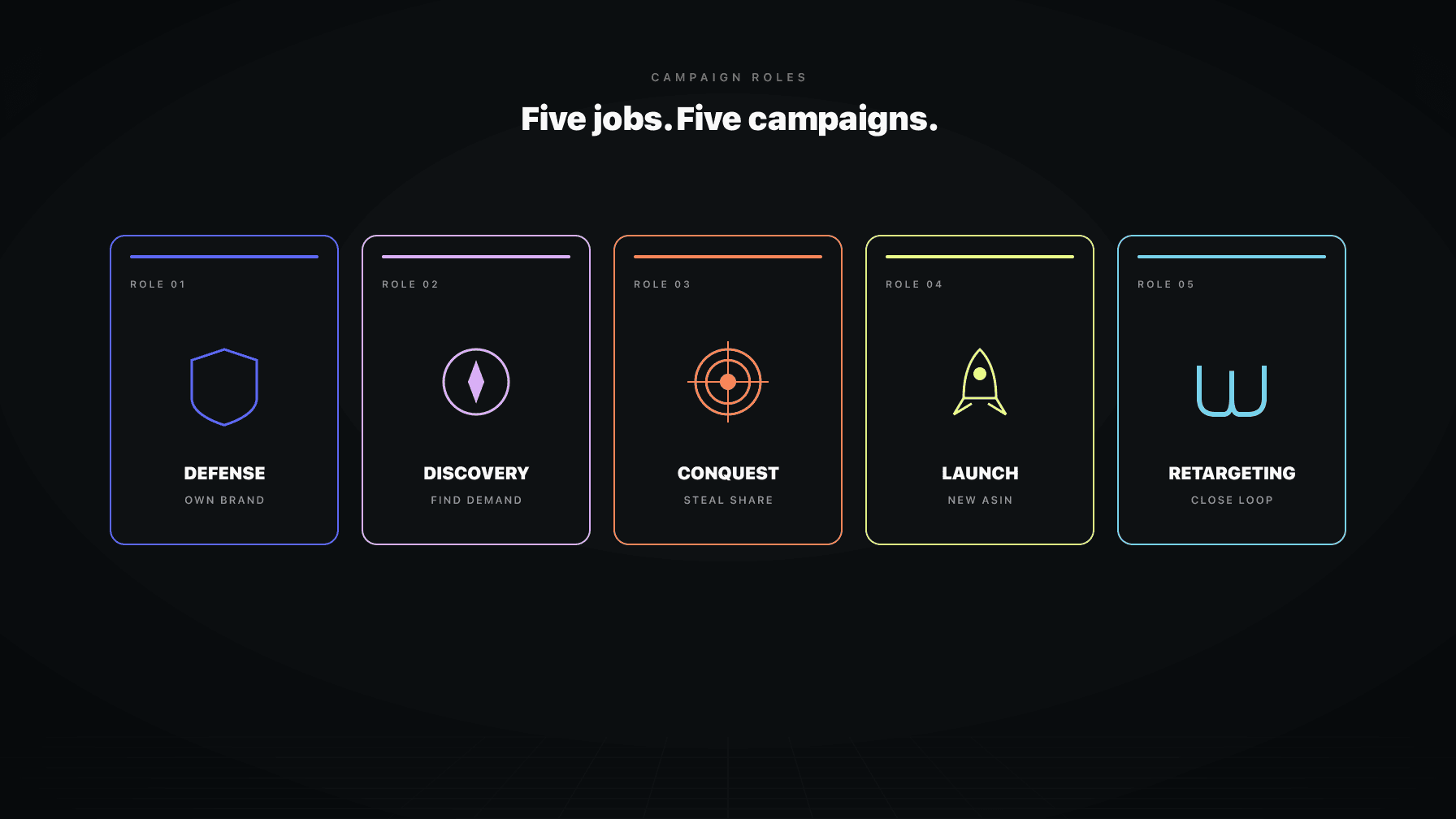
A brand-defense campaign has nothing in common with a discovery campaign. A conquest campaign against a competitor has different economics than a launch campaign on a new ASIN. A hero-product campaign protecting your top-seller should not run under the same posture as a retargeting campaign.
A serious AI PPC system lets you do four things:
Systems that let you do this outperform systems that do not, every time. The reason is simple: the AI can only apply the right posture if you have told it which campaigns and products deserve which posture. Full treatment of campaign role assignment in the deep-dive.
These determine how aggressive the AI is when blocking waste or auto-executing actions.
The ones to know:
If you are nervous about over-automation, tighten the confidence thresholds first before you start neutering the rest of the system. Confidence thresholds are the dial that controls how cautious the AI is. They are the right lever for a first-pass calibration.
If you sell consumables, repeat-purchase behavior matters. If your inventory gets tight, PPC should react. The fields that handle this:
These are not nice-to-haves if your margin or stock position changes how aggressively you should advertise. They are the difference between a PPC system that coordinates with the rest of your business and one that does not.
The AI can only reason about what you feed it. Beyond the connectors, there are specific data inputs that turn a competent PPC AI into a business-aware one.
The highest-value uploads:
A good rule of thumb: upload the documents that would change a PPC manager's bidding or budgeting decisions this week. If a document would not change a decision, it is noise. Full detail on what to upload and why in the data-checklist deep-dive.
Here is the trust point that matters: good AI Amazon PPC systems treat chat as a way to give precise, durable operator instructions, not as a vague memory that silently becomes policy.
The right way to use chat is to issue specific operator intents:
A well-designed AI does not silently act on these. It creates a draft and asks for confirmation. That is a feature, not a bug. It means you stay in control, and that every durable change is one you explicitly approved.
And a quiet but important point: plain comments in a dashboard are not hidden rules. A comment you leave in Mission Control should stay a comment. It should not secretly become a rule, a goal, or an exclusion. If you want something durable, use the explicit "save as policy" or "save as rule" path. Everything else stays advisory.
That separation matters for trust. It means multiple people can collaborate in the system without worrying that every offhand comment is secretly reprogramming the algorithm.
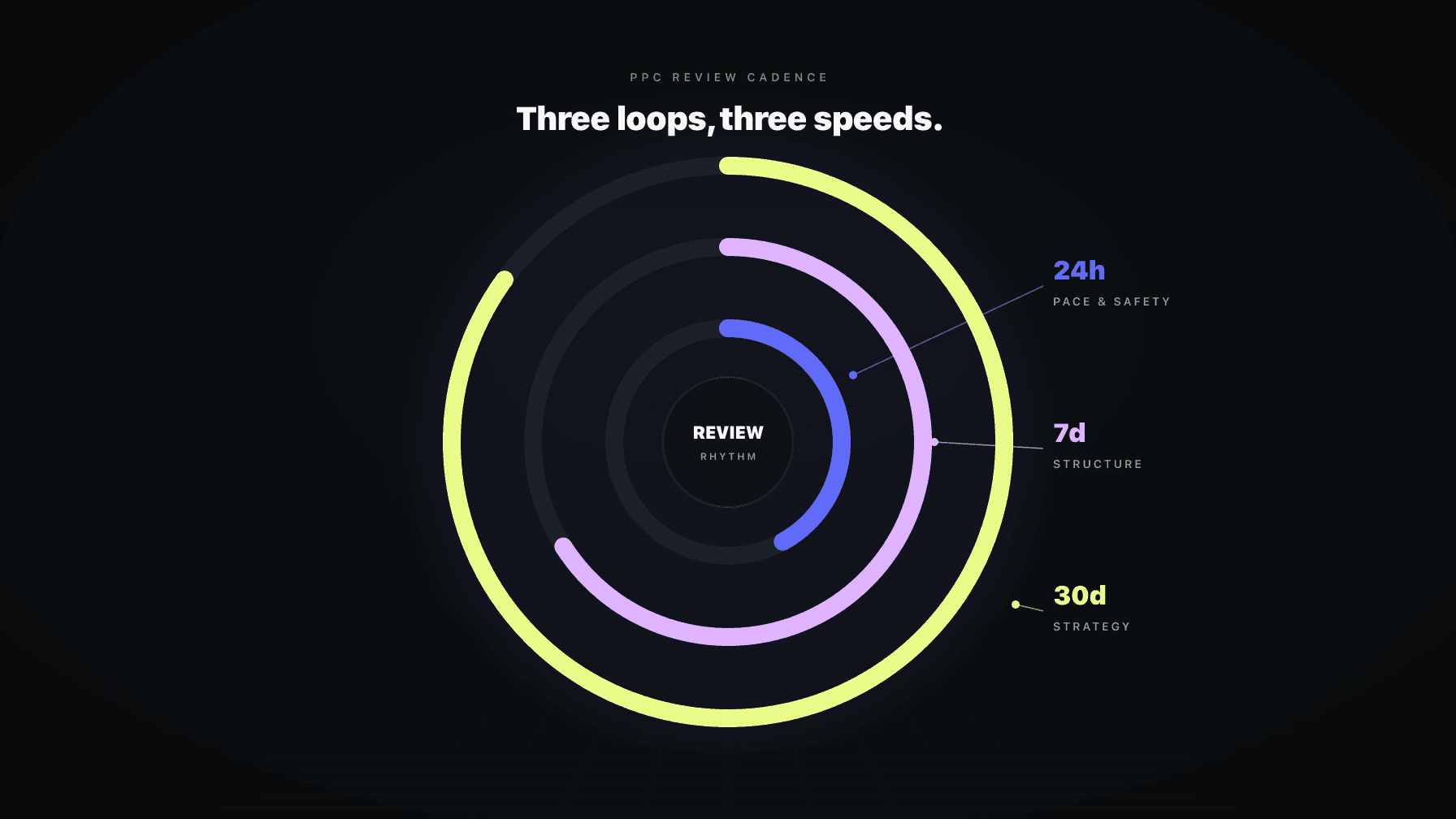
The money comes from using the right cadence for the right kind of work. This is the section that most AI PPC content skips, and it is the single biggest difference between an account that gets healthier over time and one that churns.
Daily is for tactical maintenance. Routine PPC upkeep within a bounded loop: bid adjustments inside the normal range, budget pacing checks, search-term negation under clear criteria, underperformer flagging.
Daily must not become a backdoor for broad budget reallocation, placement rewrites, or structural changes. When daily starts doing weekly's job, accounts go haywire.
Weekly is the portfolio-control loop. This is where cross-campaign budget thinking happens. Strategic rebalancing. Conservative placement work. Harvest and structural review. Deeper strategic modules.
A well-run weekly review examines campaign-type performance, hero-vs-long-tail product behavior, and whether the current targets still match your business reality. This is where dayparting proposals, B2B adjustments, and audience strategy belong, not in the daily loop.
Monthly is for business review and adaptation. Strategic questions. Are the targets still right? Is the campaign structure still aligned with your catalog? Are the guardrails still at the right calibration?
Monthly should not pretend to be a faster version of the daily cycle. A review-only monthly run can still produce useful insight without forcing unsafe strategic mutation. This is the right cadence for considering big changes, not executing them.
Dayparting and B2B optimization are advisory-only in the daily path. Their actionable strategic proposals belong in the weekly loop. Putting them in daily is how sellers end up with over-reactive accounts that change their dayparting rules every 24 hours and collapse placement.
The full breakdown of what each cadence should and should not do is in the Daily, Weekly, Monthly deep-dive.
The brands that get the most out of AI Amazon PPC management follow roughly the same sequence:
Connect Amazon Ads and SP-API. Upload cost of goods sold. Get to a truthful readiness state where the AI knows your real profit position, not just your ad spend position.
Before turning on automation, set:
These are the fields that keep the AI honest when it starts acting.
Mark campaigns by role: defense, discovery, conquest, launch, retargeting. Mark hero products and launch products. Most sellers skip this step because it feels like work. It is the work that compounds for months afterward.
Let the AI prove judgment on your catalog before you expand autonomy. A week or two of proposals is enough to see whether the AI is going to help or make noise. If the proposals feel right, graduate. If they do not, calibrate or escalate support.
Once the account behavior looks sane, move routine work into autonomous execution. Keep campaign-structure work approval-only.
Launches, inventory issues, promos, exclusions, brand rules, ASIN-specific exceptions. The AI can only adjust to your business reality if you tell it what is happening. A two-minute note in chat that says "rationing inventory on ASIN X for two weeks" is worth more than a page of dashboard dashboards.
Do not judge AI Amazon PPC management by how much activity it generates. Judge it by whether the account gets healthier with less manual work. Those are different things.
If you are in the first month, the AI cannot deliver its full value until it has the data to reason about. Judge by whether connector health is green, whether COGS is loaded, and whether you have marked your campaigns and products. Those unlocks are prerequisites for profit impact.
You make the most money with AI Amazon PPC management when you give the system clean data, clear rules, clear product priorities, and enough autonomy to handle the boring PPC work every single day.
Everything in this playbook is a subset of that sentence. Clean data means COGS, SP-API, and honest readiness states. Clear rules means the guardrails and confidence thresholds. Clear product priorities means campaign role assignment and hero/launch marking. Enough autonomy means graduating into Handling It, not staying in Ask Me First forever.
If you have those four inputs, the AI earns its keep. If you are missing any of them, you are paying for activity, not profit.
Marko is the AI PPC employee we built at Profasee. Marko does not operate alone. That is the key difference from standalone PPC tools. When Oracle changes a price, Marko sees the new margin and adjusts bids. When Bruno flags low inventory, Marko pulls back spend on that ASIN before the stockout hits. When Brett finds a listing issue, Marko accounts for the conversion-rate impact before pushing more traffic.
Coordination is the feature. No standalone PPC AI can do it because no standalone tool has access to the pricing, inventory, and listing layers in real time.
If the setup is done right (connectors live, COGS loaded, guardrails set, campaign roles assigned), most sellers see meaningful changes in the first 2–3 weeks. Waste reduction shows up first (unprofitable search terms die fast), then the broader ACoS or POAS smoothing follows over 4–8 weeks as the AI learns your account. If you are 6+ weeks in and nothing has changed, your setup is almost certainly incomplete rather than the AI being broken.
Rule-based automation executes if/then logic you write: "if ACoS > 30%, lower bid by 10%." AI PPC management uses models that learn from your data and recommend or execute actions without explicit rules. The practical difference is adaptability. Rule-based tools work well when your competitive landscape is stable. AI tools work better when the landscape shifts, because they adjust without you having to rewrite rules.
Yes, for strategic decisions. The right model is AI handles routine (bids, negations, budget pacing within guardrails), humans handle structural (new campaigns, major restructuring, strategic direction). A system that claims "fully hands-off" is either lying or setting you up for a major failure the first time something unusual happens.
Look for three things: (1) can it ingest COGS and optimize for profit, not just ACoS; (2) does it expose operating modes (ask me first / review only / handling it) rather than just an on/off switch; (3) does it coordinate with pricing and inventory, or is it an isolated PPC tool? Every tool on a "best of" list can do basic bid optimization. The coordination and profit-awareness layers are where real ROI lives. See the best Amazon PPC software breakdown for a direct comparison.
It depends on what "small" means. If you are spending less than $3,000/month on PPC, the coordination overhead of a full AI platform may not pay back. If you are $5,000+/month and have three or more ASINs, AI PPC management typically pays for itself in the first 60 days through waste reduction alone. The break-even is usually around the point where you have enough campaign complexity that a human manager would cost more than the software.
Good AI PPC systems have emergency-brake circuit breakers that pause automation on a campaign the moment its ACoS exceeds a threshold you set. They also have audit logs so you can see what the AI did and why. If you configure the guardrails correctly (max bid, daily change limits, emergency-brake ACoS), a single bad decision gets contained before it becomes a budget disaster. The warning sign to watch for: recurring breaches. One breach is a system doing its job. Five a week means your configuration is wrong.
Monthly for targets and guardrails. Weekly for campaign role assignments and hero/launch product status. Daily only if something unusual is happening (launch week, promo, inventory issue). The mistake most sellers make is tuning settings too often, chasing short-term noise and ending up with whiplashed configurations. Set the guardrails, trust them, and review on a disciplined cadence.