
Chad Rubin
April 30, 2026 · 11 min read
Operator notes by email
Short, opinionated takes on AI agents, Amazon PPC, pricing, and inventory. No fluff. About once a week.
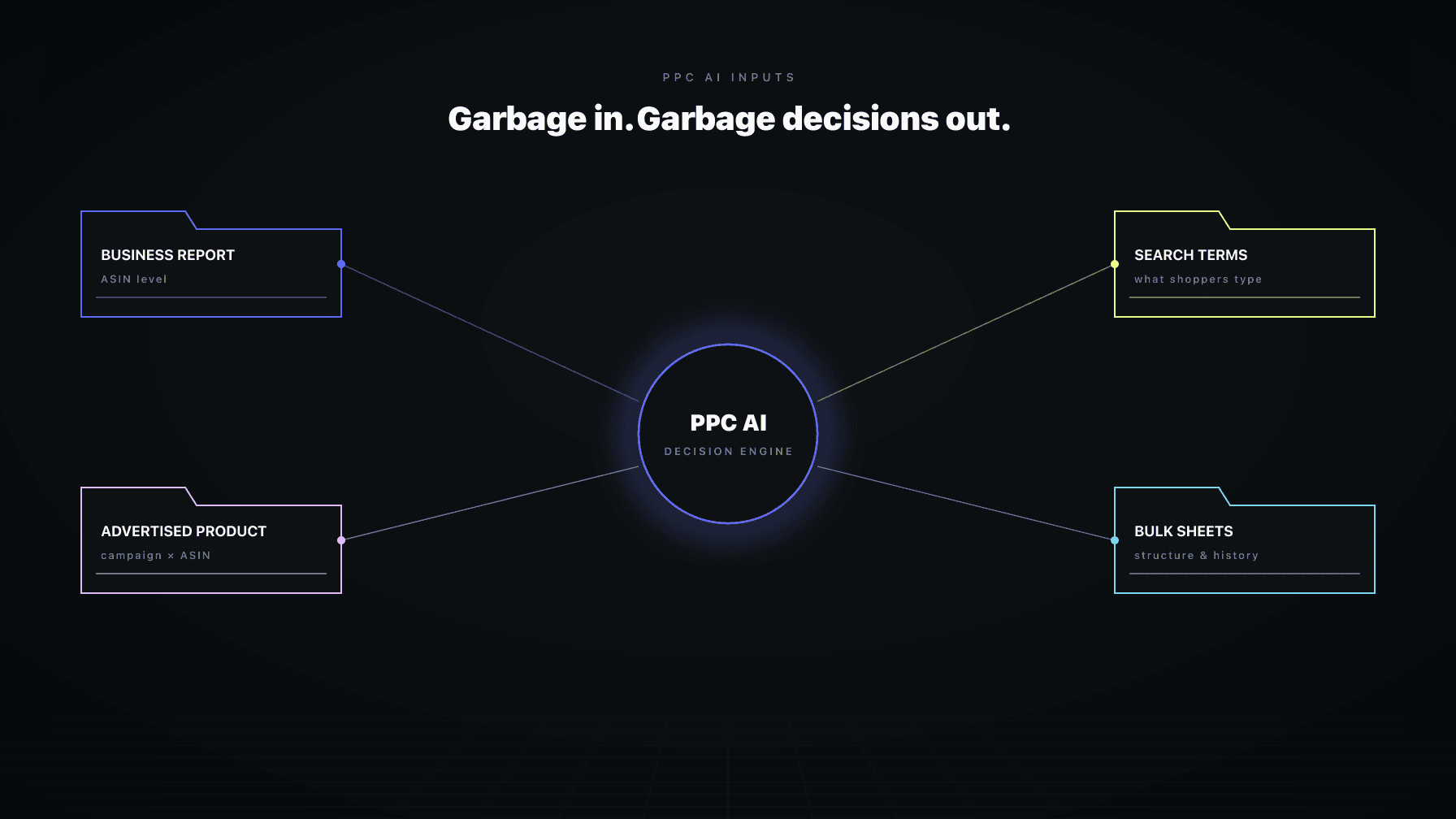
The most expensive misunderstanding in AI Amazon PPC management is treating data inputs as optional context. Sellers connect their ad account, plug in a target ACoS, and assume the algorithm will figure out the rest. The algorithm does not figure out the rest. The algorithm reasons about whatever you give it, and only whatever you give it.
If you skip cost of goods sold, the AI optimizes against revenue, not profit. If you skip your promo calendar, every Prime Day spike looks like a problem to solve. If you skip your brand-protection rules, conquest campaigns will accidentally trigger on your own branded terms. If you skip your launch and hero priorities, every ASIN gets the same generic posture.
I ran a 7-figure Amazon brand for over a decade and now run Profasee. The single biggest lever between AI Amazon PPC management that pays for itself in 60 days and AI that produces noise for six months is what you upload before the system starts acting. Not what target you set. Not what mode you pick. What context you give the AI to reason against.
This post is the deep-dive on the data inputs covered in our AI Amazon PPC management playbook. It walks through every upload that meaningfully changes decisions, how chat fits into a precise operator workflow, why dashboard comments are not hidden rules, and the rule of thumb for what to upload versus what to skip.
Key Takeaways
Before going through the checklist, the framing question:
Would this document change a PPC manager's bidding or budgeting decision this week?
If yes, upload it. If no, skip it. Stuff that does not change decisions is noise. The AI does not benefit from extra context that has no decision implication. It benefits from context that maps directly to durable inputs the system can act on: policy rules, exclusions, ASIN guardrails, seller feedback notes, and seller files with provenance.
Apply that filter and the input list gets short fast.
From reading to action
If the framework above sounds familiar, your Amazon account is probably carrying the same drag. Apply and we will show what Marko, Oracle, and Bruno would change in your first week.

Ran a 7-figure Amazon brand for a decade. Founded Skubana (acquired). Co-founded Prosper Show. 15+ years on Amazon.
Head-to-head comparisons between Profasee and the tools most Amazon sellers already use.
Apr 29, 2026
Apr 28, 2026
Apr 27, 2026
Join the brands that replaced agencies and tools with AI employees.
The single most consequential upload. COGS is what turns an ACoS optimizer into a profit optimizer. Without COGS, the AI cannot compute profit per order. It can compute revenue per order. Those are different.
The high-quality COGS upload includes:
Sellers who upload all five get a true POAS. Sellers who upload only unit cost get a directionally correct but understated POAS. Sellers who upload nothing should stay on target ACoS until they finish the cost work.
If you only do one upload from this entire post, do this one.
The PPC AI cannot tell the difference between "ACoS spiked because the campaign is broken" and "ACoS spiked because Prime Day is running and conversion is up while ad costs are up too." Both look similar in the dashboard. Without the calendar, the AI may treat the spike as a problem and try to fix it.
What to upload:
The AI uses the calendar to widen its tolerance during scheduled events and re-tighten after. Without it, every promo window triggers an over-correction that has to be unwound the following week.
Similar idea, applied to product launches. The AI handles a launching ASIN very differently from a steady-state ASIN, but only if it knows which is which.
What to upload:
This input pairs directly with the campaign roles deep-dive. Launch role configurations only work if the AI knows which products are actually launching.
Beyond just calendars, the AI benefits from a written list of which products matter most. Revenue rank is in the data, but priority is a strategic call.
What to upload:
The AI uses this to rank tradeoffs when budgets are tight or when conflicting signals appear across the catalog. Without it, the AI has to infer priority from data, which usually leads to under-protection of strategic SKUs that do not yet show up in raw revenue rank.
PPC and inventory should never be uncoordinated, but they often are. If you are rationing stock on a hero ASIN to protect Q4 demand, the AI should not be pushing maximum spend on that ASIN now.
What to upload:
This input requires SP-API connectivity to be real-time useful. Without SP-API, you can upload constraints as static documents but the AI cannot react to inventory drops as they happen. With SP-API, the AI sees inventory state in the same cycle it makes bid decisions, and the critical-inventory bid reduction guardrail becomes operational rather than theoretical.
These are durable instructions that should never be inferred from data. If you do not want to bid on certain terms, the AI needs to be told explicitly.
Common exclusions:
Upload these as a maintained list, not as one-off conversational instructions. They should survive across cycles, across sessions, and across operating-mode changes. This is the kind of input that becomes a policy rule, not a comment.
Distinct from generic exclusions. Brand-protection rules tell the AI how aggressively to defend your branded surface area.
What to upload:
Brand-protection rules pair with the defense and conquest campaign roles. Without them, the AI applies generic posture and either over-spends on defense (because every branded term gets aggressive bids) or under-defends (because no rule says to prioritize them).
The catch-all for plain-language operator context. Things that are not policy rules but should influence how the AI reasons about specific ASINs.
Examples:
These are the kind of notes a human PPC manager would write in a personal notebook. The AI benefits from them in the same way: they explain decisions that pure data cannot justify.
The trust point that matters most: good AI Amazon PPC systems treat chat as a way to give precise, durable operator instructions, not as a vague memory that silently becomes policy.
The right way to use chat is to issue specific operator intents:
A well-designed AI does not silently act on these. It creates a draft and asks for confirmation. That confirmation step is a feature, not a bug. It means you stay in control, every durable change is one you explicitly approved, and the audit trail is clear.
If your PPC tool's chat applies instructions silently, that is a trust failure waiting to happen. Operator intents are too high-leverage to be applied without confirmation, especially in a multi-user team where different operators can give conflicting instructions.
A common confusion: dashboard comments versus durable rules.
A plain comment in your PPC dashboard should stay a plain comment. It should not secretly become a rule, a goal, or an exclusion. If you write "this ASIN is launching" as a comment, the AI should not silently start treating that ASIN as a launch product. If you want that durable change, use the explicit save-as-rule or save-as-launch path.
Even saved seller feedback notes should remain advisory unless intentionally promoted into a stronger durable control. The separation matters for trust: it means multiple people can collaborate in the system, leave comments and observations, without worrying that every offhand note is secretly reprogramming the algorithm.
The pattern: comments are notes. Rules are rules. Durable changes require explicit promotion. Tools that blur this line lose trust within the first month, because operators stop knowing whether their comments are reprogramming the system or just journaling.
Equally important: what is not worth uploading.
Old reports. The AI does not need last quarter's PDF dashboards. Live data feeds are better.
Generic category guides. "Best practices for Amazon PPC" PDFs do not change decisions. Skip them.
Aspirational marketing plans. "We want to be the #1 brand in our category" is not actionable. Specific decisions ("push ASIN X through Q3") are.
Historical campaign settings. The AI can read live settings from the platform. Uploading old config files just creates ambiguity about which version is canonical.
Internal team docs. Strategy documents, OKRs, and team playbooks belong in your team workspace, not in the AI's input set. They do not map to durable inputs.
The filter is the same one we started with: would this document change a decision this week? If not, it is noise.
The first 30 days of using AI Amazon PPC management should include a serious upload sprint. COGS, promo calendar for the next quarter, launch calendar for the next 90 days, hero and launch ASIN lists, exclusions, brand-protection rules. That is the foundation.
After that, inputs should change as the business changes. New launch SKUs get added to the launch list. New promos get added to the calendar. ASIN-specific notes get updated as situations change. Hero status promotes and demotes as products earn or lose their position.
The pattern that fails: load everything once, never update it. Six months later the launch list still includes products that have graduated, the promo calendar is from last quarter, and the exclusion list has not been touched. The AI is reasoning against stale context, and the operator wonders why the decisions feel off.
The pattern that works: a 15-minute weekly review of inputs as part of the weekly portfolio review cadence. Add what changed. Remove what is stale. Promote launch products that have graduated. The maintenance is small but compounds dramatically.
Marko treats every input as a typed first-class object. COGS is structured cost data, not an attached spreadsheet. Promo calendars are scheduled events, not free-text notes. Hero and launch lists are typed product groups with associated graduation criteria. Exclusions are policy rules with audit trails.
The structured-input model has two practical effects. First, every decision Marko makes has decision provenance: which inputs were referenced, which rules applied, which exclusions filtered the action. You can trace any bid change back to the inputs that produced it. Second, inputs survive across cycles, across user sessions, and across operating-mode changes. They are not chat history.
Coordination is the bigger story. When Oracle updates a price, the cost-aware POAS calculation Marko uses sees the new margin. When Bruno flags a low-inventory state, Marko's bid logic adjusts before the inventory threshold guardrail would catch it. When Brett finds a listing issue, Marko sees the conversion-rate impact in the same cycle it makes spend decisions.
Standalone PPC tools cannot do this because they do not have access to the pricing, inventory, and listing layers in real time. Coordination is the input that no upload can replace.
The eight high-value uploads: cost of goods sold (per-SKU), promo calendars, launch calendars, hero and launch ASIN priority lists, inventory constraints, category and keyword exclusions, brand-protection rules, and product-specific operator notes. The filter for whether something is worth uploading: would this document change a PPC manager's bidding or budgeting decision this week? If yes, upload it. If no, skip it.
Because without COGS the AI optimizes against revenue, not profit. Two campaigns with identical ACoS can have radically different profit outcomes if their margin structures differ. Uploading COGS lets the AI compute true POAS, which is what actually represents your business goal. Without COGS, even target POAS is just relabeled ACoS.
Run a 15-minute weekly review of inputs as part of your weekly portfolio review cadence. Add new launch ASINs, update promo calendars, promote graduated launch products to hero or steady-state status, refresh COGS when supplier costs change. The pattern that fails is loading inputs once and never updating them; six months later the AI is reasoning against stale context.
As a structured upload, ideally. Brand-protection rules are durable instructions that should survive across cycles, sessions, and operating-mode changes. Chat works for one-off operator intents like "pause automation on ASIN X" but is not the right surface for policy that should be canonical. Upload brand-protection rules as a maintained list, not as conversational notes.
In well-designed systems, no. A plain comment in a PPC dashboard stays a plain comment. It does not silently become a rule, a goal, or an exclusion. To make a change durable, use the explicit save-as-rule path. The separation matters for trust: it means multiple operators can leave observations and journal-style comments without worrying that every offhand note is reprogramming the algorithm.
An inventory constraint upload is a static document telling the AI about current restrictions ("ration ASIN X through Q4"). SP-API integration is a live data feed that gives the AI real-time visibility into inventory levels, sessions, and conversion data. Both have value but they serve different roles. Use uploads for strategic constraints; use SP-API for operational reactivity. Without SP-API, guardrails like critical-inventory bid reduction are theoretical rather than operational.
Skip old reports, generic category guides, aspirational marketing plans, historical campaign config files, and internal team strategy docs. None of these change a bidding or budgeting decision this week. Uploading them creates ambiguity about which version of the truth is canonical and dilutes the actionable inputs the AI actually uses for decisions.
