Chad Rubin
April 28, 2026 · 11 min read
Operator notes by email
Short, opinionated takes on AI agents, Amazon PPC, pricing, and inventory. No fluff. About once a week.
Most Amazon sellers run their PPC reviews on the wrong cadence. They check daily for everything, push structural decisions into a "I will get to it eventually" pile, and then panic-restructure once a quarter when the numbers go sideways.
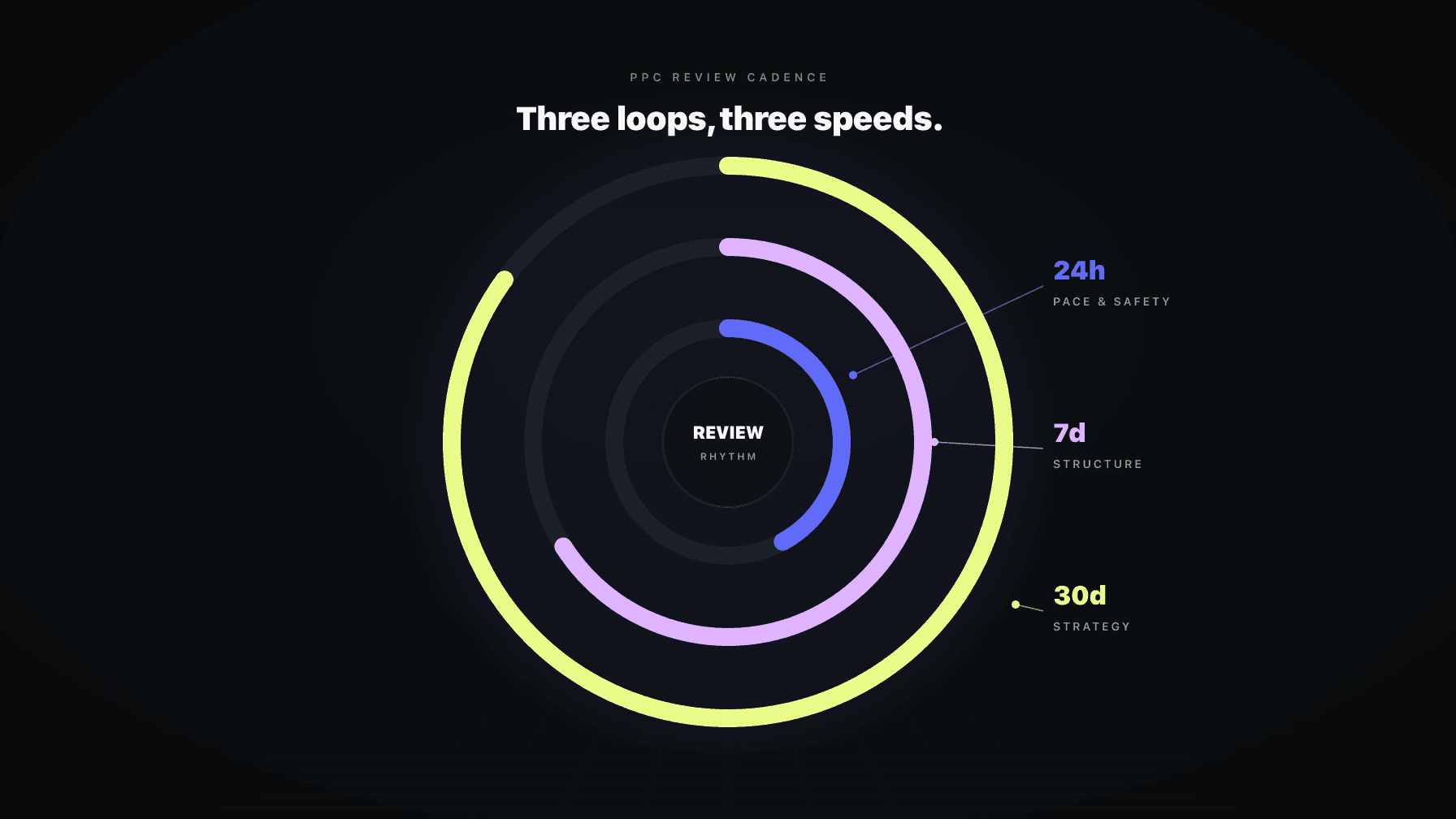
The fix is not more frequent reviews. It is the right work at the right cadence. Daily exists for tactical maintenance. Weekly exists for portfolio control. Monthly exists for business review and adaptation. When you confuse the three, accounts get chaotic, and the PPC AI you bought to make life easier ends up generating noise that you have to constantly clean up.
I ran a 7-figure Amazon brand for over a decade and now run Profasee, a coordinated AI employee platform built for sellers. The single biggest difference between brands whose accounts get healthier under AI Amazon PPC management and brands whose accounts get more chaotic is cadence discipline. Same software. Different cadence. Different outcome.
This post is the deep-dive on the operating rhythm we cover in our AI Amazon PPC management playbook. It explains the job of each cadence, what belongs in each, the swaps that destroy accounts, and how the AI's native rhythm should map to your manual triggers.
Key Takeaways
Every PPC tool sells dashboards. Most of them surface the same metrics at every cadence. The result is sellers checking ACoS daily, weekly, and monthly, and convincing themselves they are running a disciplined review process.
They are not. They are checking the same number three times per week and treating each check as a decision moment. When ACoS spikes Tuesday morning, they cut bids. When it recovers Wednesday, they raise them. When the weekly report comes, they second-guess Tuesday's cut. By Friday the campaign has been touched four times for a noise event that should have been ignored.
Cadence discipline is the antidote. Each cadence has a job. Each job has a different time horizon, a different signal-to-noise ratio, and a different appropriate set of actions. Daily is not a faster weekly. Weekly is not a faster monthly. They are different loops with different purposes. When operators conflate them, the account churns.
From reading to action
If the framework above sounds familiar, your Amazon account is probably carrying the same drag. Apply and we will show what Marko, Oracle, and Bruno would change in your first week.

Ran a 7-figure Amazon brand for a decade. Founded Skubana (acquired). Co-founded Prosper Show. 15+ years on Amazon.
Head-to-head comparisons between Profasee and the tools most Amazon sellers already use.
Join the brands that replaced agencies and tools with AI employees.
Daily is for routine PPC upkeep. The work that has to happen every 24 hours to keep the account from drifting. Specifically:
That is the entire daily job. Notice what is not on the list: campaign creation, budget reallocation across campaigns, structural changes, placement rewrites, dayparting decisions, B2B optimization, audience strategy, harvest decisions, target changes.
Those belong in weekly or monthly. When daily starts touching them, you get over-reactive accounts that change their dayparting rules every 24 hours, collapse placement, and confuse their own algorithm.
The mental model: daily is a maintenance loop running inside tight guardrails. It keeps the account stable so weekly can do real strategic work without first having to clean up daily's mess.
A few specific anti-patterns to call out, because they are common.
Daily should not move budgets between campaigns. That is portfolio thinking. It belongs to weekly. A daily pace adjustment within a single campaign's budget is fine. Moving $500 from Campaign A to Campaign B is not.
Daily should not change the campaign's role. A campaign tagged as "defense" should not become "discovery" because of a single noisy day. Role changes are weekly or monthly decisions.
Daily should not modify placement or bid-by-placement modifiers. Placement changes have ranking implications that take days to surface. Touching them every 24 hours creates noise that masks real signal. Treat placement decisions as weekly proposals, not daily writes.
Daily should not auto-execute strategic proposals from advisory modules. Dayparting and B2B optimization are advisory-only in the daily path. The system can show you the proposed dayparting rule. It should not write the rule until weekly review.
Daily should not act on emergency-brake fires without human review. When a campaign's emergency brake trips, the right behavior is to pause and surface, not to immediately restructure. Restructure decisions are weekly or human-gated.
These anti-patterns are not theoretical. They show up in nearly every PPC tool that defaults to daily cycles for everything. The fix is cadence-aware automation that knows which actions belong where.
Weekly is the portfolio-control loop. This is where the strategic thinking happens.
The actual weekly job:
A well-run weekly review takes 30 to 60 minutes for a mid-size account, longer for a larger one. The output is a small number of intentional changes, not a long list of micro-adjustments. The micro-adjustments already happened in daily.
Weekly is the cadence most operators skip or under-invest in. Daily is forced by anxiety. Monthly is forced by reporting cycles. Weekly has no external forcing function, so it gets pushed.
The result: structural drift accumulates. Campaigns that should have been merged stay separate. Hero products get the same treatment as long-tail products. Dayparting rules go un-implemented. Placement adjustments never happen. The account looks fine on a daily basis and then crumbles every quarter under the weight of accumulated structural debt.
The fix is putting weekly on the calendar as a non-negotiable. Same time, every week, 60 minutes. Even if the AI is doing most of the actual work, the human review of the AI's weekly proposals is the moment where strategic decisions get ratified or vetoed.
Monthly is for the questions that take a full month of data to answer.
Monthly is review-mode by default. The right monthly cadence does not execute big changes. It identifies what big changes need to happen, drafts proposals for them, and queues them as approval-gated work for the upcoming weekly cycles.
The biggest mistake in monthly reviews is trying to execute strategic mutation in the same session you identified the need.
If the monthly review reveals that your target POAS should change from 1.4 to 1.8, do not flip it that day. Draft the change, review the cascading effects on guardrails and campaign-type targets, and execute it on the following weekly cycle with the full set of related changes.
If the monthly reveals a campaign restructure is needed, draft it, review the migration plan, and execute it on a Tuesday or Wednesday of the following week when you have time to monitor the impact. Never execute structural changes on Friday afternoon. Never execute them right before a major sales event.
The pattern: monthly identifies, weekly executes. That separation prevents the most common monthly-review failure mode, which is rushing a strategic change because it felt urgent in the review session.
A serious AI Amazon PPC system has its own native operating rhythm. It runs daily tactical checks, weekly portfolio reviews, and monthly business review cycles on a schedule. It does this even when you are not actively interacting with the system.
When you manually say "run daily now" or "trigger weekly cycle" or "run monthly review," the system should reuse the same underlying cadence-aware path the native rhythm uses. Not a separate parallel schedule. The native and the manual triggers should land on the same code, queueing the cadence-specific path for the cadence you asked for.
This matters because of duplicate guarding. A pending daily run should not block a weekly trigger. A pending weekly should not block a monthly. The cadence-aware duplicate guard is what lets the system run all three loops without colliding with itself.
If your PPC tool runs everything through a single generic loop and pretends the cadence labels are just dashboards, the tool will eventually trip over itself. Cadence-aware queueing is a backend feature, not a UI feature. Look for it.
Some sellers want to build their own custom automations on top of the native rhythm. Specific event-driven rules, scheduled tasks, or category-specific behaviors that the platform does not handle by default.
Custom automations are fine as supplements. They are dangerous as replacements. The pattern that works: native cadence handles the routine work, custom automations handle scheduled or event-driven behavior on top.
The pattern that fails: custom automations replicate work that the native cadence already does, leading to two parallel systems competing for the same writes. When that happens, accounts whiplash, audit trails get noisy, and nobody can tell which system caused which change.
The practical rule: if the native cadence handles it, do not duplicate it. If the native cadence cannot handle a specific business need, build a custom automation that runs at a different layer, not the same one.
Cadence and operating mode are independent settings, but they should be tuned together.
In Ask Me First mode, every cadence runs as proposals. Daily proposes bid changes for approval. Weekly proposes structural moves for approval. Monthly proposes target changes for approval. The AI does the analysis, you do the approving.
In Handling It mode, daily executes within guardrails autonomously. Weekly proposals are typically still gated for review (because they are structural). Monthly is always proposal-mode regardless of how mature the account is.
In Review Only mode, no cadence executes. All three produce reports and analysis without writes. This mode is useful during high-stakes periods (major launches, Q4 peak weeks) when you want the AI's intelligence without its hands on the wheel.
Most mature accounts run daily in Handling It, weekly in Ask Me First, and monthly in Review Only by design. That mix is the sweet spot.
Marko ships with the three native cadence loops as first-class operations, not as dashboard labels. Daily, weekly, and monthly each have their own code path, their own duplicate-guard, their own action set, and their own audit trail.
Manual triggers reuse the same canonical system cadence rather than running as a parallel queue. When you say "run weekly cycle," Marko classifies that requested cadence and enqueues the actual weekly path. A pending daily run does not block it. A pending weekly does not collide with a triggered monthly.
Critically, dayparting and B2B optimization are advisory-only in the daily path by design. Their actionable proposals belong to the weekly loop. Putting them in daily would trigger exactly the over-reactive behavior we cover above. The system enforces this at the architecture level, not as a configuration choice.
If your current PPC AI tool runs everything through one loop and exposes daily/weekly/monthly as toggles, the cadence discipline you read about in this post will be hard to enforce. You can manage cadence externally, but the tool will keep nudging you back into a single-loop pattern. The right tool runs three loops natively. Coordination across pricing and the rest of the catalog is what makes that work.
The right cadence has three loops with different jobs. Daily is for tactical maintenance: bid adjustments inside guardrails, budget pacing, search-term negation, anomaly detection. Weekly is for portfolio control: cross-campaign budget reallocation, structural review, dayparting and B2B proposals, harvest decisions. Monthly is for business review: target recalibration, guardrail audit, structural drift detection.
Once per week, same day, 30 to 60 minutes for a mid-size account, longer for larger ones. The weekly review is the cadence most operators under-invest in because it has no external forcing function, but it is where the strategic thinking happens. Skipping weekly leads to structural drift that surfaces as a quarterly crisis.
Daily should not move budgets between campaigns, change campaign roles, modify placement or bid-by-placement modifiers, auto-execute dayparting or B2B proposals, or restructure campaigns when the emergency brake fires. Those belong in weekly or monthly. When daily takes on weekly's work, accounts go chaotic and the AI ends up generating noise that has to be cleaned up.
On a fixed monthly schedule, ideally aligned to your business reporting cycle. Monthly is for big questions (are the targets still right, are the guardrails still calibrated, is the campaign structure still aligned with the catalog) not for executing big changes. Identify the changes in monthly, queue them for the following weekly cycle.
Daily typically runs in Handling It mode, weekly in Ask Me First mode, monthly in Review Only. That mix lets the AI execute routine work autonomously, surface portfolio-level proposals for human approval, and produce strategic insight without forcing risky strategic mutation. Adjust the mix based on your trust level with the AI's specific behavior on your catalog.
The cadence rhythm is the same (daily, weekly, monthly) but the work inside each cadence differs by product role. Hero products get tighter daily monitoring with looser daily action. Launch products get aggressive daily action inside the 90-day window with weekly graduation reviews. Monthly is when launch-to-hero promotions and hero-to-defense reclassifications happen. Campaign role assignment is what makes this work; full coverage in the campaign roles deep-dive.
Native cadence is the AI tool's built-in daily, weekly, and monthly operating rhythm running on the platform's own schedule. Custom automations are seller-defined rules that fire on specific events or schedules on top of the native rhythm. Use custom automations as supplements for behavior the native cadence does not cover. Do not use them to replicate work the native cadence already does, because parallel writes lead to whiplash and audit trail noise.