Chad Rubin
May 28, 2026 · 16 min read
Operator notes by email
Short, opinionated takes on AI agents, Amazon PPC, pricing, and inventory. No fluff. About once a week.

Gross margin lies. It lies by leaving things out. When you look at a product and say it runs a 60% gross margin, you are looking at the sale price minus the cost of goods, and nothing else. No referral fee, no FBA fee, no returns, no ad spend. That 60% feels healthy right up until the quarter closes and the bank account disagrees.
Blended margin lies too, just differently. Blended margin averages the whole catalog into one number, and an average is the easiest place in the world to hide a loser. You can have a portfolio that nets 25% on paper while three of your hero ASINs are bleeding cash on every unit, because two strong products carry the dead weight. The blended number looks fine. The dashboard sees no problem. Meanwhile the cash leaves the building one unit at a time.
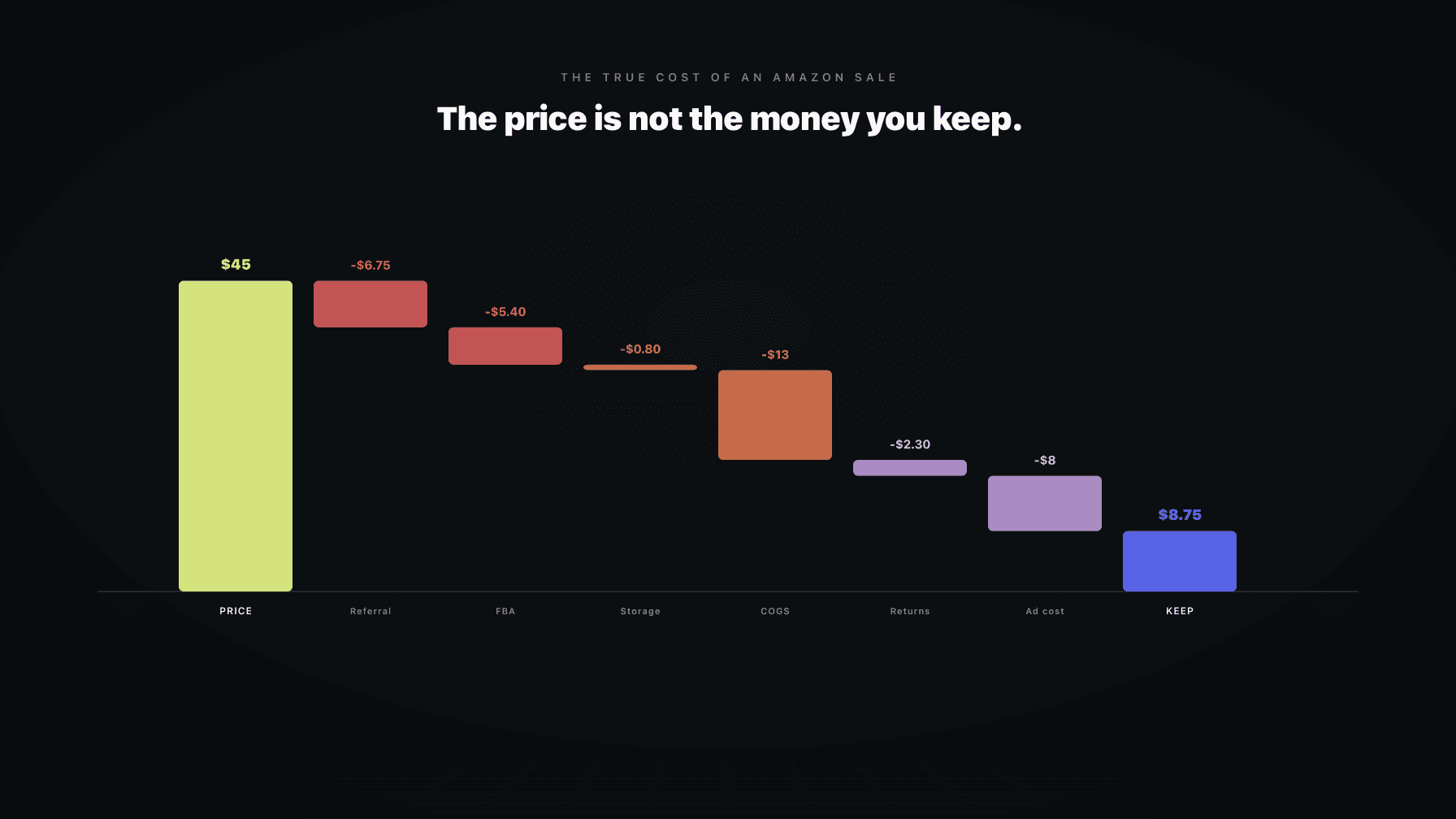
The number that tells the truth is contribution margin per unit. It is what survives one sale after every cost that scales with that sale: the referral fee, the FBA fee, the landed cost of goods, the returns reserve, and the ad spend it took to win the order. It is per unit, and it is per ASIN, because those are the only two cuts that cannot hide a problem behind an average. If you do not know contribution margin per unit for each product, you do not know which products fund your business and which ones drain it.
This is the operator math I run for myself and for the brands I work with. It is not accounting you do after the quarter closes. It is the currency every other decision is denominated in. Every PPC bid you place spends contribution margin. Every price cut spends contribution margin. Every reorder bets contribution margin. Get this number right, per ASIN, and the rest of the business starts making sense.
## Key takeaways >- Contribution margin per unit is the only Amazon metric that survives every scaling cost. Gross margin and blended margin both leave out the costs that actually kill products.- Gross margin ignores fees, returns, and ads. Blended margin averages your losers into your winners and hides both.- The formula is sale price minus referral fee, FBA fee, landed COGS, allocated returns reserve, and allocated ad cost per unit.- Ad spend belongs in contribution margin because you cannot win the sale without it. Excluding it is the most common way operators fool themselves.- Returns belong in contribution margin as a reserve, allocated across all units sold, not just the units returned.- Contribution margin sets your pricing floor (break-even plus a minimum CM) and your maximum profitable bid. Both fall out of the same number.- Tier the catalog by contribution margin per unit. Feed the products that fund the business, starve or fix the ones that drain it.
Gross margin is the number sellers quote because it is the easiest to calculate and the most flattering to say out loud. Sale price minus cost of goods. On a $30 product with $9 of COGS, that is 70% gross margin. It sounds like a business that prints money.
From reading to action
If the framework above sounds familiar, your Amazon account is probably carrying the same drag. Apply and we will show what Marko, Oracle, and Bruno would change in your first week.

Ran a 7-figure Amazon brand for a decade. Founded Skubana (acquired). Co-founded Prosper Show. 15+ years on Amazon.
Join the brands that replaced agencies and tools with AI employees.
It is not, because Amazon takes its cut before you see a dollar. The referral fee comes off the top, usually 15%. The FBA fulfillment fee comes off next, a few dollars depending on size and weight. Then returns happen, and storage accrues, and you spent money on ads to make the sale in the first place. By the time all of that lands, the 70% gross margin product might be keeping 20%, or it might be keeping nothing. Gross margin does not tell you which, because it was never built to.
Blended margin makes the opposite mistake. Instead of leaving costs out, it leaves products in, all of them, averaged together. The reason this is dangerous is simple. An average smooths. A catalog that nets 25% blended can contain ASINs running at 45% and ASINs running at negative 10% at the same time, and the blended number reports neither. The strong products subsidize the weak ones, and because the topline still looks healthy, nobody investigates. The losers keep getting reordered. The ad budget keeps flowing to them. The bleed is silent because it is hiding inside an average that looks fine.
Contribution margin per unit refuses both lies. It includes every cost that scales with the sale, so nothing hides by omission. And it is reported per ASIN, so nothing hides inside an average. That is the entire point of the metric. It is built to surface the products you would rather not look at.
Here is the formula, stated plainly:
Contribution margin per unit = Sale price minus referral fee minus FBA fee minus landed COGS minus allocated returns reserve minus allocated ad cost per unit.
Let me define each term so there is no ambiguity.
Notice what is not in here. Overhead. Salaries. Software. Rent. Those are real costs, but they do not scale per unit, so they do not belong in contribution margin. Contribution margin is the money each unit contributes toward covering fixed costs and generating profit. You subtract the fixed costs once, at the bottom of the P&L, not unit by unit. Mixing fixed costs into per-unit math is a different error that makes every product look worse than it is and paralyzes pricing. Keep the per-unit number clean.
These numbers are illustrative. Use your own. The point is the structure, not the figures.
Take a standard-size private label product selling at $30.
Stack it up. Sale price of $30.00, minus $4.50, minus $5.50, minus $7.00, minus $1.20, minus $4.00. What survives is $7.80 of contribution margin per unit, which is 26% of the sale price.
Now compare that to what gross margin told you. Gross margin said $30.00 minus $7.00 COGS equals $23.00, or 77%. The honest number is 26%. The gap between 77% and 26% is the entire reason gross margin gets sellers into trouble. They make decisions as if they have $23.00 of room per unit to play with. They actually have $7.80. When you discount $5.00 to chase a sales spike on a product you think has $23.00 of margin, you feel fine. On a product with $7.80 of real contribution, that same $5.00 cut takes you to $2.80 per unit, and you may not even know it happened.
That is the operational value of the number. It tells you how much room you actually have before a price move or a bid increase pushes the unit underwater.
Costs do not hold still. Amazon raises FBA fees. Freight spikes. A supplier passes through a raw material increase. Watch what a modest set of increases does to the same ASIN, holding the $30 price constant. Still illustrative.
Now the stack: $30.00 minus $4.50, minus $6.50, minus $8.20, minus $1.20, minus $4.00. What survives is $5.60 of contribution margin per unit, down from $7.80.
That is a $2.20 drop per unit, and the price on the listing never moved. Nothing on the sales dashboard changed. Revenue is identical. A seller watching the topline sees a healthy product behaving normally. A seller watching contribution margin per unit sees a product that just lost 28% of its real profit to costs they do not control.
This is why contribution margin has to be a live number, not a spreadsheet you build once at launch. The inputs drift. Fees climb, freight moves, ad costs rise when competition heats up. A contribution margin you calculated eight months ago is describing a product that no longer exists. The number is only useful if it tracks the costs as they change, which is the difference between knowing your business and remembering what it used to be.
The single most common way operators fool themselves is by leaving ad spend out of contribution margin. The reasoning sounds plausible: ads are a marketing investment, not a cost of the unit, so put them somewhere else. That reasoning is wrong on Amazon, and it is wrong in a way that hides losses.
On Amazon you cannot win the sale without paying to be seen. A meaningful share of your orders only happen because an ad put the listing in front of the buyer. Ad spend is not optional overhead. It is part of the cost of acquiring the sale, which means it scales with the sale, which means it belongs in contribution margin. Leave it out and every product looks more profitable than it is, especially the ones you are propping up with heavy spend.
The right allocation is simple. Take total ad spend on the ASIN over a period and divide by total units sold on that ASIN over the same period. Not units sold from ads. Total units. The reason you divide by total units is that ad spend lifts organic rank, which produces organic sales, which are part of the return on that spend. Allocating ad cost only to ad-attributed units overstates the cost on those units and pretends the organic halo was free. Spread the full ad spend across the full unit cohort and you get the honest per-unit ad load.
This is the per-unit version of TACoS thinking. TACoS measures ad spend against total sales because that is the only way to see whether ads are building the business or just renting volume. The contribution margin allocation does the same thing one unit at a time. If you want the fuller picture, the relationship between ad spend and total revenue is covered in Amazon TACoS explained.
Returns confuse people because the cost lands on specific units while the risk lives across all of them. A buyer returns one item out of every twenty-five you sell. The instinct is to assign the return cost to that one unit and call the other twenty-four clean. That is wrong, because you did not know in advance which unit would come back. Every unit carried the risk. So every unit carries the reserve.
The right way to handle returns in contribution margin is as an allocated reserve, spread across all units sold. Take your historical return rate for the ASIN, multiply by the full cost of a return (lost product if it cannot be resold, return shipping, processing fees, plus the referral fee Amazon may not fully refund), and express that as a per-unit number applied to every sale.
A worked version, illustrative. Suppose the ASIN returns at 4% and each return costs you about $30 all-in (a unit you cannot resell, plus handling). That is $30 times 0.04, which is $1.20 of expected return cost per unit sold. That $1.20 is what you subtract from every single unit, not just the one in twenty-five that actually comes back. The reserve smooths a lumpy cost into a per-unit number you can plan around.
Get the return rate wrong and the whole number tilts. A product you think returns at 4% but actually returns at 12% has triple the reserve you budgeted, which can erase the contribution margin entirely on a thin product. This is why categories with high return rates, apparel and electronics being the classic offenders, need the reserve sized honestly. Underbudget returns and you will swear a product is profitable while it quietly loses money on the back end.
I said it in the intro and it is worth a section of its own, because this is where most catalogs hide their biggest problems.
Blended contribution margin averages every ASIN into one number. The trouble is that an average is a hiding place. Picture a catalog of ten ASINs. Six of them run healthy contribution margins. Two run thin. Two are underwater, losing a couple of dollars per unit after ads and returns. Blend them and the catalog might still report a respectable positive contribution margin, because the six strong products carry the two losers. The blended view says everything is fine.
It is not fine. Those two underwater ASINs are consuming working capital on every reorder, eating ad budget that could go to the products that actually convert into profit, and taking up warehouse space that costs storage fees. The longer they hide inside the average, the more cash they pull out of the business. And because the blended number never flinches, nobody goes looking.
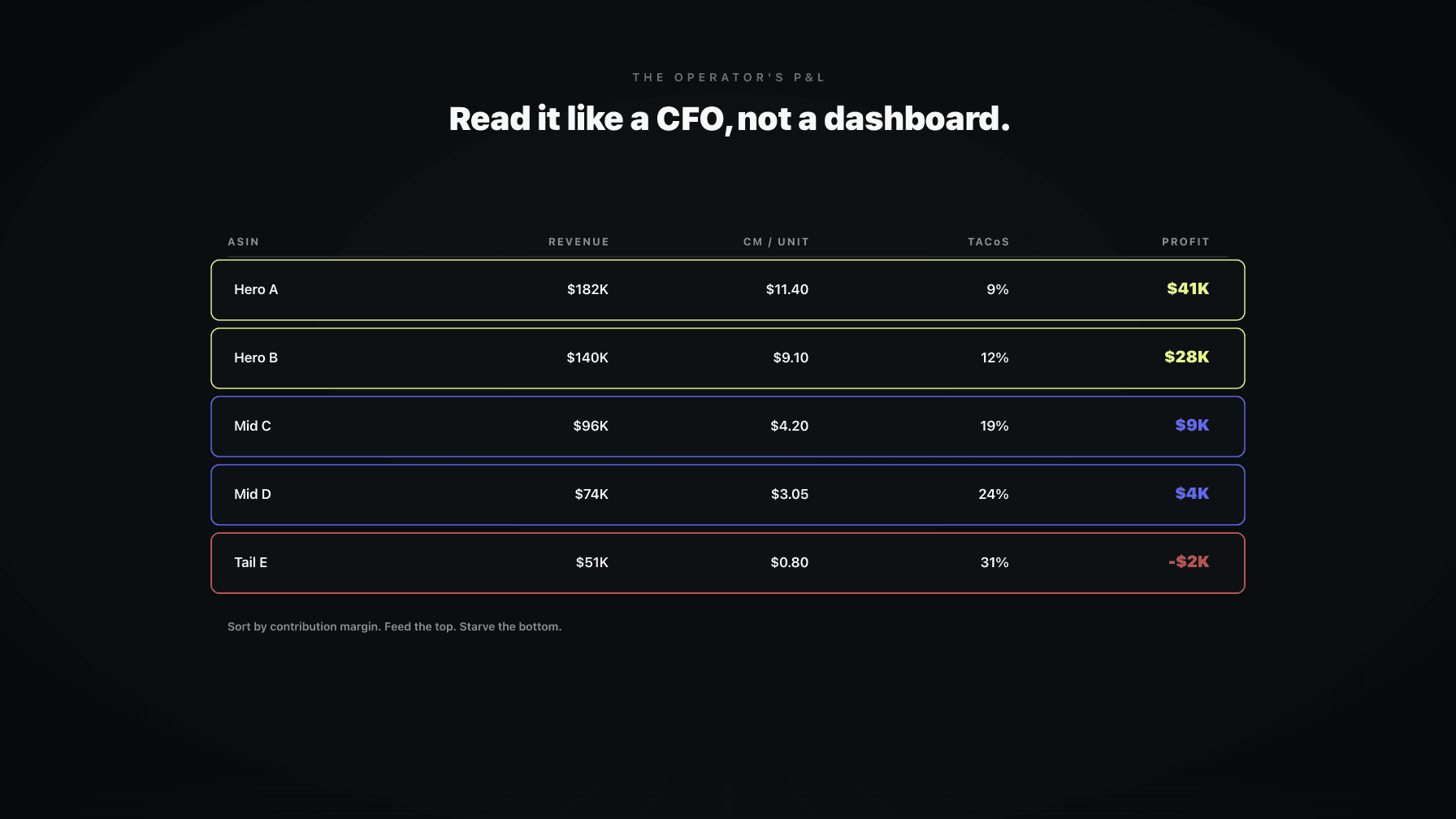
The fix is to never let yourself look at the blended number first. Look at the distribution. Rank every ASIN by contribution margin per unit, from best to worst. The losers will be at the bottom of that list, and they will be obvious the moment you stop averaging them away. The blended number is fine as a summary after you have seen the distribution. It is dangerous as a substitute for it.
Your pricing floor is not a number you pick because it feels safe. It is an output of contribution margin, and it has two parts.
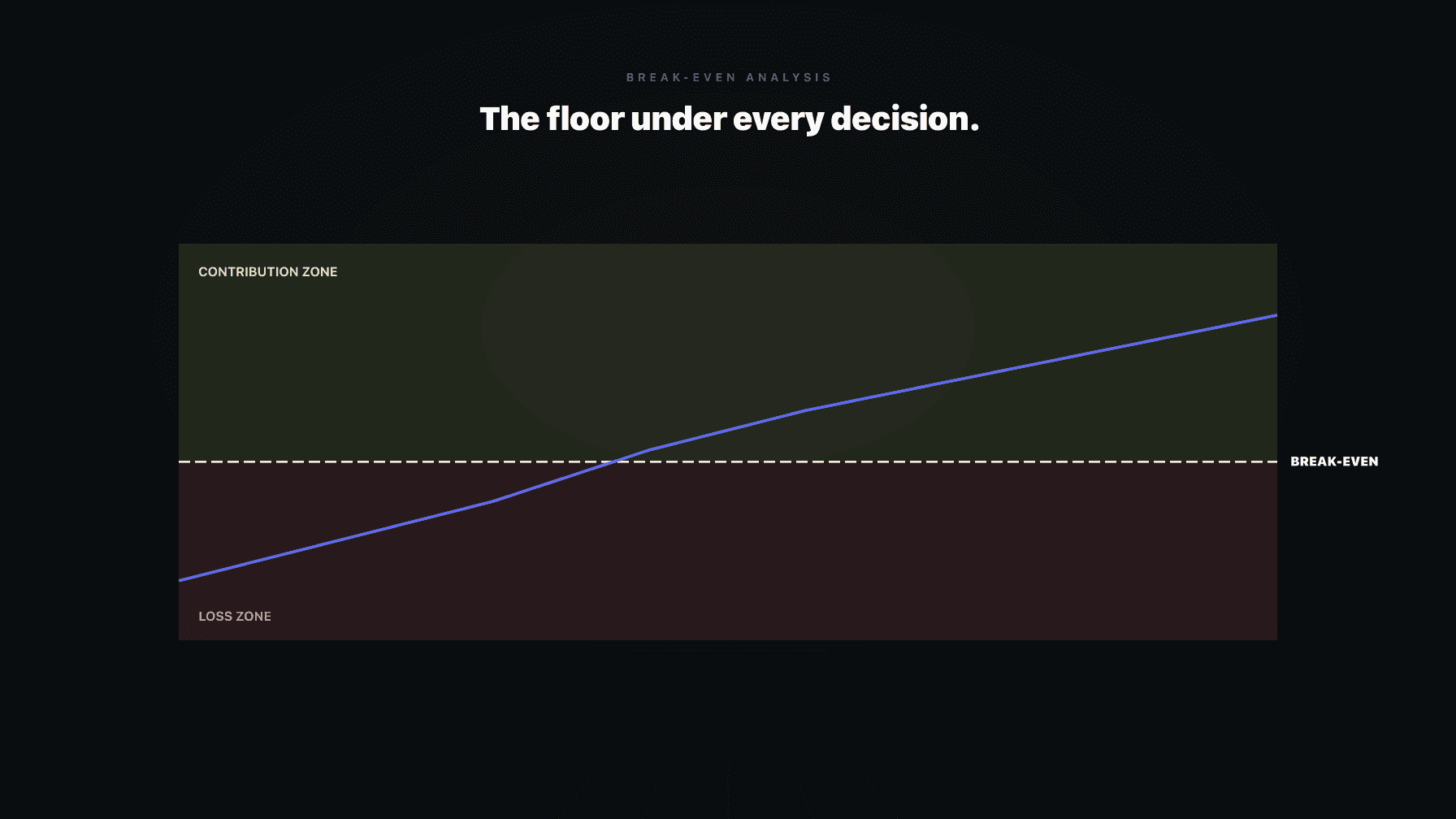
The first part is break-even. Break-even is the price at which contribution margin per unit hits zero, the point where the sale covers its own costs and nothing more. Below break-even, every unit you sell loses money, and selling more makes it worse. Break-even is the cliff edge. A repricer or a pricing rule that does not know exactly where it sits is guessing where the cliff is, and a wrong floor is worse than no floor, because it gives you false confidence. The mechanics of building a real floor are in Amazon break-even analysis.
The second part is the minimum contribution margin you require to make the sale worth making. Break-even alone is not a floor you want to sell at, because a unit that contributes zero contributes nothing toward your overhead and profit. So the real floor is break-even plus a minimum CM. If your product breaks even at $19.40 and you require at least $4.00 of contribution margin per unit to justify selling it, your floor is $23.40, not $19.40.
This is why two products with identical break-even points can have different floors. The floor is a business decision layered on top of a math fact. The math gives you break-even. You decide the minimum CM. Together they produce the price below which the repricer must never go. For the broader logic on floors and ceilings as a working range rather than fixed rails, see Amazon pricing strategy.
The same number that floors your price also caps your bid. This is the part PPC managers most often miss, because they bid against ACoS targets instead of against contribution margin, and ACoS targets are disconnected from whether the unit actually makes money.
The logic is direct. Every unit has a contribution margin before ad spend. That pre-ad CM is the most you can spend to acquire the sale before the unit goes underwater. If a unit contributes $11.80 before ads, then $11.80 is your absolute ceiling on cost per acquisition for that ASIN. Spend more than that to win the order and you bought a sale at a loss.
You do not bid all the way to the ceiling, of course, because then the unit contributes zero. You bid to a target that leaves the minimum CM you decided you need. If you want at least $5.00 of contribution margin per unit after ads, and the pre-ad CM is $11.80, then your maximum profitable ad cost per unit is $6.80. Convert that to a bid using the ASIN's conversion rate and click economics, and you have a bid ceiling that is grounded in profit instead of an arbitrary ACoS number.
The reason this matters: a fixed ACoS target treats every ASIN as if it has the same margin structure, and they do not. A high-CM product can profitably absorb a much higher ACoS than a thin one. Bidding against contribution margin lets each ASIN spend exactly what its economics allow, no more and no less. The thin products get protected from overspending and the fat products get allowed to scale.
Once you have contribution margin per unit for every ASIN, you can do the thing that actually moves the business: tier the catalog and allocate resources by tier.
Rank every ASIN by contribution margin per unit and sort them into three groups.
Feed. The top tier. High contribution margin, strong velocity. These products fund the business. They get the ad budget, the inventory priority, the price discipline to protect margin, and the attention. When you have a dollar to invest, it goes here. These are the ASINs you scale.
Hold. The middle tier. Decent contribution margin or strong margin with modest volume. These are stable contributors. Keep them running efficiently, do not overspend to grow them, and watch for any drift that pushes them down a tier. They are the base.
Starve or fix. The bottom tier. Thin or negative contribution margin per unit. These are the products hiding inside your blended average. Two options, and only two. Fix them by raising price, cutting COGS, lowering the FBA fee through repackaging, or reducing the return rate. Or starve them by pulling ad spend, stopping reorders, and letting them sell through. What you do not do is keep feeding them on autopilot because the topline still looks fine.
The discipline here is unsentimental. A product you launched with high hopes that lands in the starve tier is not a product you keep funding out of loyalty. It is a drain you either repair or shut. Contribution margin per unit is what gives you the standing to make that call with numbers instead of feelings.
This is the math underneath how our AI employees actually operate. Neither of them works without it.
Oracle, the pricing employee, sets the floor at break-even plus your minimum contribution margin, exactly as described above, and it keeps that floor live as costs drift. When an FBA fee rises or freight moves your landed COGS, Oracle recalculates the floor so the repricer never wanders below the price where the unit makes money. It treats the floor as the math output it is, not a number you guessed once at launch. You can see how the pricing employee works at Profasee pricing software and the pricing solution overview.
Marko, the PPC employee, bids against contribution margin instead of a flat ACoS target. It knows the pre-ad CM on every ASIN, so it knows the maximum profitable ad cost per unit and bids to leave the minimum CM you require. High-CM products are allowed to scale spend, thin products are protected from overspending, and every bid is grounded in whether the unit actually contributes profit. That is the difference between renting sales and building the business. The PPC employee is at Profasee PPC manager.
Because both employees share the same contribution margin model, pricing and PPC stop fighting each other. A price move updates the floor and the bid ceiling in the same breath. If you want to see whether your catalog fits this approach, pricing and the application are the next step.
Contribution margin per unit is what survives one Amazon sale after every cost that scales with that sale: the referral fee, the FBA fee, your landed cost of goods, an allocated returns reserve, and the ad cost per unit it took to win the order. It is the money each unit contributes toward covering your fixed costs and generating profit. It is calculated per ASIN, not blended, because that is the only way it cannot hide a losing product inside an average.
Gross margin is just sale price minus cost of goods. It leaves out fees, returns, and ad spend, which are the costs that actually decide whether a product makes money on Amazon. A product can show a 70% gross margin and a 25% contribution margin at the same time. Gross margin tells you how the product looks. Contribution margin tells you how it performs.
Yes. On Amazon you cannot win most sales without paying to be seen, so ad spend is part of the cost of acquiring the sale, which means it scales with the sale and belongs in contribution margin. Leaving it out is the most common way operators make a product look profitable when it is not. Allocate total ad spend on the ASIN across total units sold, including organic units, because ad spend lifts organic rank.
Treat returns as a reserve spread across every unit sold, not as a cost charged only to the units that come back. Take your return rate, multiply it by the full cost of a return (lost product, return shipping, processing, unrefunded fees), and apply that per-unit figure to every sale. You did not know in advance which unit would be returned, so every unit carries the risk and the reserve.
There is no universal number, because it depends on your fixed cost base and category. The honest test is whether the contribution margin per unit, multiplied by your volume, covers your overhead and leaves the profit you need. As a rough operator benchmark, many durable private label products aim for contribution margin in the 20% to 35% range after ads and returns. What matters more than the percentage is that the number is positive after every scaling cost and that you know it per ASIN.
Because an average smooths. A blended margin folds your strong and weak products into one number, so a few healthy ASINs can carry several underwater ones and the blended figure still looks fine. The losers keep getting reordered and keep eating ad budget because the summary number never flinches. Rank every ASIN by contribution margin per unit instead, and the losers show up at the bottom of the list immediately.
Your floor has two parts. Break-even is the price where contribution margin per unit hits zero, the point below which every sale loses money. On top of that you add the minimum contribution margin you require to make the sale worth making. The floor is break-even plus that minimum CM. If a product breaks even at $19.40 and you require $4.00 of contribution per unit, your floor is $23.40. The math gives you break-even, you decide the minimum, and together they set the price your repricer must never cross.