Chad Rubin
June 1, 2026 · 15 min read
Operator notes by email
Short, opinionated takes on AI agents, Amazon PPC, pricing, and inventory. No fluff. About once a week.
Open Seller Central and the first thing you see is a number that feels like it matters. Sessions. Units ordered. Sales for the trailing week. The chart is green or it is red, and your mood follows the chart. That is the trap. The dashboard answers a question a CFO would never ask first: how much stuff moved? It does not answer the question that decides whether the business survives: how much did we keep after every cost touched the unit.
I ran a 7-figure Amazon brand for a decade. For the first few years I read the dashboard the way most operators do, as a scoreboard. Sales up was good, sales down was bad. The problem is that a sales line can climb while the business bleeds. You can ride a hero ASIN into a growth chart that looks great and a bank account that looks terrible, because the ASIN doing all the volume is the one giving back the most margin to ads, returns, and storage. The dashboard cannot see that. It was never built to.
A CFO reads the same business through a different lens. Contribution margin per unit. Total advertising cost of sales as a trend, not a snapshot. Profit per ASIN, sorted from best to worst, after you subtract the things sellers love to ignore: referral fees, FBA fulfillment, the latest fee increase, storage drag, the returns that quietly came back in month three. Same business, different questions. And because the questions are different, the actions are different. The dashboard tells you to celebrate. The P&L tells you which ASIN to feed and which one to starve.
This is a guide to building and reading that operator P&L. Not a finance lecture. A working view you can act on, organized the way someone who has to make the payroll would organize it.
From reading to action
If the framework above sounds familiar, your Amazon account is probably carrying the same drag. Apply and we will show what Marko, Oracle, and Bruno would change in your first week.

Ran a 7-figure Amazon brand for a decade. Founded Skubana (acquired). Co-founded Prosper Show. 15+ years on Amazon.
Join the brands that replaced agencies and tools with AI employees.
A profit and loss statement has a shape. Revenue at the top, costs subtracted in order, profit at the bottom. Every line is a cost that touched the sale. The Seller Central dashboard has none of that shape. It is a feed of activity metrics dressed up as a performance report.
Look at what it shows. Sessions, conversion, units ordered, ordered product sales. Useful for diagnosing traffic and conversion. Useless for answering whether you made money. There is no line for the referral fee Amazon takes off the top, no line for FBA fulfillment per unit, no line for the ad spend that bought the sale, no line for returns processed after the order window, no line for storage. The number that looks like sales is the number before any of the costs that decide profit.
The deeper issue is that the dashboard rolls everything to the account. Even when you drill into a child ASIN, you see its sales, not its profit. So the account can show a healthy trend while three ASINs are profitable, four break-even, and two losing money on every order. The winners carry the dead weight, you feel fine because the aggregate feels fine, and the aggregate is exactly where bad ASINs hide. A CFO never accepts the aggregate. To read the business honestly you break it down to the unit. You build the P&L yourself, or a tool builds it for you. Either way, the dashboard is the starting input, not the answer.
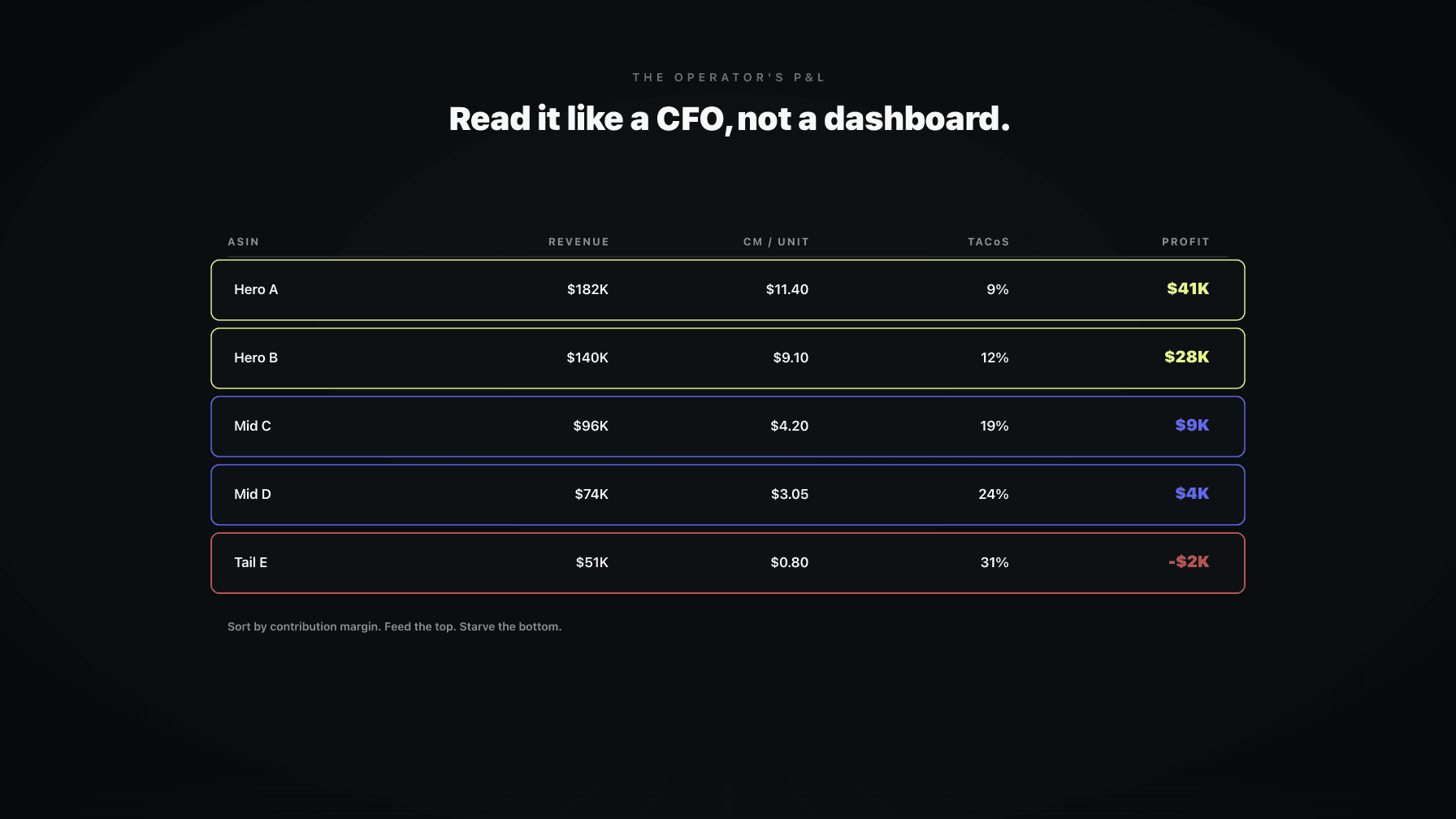
The view that changes how you run the business is a table, one row per ASIN, sorted by contribution after all variable costs. Columns left to right: net revenue per unit, each cost subtracted in order, contribution margin per unit, units, total contribution, and TACoS for context. Sort by total contribution descending and you are looking at your business the way it actually is, not the way the dashboard flatters it.
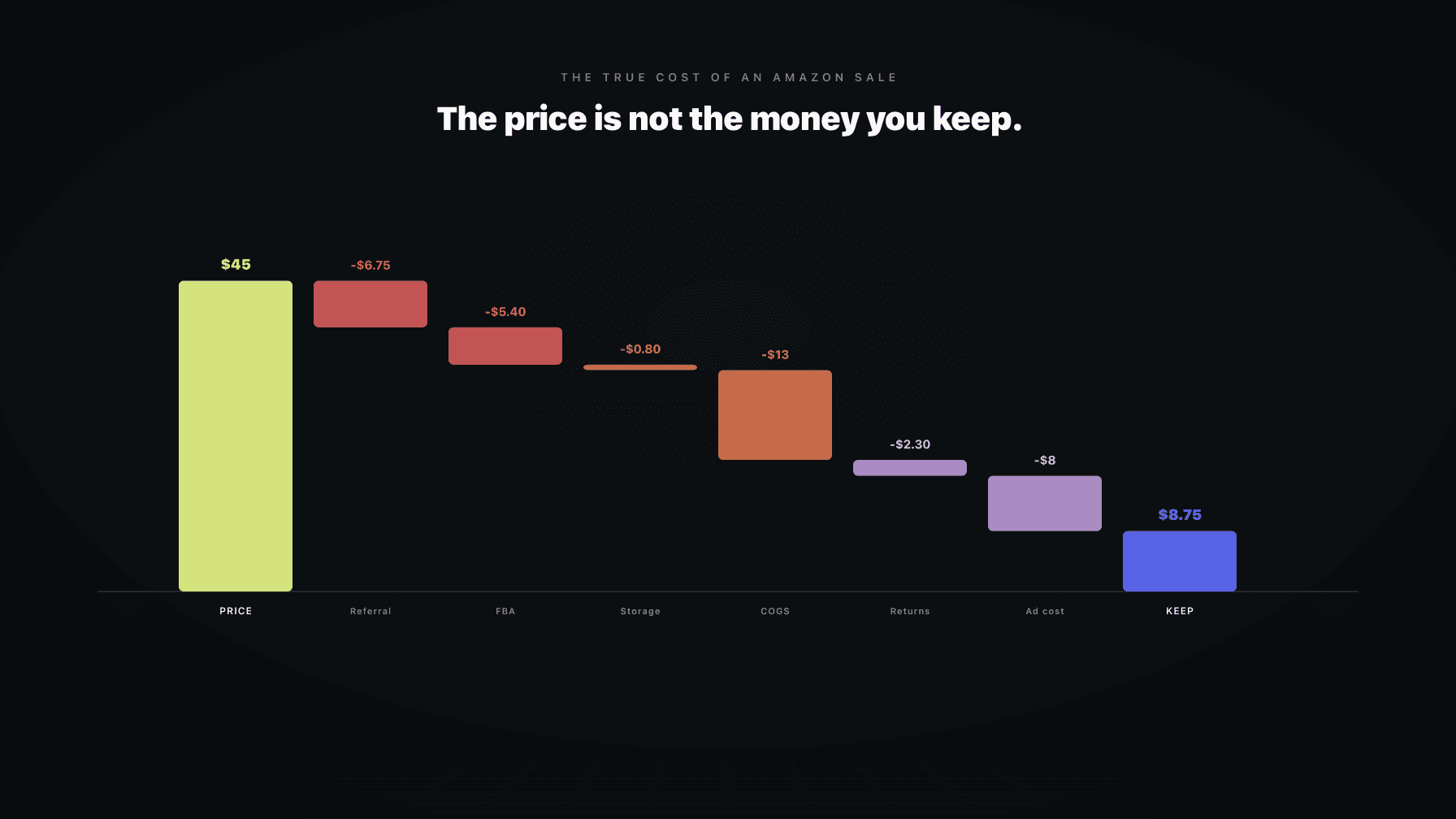
The order of the cost columns matters because each one is a different lever. Start with the sale price. Strip the referral fee (a category-dependent percentage Amazon takes). Strip FBA fulfillment, which is per unit and changed again recently. Strip your landed product cost, the all-in number with freight and duty, not the factory invoice. Strip the per-unit ad cost, total ad spend on the ASIN divided by units sold, not just the spend on the keywords that converted. Strip a returns allowance based on that ASIN's actual return rate, because a sale that comes back is not a sale. What is left is contribution margin per unit. Multiply by units and you have total contribution, the number that pays for your overhead and your salary.
The first time most operators build this view, the surprise is not which ASINs are losing money. It is which ASINs they thought were winners. The high-volume hero often sits in the middle of the ranking, because it absorbs the most ad spend and the most returns. The quiet ASIN nobody talks about, niche audience and almost no ad spend, frequently sits at the top on contribution per unit. The dashboard would never tell you that. The per-ASIN P&L tells you in one sort. For the mechanics underneath this table, Amazon unit economics breaks down each cost line, and contribution margin per unit goes deep on the metric.
One ASIN's contribution margin tells you whether that ASIN is healthy. The distribution across the whole catalog tells you whether the business is healthy. Those are different reads, and the second is the one operators skip.
Lay out every ASIN by contribution margin per unit and look at the shape. A healthy catalog has a fat middle and a clear top: most ASINs in a reasonable band, a handful of standout contributors, a short tail. An unhealthy catalog is bimodal, a few heroes carrying everything and a long tail hovering at or below break-even. That shape is a warning. The business is fragile, because a fee increase or a competitor undercutting the heroes takes out the only ASINs paying the bills. The tail does not save you. The tail was never contributing.
The distribution also surfaces the dollar-versus-percentage trap. A 40 percent margin on a $12 product is $4.80 per unit. A 20 percent margin on a $60 product is $12. The percentage looks worse and the dollar contribution is more than double. Sort by percentage and you make the wrong call. Sort by total contribution, percentage times units, and you see what feeds the business. CFOs think in dollars because dollars pay invoices. Percentages are a diagnostic, not a goal. Read this way, the question stops being "which ASIN has the best margin" and becomes "where is my contribution coming from, and how concentrated is the risk."
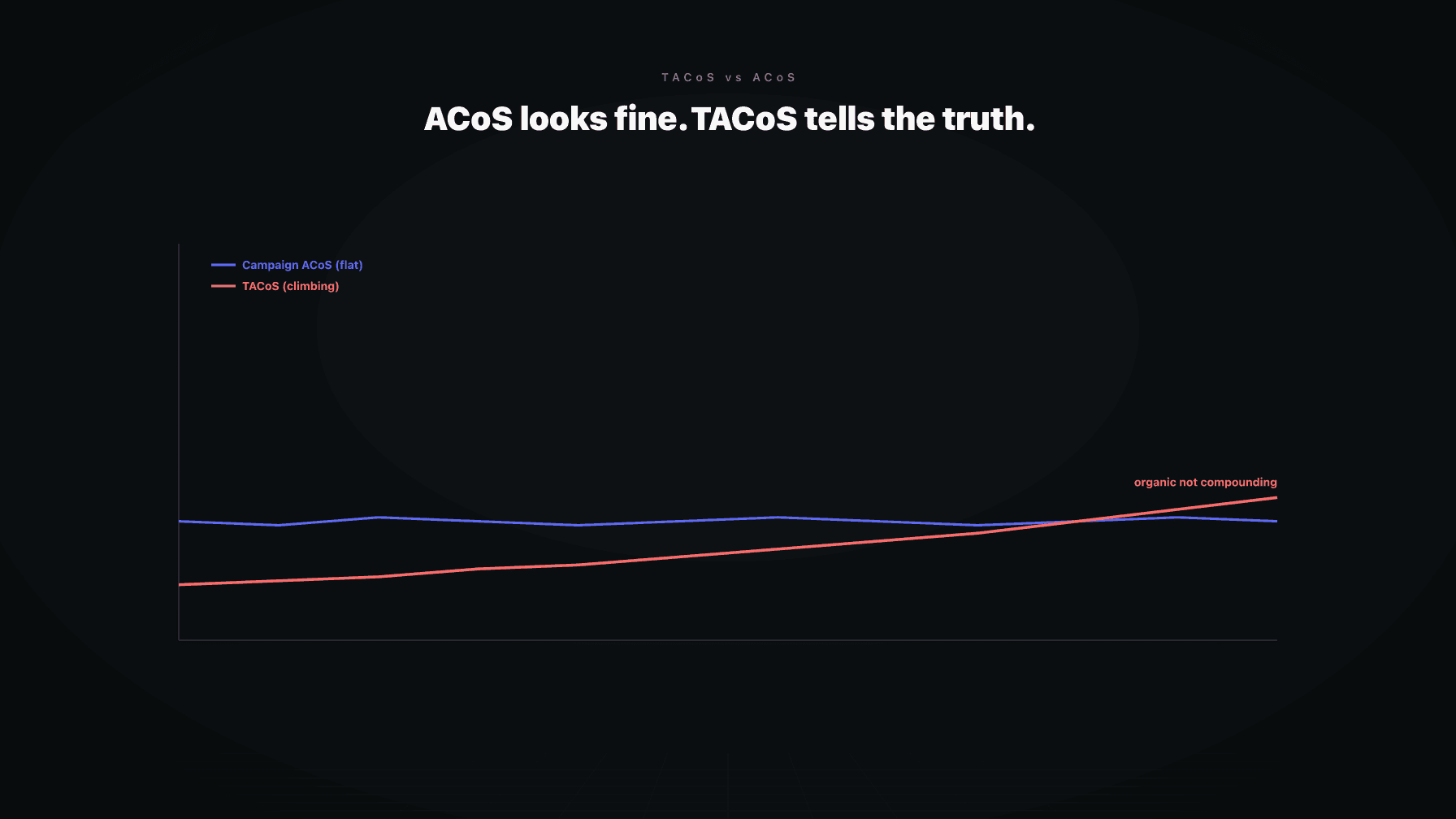
Most sellers watch ACoS, advertising cost as a percentage of ad-attributed sales. ACoS tells you how efficient a campaign is, not how the ASIN is doing as a business. TACoS, total advertising cost of sales, divides total ad spend by total sales, organic and paid combined. That one change in the denominator turns a campaign metric into a business metric, and makes TACoS the closest thing to a leading indicator the P&L has.
The trend matters more than the number. Stable TACoS means ad spend and total sales are growing together, usually because ads are supporting organic rank rather than replacing it. Rising TACoS with flat sales means you are spending more to hold the same ground, the early signal that organic rank is slipping and ads are papering over it. By the time the sales line drops, the rank erosion already happened weeks ago. Falling TACoS with growing sales is the goal: the ASIN is earning more of its sales organically and you can pull spend back without losing volume.
Read TACoS per ASIN, not at the account level, for the same reason you read profit per ASIN. The account average hides the ASIN quietly bleeding ad budget. Track it as a line over time and the slope tells the story the snapshot hides. Amazon TACoS explained walks through the math. The point: TACoS moves before profit does, which makes it the metric a CFO watches to catch trouble early instead of explaining it late.
A P&L tells you whether you made money. It does not tell you whether you have money, and on Amazon those are different problems. The cash view sits next to the P&L and answers the second. A brand can be profitable on paper and broke in practice when the cash is trapped in inventory sitting in a warehouse.
Two lines drive it. First, capital tied up: units on hand and in transit, times landed cost. That is real money, already spent, not yet recovered. An ASIN with a fat margin and six months of cover is contributing on every sale and starving the business of cash at the same time, because the cash you could spend on a faster-turning ASIN is frozen in a slow one. Sell-through, not margin, frees that cash. Second, storage drag: the monthly FBA storage fee plus the long-term surcharge on aged units. A slow ASIN gets punished twice, once on frozen cash and again on rising storage fees that eat the margin that made it look healthy.
The cash view changes which ASINs you reorder and how much. The CFO question is not "is this ASIN profitable." It is "what is my contribution per dollar of cash tied up, per month." An ASIN that turns six times a year at a modest margin can throw off more cash than one that turns twice at a fat margin. Amazon inventory management covers the reorder mechanics. The takeaway: profit and cash are two views of the same business, and ignoring the cash view is how profitable brands run out of money.
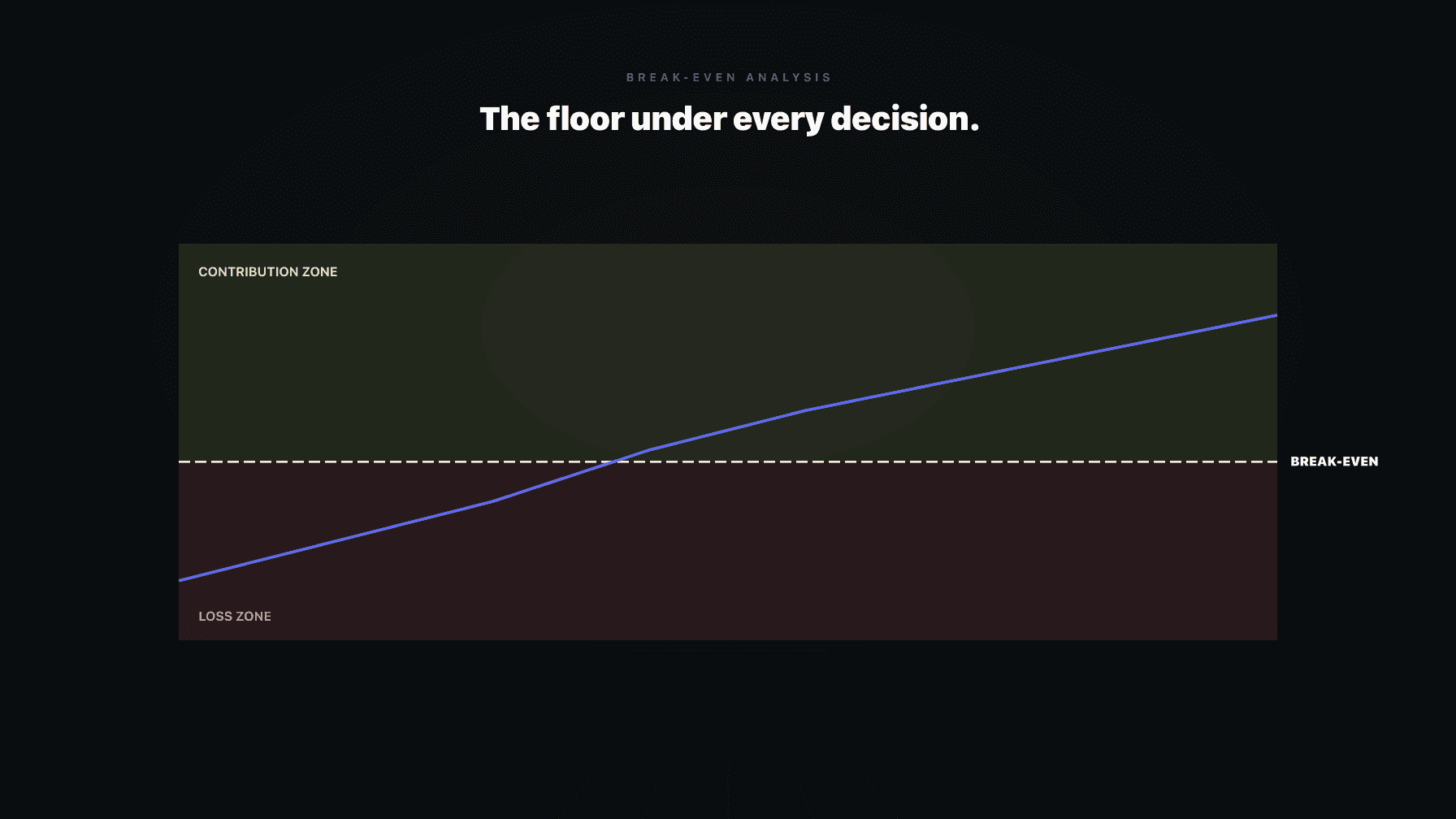
Amazon changes fees. Referral percentages shift by category, FBA rates step up, storage surcharges expand, inbound placement fees appear. Every change moves your break-even floor, the price below which you lose money on the unit. The fee-impact view answers a question the dashboard cannot: after the latest increase, which ASINs are now underwater at their current price.
The mechanics are direct. Break-even price is where contribution margin per unit hits zero, every variable cost covered and nothing left over. When a fee goes up, break-even goes up with it. An ASIN priced at $19.99 with a $17.50 break-even had $2.49 of cushion. A fee increase pushing break-even to $18.75 cuts that to $1.24, and if returns or ad costs tick up at the same time, the unit flips from contributing to losing without the price changing at all. Nothing on the dashboard flags this. The sales line keeps moving. The money quietly stops.
The discipline is to rerun break-even across the catalog every time fees change, sorted by remaining cushion. Thin-cushion ASINs need a price move or cost fix immediately. Underwater ASINs need a decision: raise price, cut cost, or stop selling. Amazon break-even analysis and the true cost of an Amazon sale cover the full cost stack. Fee increases are not a one-time hit you absorb. They reset your floors, and the floors decide which prices are still safe.
Working capital, ad budget, and attention are finite. The per-ASIN P&L exists to decide where those dollars go: which ASINs you feed with more inventory and ad spend, and which you starve, manage down, or kill.
The instinct most sellers run on is volume. Feed the ASIN that sells the most. That is exactly backwards when the high-volume ASIN is the one giving back the most margin to ads and returns. The CFO frame is contribution per dollar invested. An ASIN that returns strong contribution per unit, turns inventory quickly, and holds organic rank with low TACoS is the one to feed, because every dollar comes back fast with margin attached. An ASIN at break-even with rising TACoS and slow turns is the one to starve, because every dollar props up something that does not pay you back.
The middle is where judgment lives. An ASIN losing money today might be a launch still climbing rank, TACoS high by design and falling, where feeding it is an investment with a clear payoff. Another at the same margin might be a mature product in permanent decline, where feeding it is throwing money at a corpse. The P&L gives you the numbers. The trend lines, contribution direction and TACoS direction, tell you which way the ASIN is heading. Feed the ones heading up, starve the ones heading down, and stop pretending the revenue chart knows the difference.
A dashboard answers "what happened." A CFO asks "what does it mean and what do we do." That gap is the entire job. Here are the questions the dashboard structurally cannot answer.
Which ASINs are subsidizing which? The dashboard rolls profit to the account, so you never see two winners carrying five losers. If we lost the top three contributors tomorrow, would the business still cover overhead? That concentration-risk question lives in the contribution distribution. Is TACoS rising because we are investing in rank or because rank is slipping? Same number, opposite meanings, and only the trend per ASIN tells you which. How much profit is frozen in inventory we cannot move? The cash view answers it; the sales chart hides it. After the last fee increase, which prices are now below break-even? The fee-impact view flags it; the dashboard keeps showing those underwater units as sales.
The answers all require subtracting costs the dashboard ignores and reading metrics as trends across ASINs rather than snapshots across the account. None of it is exotic finance. It is arithmetic applied with discipline. The reason most sellers do not run these views is that the data lives in five different reports and stitching it together by hand is brutal, so the dashboard wins by default. That is the gap a real operator P&L closes, and the gap an AI operating system for Amazon brands is built to close automatically.
You can build a usable operator P&L in a spreadsheet, and many seven-figure brands run on exactly that for years. The inputs come from a handful of Seller Central reports plus your own cost data: the business report for sales, the FBA fee report for fulfillment and storage, the referral schedule for your categories, the advertising reports for spend per ASIN, and the returns report. Add your landed cost per unit, the all-in number with freight and duty that Amazon does not know and you have to maintain. Stitch those into the per-ASIN table, sorted by total contribution.
Then the harder part: cadence. A P&L you build once is a museum piece. Ad costs move, returns trickle in late, fees reset, inventory ages. The discipline is a rhythm. Daily, glance at TACoS trend per ASIN. Weekly, refresh contribution per unit on your top ASINs and flag anything that flipped near break-even. Monthly, rerun the full per-ASIN P&L, the contribution distribution, the cash view, and the fee-impact view, then make the feed-vs-starve calls. Quarterly, read concentration risk and the shape of the catalog.
The spreadsheet has a ceiling. It is manual, it lags, returns and fee changes break it, and a catalog past a few dozen ASINs becomes a part-time job to maintain. The deeper problem is not the labor. It is that an insight arriving a week late is an insight you cannot act on, and the whole value of the P&L is acting on it.
A P&L is only worth building if it changes what you do, and on Amazon the actions live in four domains that move together. This is where operators stall, because reading the P&L is one skill and acting on it across four systems is another.
Pricing is the fastest lever. A 1 percent price change moves contribution margin far more than 1 percent, because it falls straight to the bottom after every cost is already paid. When the fee-impact view flags an ASIN with thin cushion, the action is a price move, and the P&L tells you the floor you cannot cross. PPC is next. When TACoS trend says an ASIN is earning organic rank, pull spend back and bank the margin; when rank is slipping, defend it or decide it is not worth defending. Inventory is the cash lever: the cash view tells you which ASINs to reorder hard and which to let run down. Catalog is the slow lever: the contribution distribution tells you which ASINs to kill, which to relaunch, and where the gaps are.
The trap is that these four levers interact, and pulling one without the others creates hidden losses. Cut price to defend rank and you blow the break-even you just calculated. Cut ad spend to protect TACoS and you let a competitor take the rank you were holding. The P&L gives you the numbers in one place so the actions stay coordinated. Reading the P&L is the diagnosis. Acting across all four levers, in the same currency of contribution margin, is the treatment.
Most operators never run the views in this guide not because they do not understand them, but because the data is scattered, the math is manual, and by the time the spreadsheet is current the insight is stale. Profasee closes that gap with a live CFO view and AI agents that operate in the currency a CFO thinks in: contribution margin, not revenue.
The agents do not optimize in isolation. The Amazon pricing software agent moves prices against a target contribution margin and a break-even floor, so a price move never crosses the line the P&L drew. The PPC manager agent reads TACoS as a trend per ASIN and adjusts spend to defend rank where it pays and pull back where the ASIN is earning organic, instead of optimizing ACoS in a vacuum. The demand planner agent reads the cash view, sell-through, and cover weeks to set reorder quantities that free trapped cash rather than freeze it. Because the agents share state, a pricing move, an inventory decision, and an ad adjustment stay coordinated instead of fighting each other.
Above the agents sits Mission Control, the operator surface. It treats you as the operator, not a passive viewer of charts. It surfaces per-ASIN profit, contribution margin, TACoS trend, and break-even floors as living views, updated continuously, so the feed-vs-starve call you make each month runs on numbers that are current today. You set the targets and the guardrails. The agents operate inside them. The CFO view stops being a spreadsheet you maintain and becomes the dashboard you should have had all along. See the pricing solution, review pricing, or apply to see your own per-ASIN P&L.
Read it per ASIN and read it after every cost. Build a table with one row per ASIN: net sale price, then subtract the referral fee, FBA fulfillment, landed product cost, per-unit ad spend, and a returns allowance. What remains is contribution margin per unit. Multiply by units for total contribution and sort the catalog by that number. That sort, not the Seller Central sales chart, tells you where your profit comes from.
The dashboard reports activity: sessions, units, sales, measured before any cost touches the unit. A real P&L reports outcome: contribution margin and profit after every cost, per ASIN. The dashboard answers "how much moved." The P&L answers "how much did we keep." Reading the dashboard as a profit report is the most common and most expensive mistake operators make.
Contribution margin per unit per ASIN. The contribution distribution across the catalog, for concentration risk. TACoS as a trend per ASIN, to catch rank erosion. The cash view, capital tied up plus storage drag. And the fee-impact view, break-even floors rerun after any fee change. Together these show where profit comes from, how fragile it is, where it is heading, and where cash is trapped.
Amazon does not show it directly. You build it: pull sales from the business report, fees from the FBA and referral schedules, ad spend from the advertising reports, returns from the returns report, then subtract all of them plus your landed cost from the sale price. The result is contribution margin per unit. Doing it by hand works for small catalogs and breaks down past a few dozen ASINs.
Feeding means investing more: inventory, ad spend, attention. Starving means pulling investment back, managing it down, or killing it. The decision runs on contribution per dollar invested and on trend direction, not on volume. Feed the ASINs returning strong contribution that turn fast and hold rank. Starve the ones at break-even with rising TACoS and slow turns.
Build a cash view alongside the P&L. Multiply units on hand and in transit by landed cost to see capital frozen in inventory, then add storage fees and the long-term surcharge on aged units. Read it as contribution per dollar of cash tied up per month. A fast-turning ASIN at a modest margin often throws off more cash than a slow-turning ASIN at a fat margin.
Which ASINs are subsidizing which. Whether the business survives losing the top contributors. Whether TACoS is rising from investment or from slipping rank. How much profit is frozen in inventory you cannot move. And which prices fell below break-even after the latest fee change. The dashboard answers none of these. The operator P&L answers all five.