Chad Rubin
May 30, 2026 · 13 min read
Operator notes by email
Short, opinionated takes on AI agents, Amazon PPC, pricing, and inventory. No fluff. About once a week.
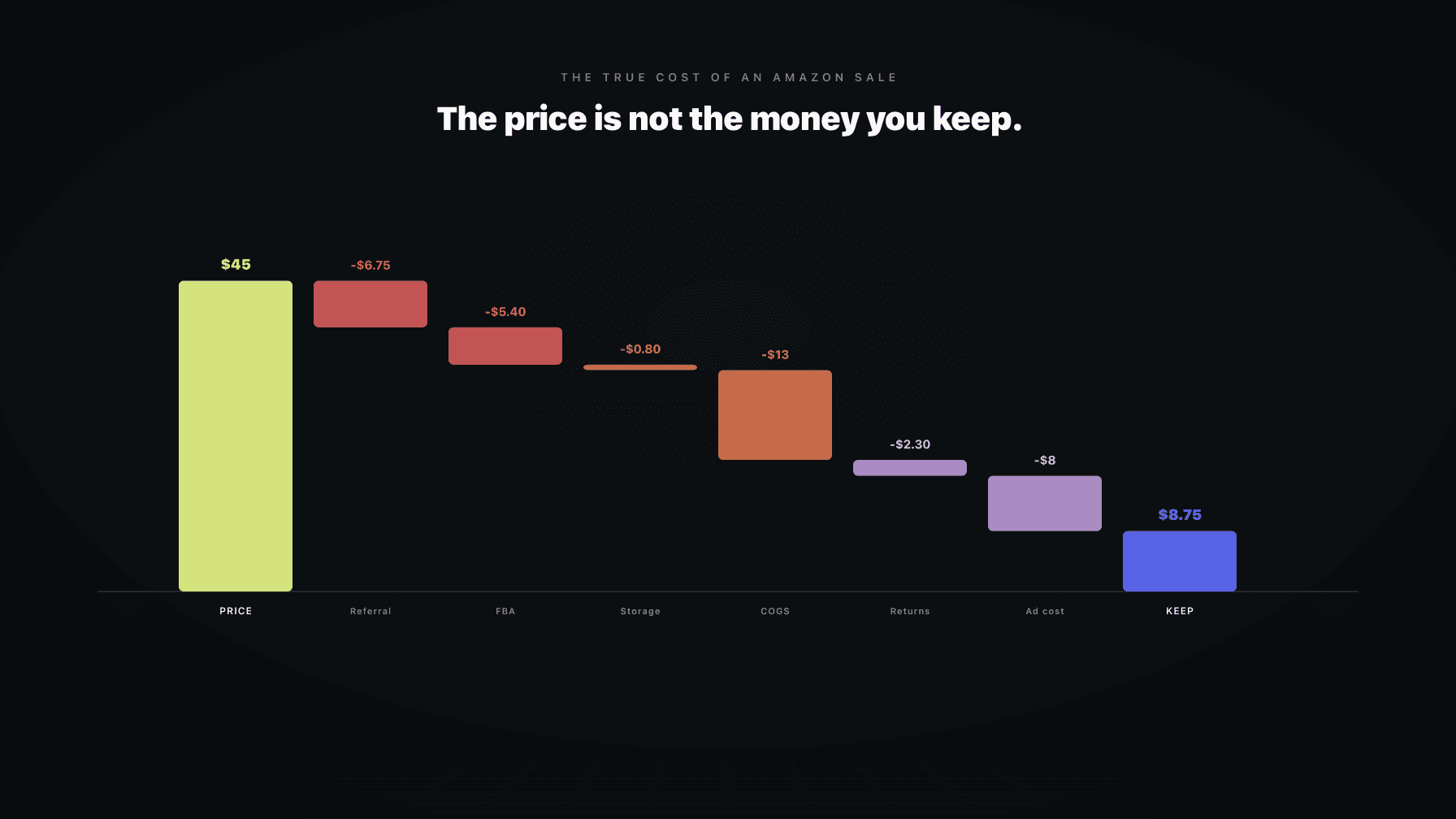
The price on your listing is the most visible number in your business and the most misleading. It feels like income because it is the figure the customer pays and the figure Seller Central shows you first. It is not income. It is the top of a waterfall, and the money you actually keep is whatever survives the long fall to the bottom.
Most sellers stop counting somewhere around COGS plus FBA. They know the factory invoice, they know the fulfillment fee, they subtract the two, and they call the remainder profit. That number is not profit. It is a guess with three or four cost lines missing, and the missing lines are rarely small. They are storage, returns, the freight and duty that turn a factory invoice into landed cost, the ad spend it took to win the sale, and a handful of fees that only show up when something goes wrong.
Here is the problem with stopping early. Every decision you make downstream (the bid you set, the price floor you defend, the SKU you reorder) is denominated in the money that survives the waterfall, not the listing price. If you price and bid against a number that is too high by a few dollars, you are not building margin. You are renting revenue and paying for the privilege without knowing it.
This post itemizes the full stack. Every fee, every deduction, every cost that most operators forget until the quarterly review. The figures are illustrative and the structure is the point. Use the structure, plug in your own numbers, and you will see why the listing price was never the money you keep.
## Key takeaways >- The listing price is the top of a waterfall, not your income. Real profit is whatever survives every deduction below it.- Most sellers count COGS plus FBA and stop. They miss storage, returns, landed freight and duty, ad cost per unit, and the fees that only fire when something breaks.- The Amazon referral fee is a percentage of the full sale price, not the discounted price, and the category you sell in changes it by several points.- Returns are the most under-reserved line in Amazon P&Ls. The lost unit, the return shipping, and the processing fee rarely come back as a full sellable unit.- Storage fees compound on slow movers. Long-term storage surcharges and aged-inventory fees can quietly erase the margin on inventory that sits.- The full fee stack, not COGS plus FBA, is the correct floor for your pricing and your bids. Get the floor wrong and automation will defend a number that loses money.
Picture the sale price at the top. Below it sit a series of steps, and each step takes a piece. The referral fee comes off first as a percentage of the gross. The FBA fulfillment fee comes off as a flat charge tied to size and weight. Then landed COGS, which is bigger than the factory invoice once you add freight and duty. Then a reserve for returns, because some fraction of these units come back. Then storage, prorated per unit for the time it sat. Then the ad cost it took to win the sale. What remains at the bottom is contribution margin, the only number that tells you whether the SKU funds the business.
From reading to action
If the framework above sounds familiar, your Amazon account is probably carrying the same drag. Apply and we will show what Marko, Oracle, and Bruno would change in your first week.

Ran a 7-figure Amazon brand for a decade. Founded Skubana (acquired). Co-founded Prosper Show. 15+ years on Amazon.
Join the brands that replaced agencies and tools with AI employees.
The waterfall matters because the steps are not optional and they are not small. A product that looks like it carries a healthy margin at the COGS-plus-FBA level can finish thin or negative once the bottom three steps are included. The operators who win are the ones who count to the bottom of the waterfall before they set a price or a bid, not after the quarter closes.
The referral fee is Amazon's commission for the sale. It is a percentage of the total sale price, which includes the item price plus any gift wrap, and it is charged whether you use FBA or fulfill the order yourself. For most categories the rate sits around 15 percent, but the number depends entirely on what you sell.
Two things sellers get wrong here. First, the rate is not uniform. Some categories run lower, some run higher, and a few have tiered structures where the percentage changes above and below a price threshold. If you sell across multiple categories, you cannot use one referral percentage for the whole catalog. Second, the fee is charged on the full sale price, not the discounted price. Run a coupon or a deal and Amazon still takes its percentage of the original number in many cases, which means a discount costs you more than the discount itself.
There is also a minimum referral fee on many categories, usually around 30 cents. On a low-priced item that minimum can represent a much larger effective percentage than the headline rate. The reason this matters is simple. If you sell cheap units, the referral floor is a bigger drag than you think, and it does not scale down with your price.
The FBA fulfillment fee covers the pick, the pack, and the shipping to the customer. It is a flat charge per unit, and it is determined by the size tier and the weight of the packaged product, not by what you sell or what you charge for it.
The trap is that size tier is a step function, not a smooth curve. A product that is a fraction of an inch over a tier boundary jumps to the next bracket and pays the higher fee even though it is barely bigger. Sellers lose real money to packaging that pushes a unit from small standard to large standard, or from one weight band to the next, when a different box or a tighter pack would have kept it in the cheaper tier.
Two more things. Amazon raises FBA rates regularly, often at the start of the year, so a fee you modeled twelve months ago is probably out of date now. And the fees layer. Beyond the base fulfillment fee there are inbound placement fees, low-inventory-level fees on slow-moving stock, and surcharges that apply to oversized or heavy items. The base fee is the floor, not the total.
Monthly storage is charged per cubic foot of space your inventory occupies in Amazon's warehouses. It sounds trivial because the per-cubic-foot rate is small. It is not trivial, for two reasons.
First, the rate spikes in the fourth quarter. Peak-season storage runs several times the off-season rate, so the inventory you stage for the holidays costs far more to hold in October through December than it does in the spring. If you over-staged, you pay for that miscalculation every month it sits.
Second, the cubic-foot trap. You think in units, but Amazon bills in volume. A bulky, light product that sells slowly can rack up storage charges that quietly outpace its margin, because it eats space without moving. The fix is to allocate storage cost per unit based on how long the unit actually sat, not to ignore it because the line item looks small on the monthly invoice.
This is where slow movers go from low-margin to negative. Amazon charges aged-inventory surcharges on units that have been sitting in the warehouse for an extended period, and the surcharge climbs the longer the unit stays. Inventory that has been in stock for many months can carry a surcharge on top of the normal monthly storage, and that surcharge keeps growing.
The reason this destroys margin is compounding. A unit that did not sell is already a problem, because the capital is tied up and the storage clock is running. Add an aging surcharge and the same unit is now actively costing you more each month it fails to move. At some point the math flips and it is cheaper to remove or dispose of the unit than to keep paying to store it. Most sellers discover this far too late, after the surcharges have already eaten the contribution the unit would have generated if it had sold.
The factory invoice is not your cost of goods. It is the start of it. Landed COGS is what the unit costs to get from the factory to Amazon's warehouse, ready to ship, and it includes a stack of items that the factory invoice does not show.
The full landed cost includes the unit price from the supplier, ocean or air freight, customs duty and any tariffs, the brokerage and port handling, drayage to your prep location, prep and labeling, inbound freight to Amazon, and the per-unit cost of inspection or quality control. Freight and duty alone can add 20 to 40 percent to the factory price depending on the product and the lane, and tariff schedules can change that overnight.
The mistake is treating the factory invoice as COGS and absorbing freight and duty as a lump expense somewhere else in the P&L. When you do that, your per-unit margin looks better than it is, and you make pricing and reorder decisions on a cost that is too low. Landed COGS, allocated per unit, is the only honest input.
Returns are the line almost everyone underestimates, because the instinct is to net the return out and move on. The real cost of a return is rarely just the refund.
When a unit comes back, several things happen. You refund the customer. Amazon may charge a returns processing fee on certain categories. The return shipping is a cost. And the returned unit often cannot be resold as new, so you either accept it back as unsellable, pay to have it inspected and repackaged, or write it off entirely. A return is frequently the loss of the full unit plus the cost of handling it, not a clean reversal of the sale.
The right way to handle this is a reserve, not a hope. If a SKU returns at a given rate, you allocate a per-unit returns cost across every unit sold, the way an insurer prices risk across a pool. A category with a high return rate carries a heavier reserve, and that reserve has to come out before you call anything margin. Skip the reserve and your contribution margin is overstated by exactly the amount returns will eventually take.
Ad spend is a cost of the sale even though Amazon does not deduct it from the order. If you spent money on PPC to win the customer, that spend belongs in the unit economics of the units it sold.
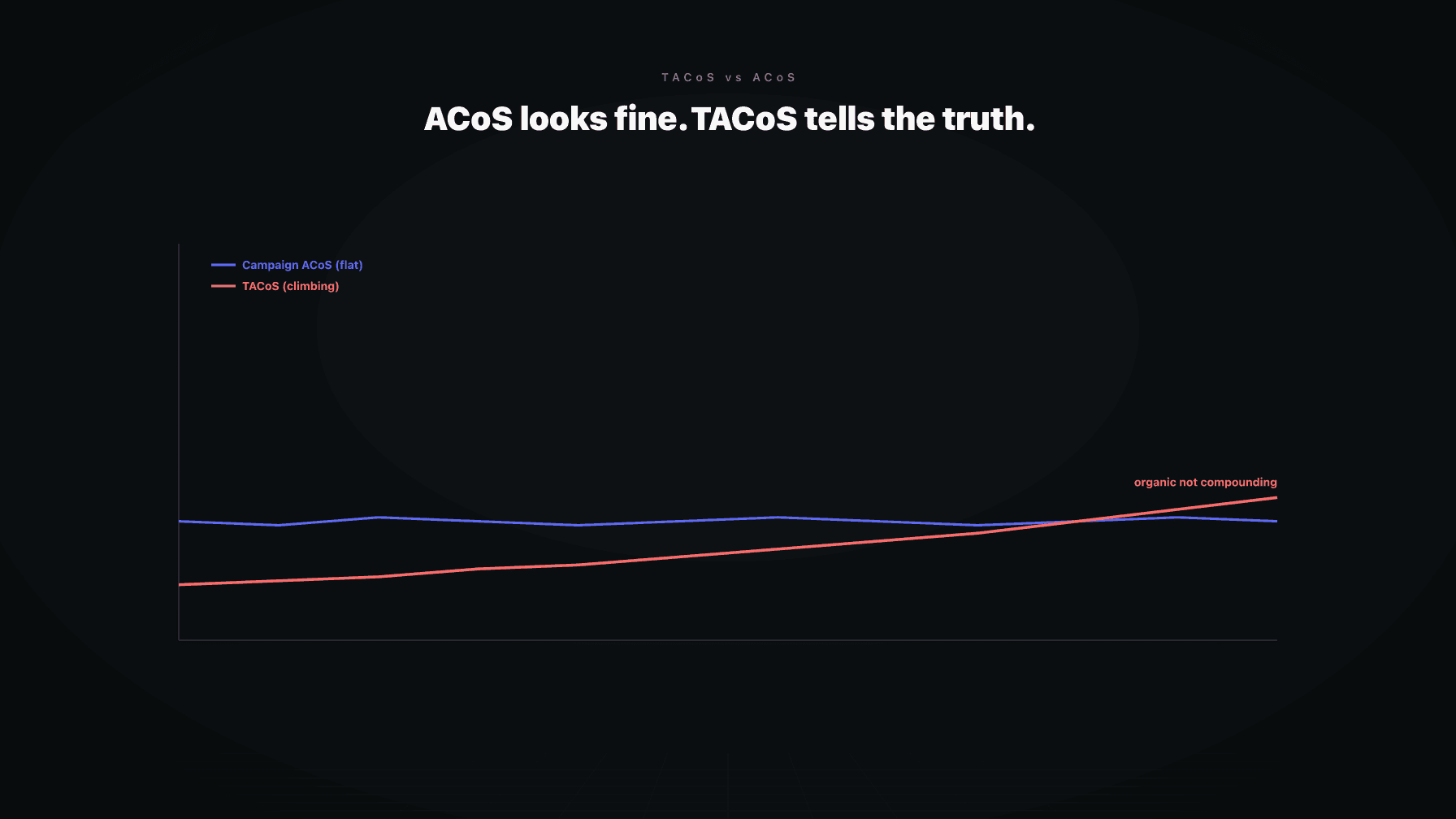
The cleaner way to think about this is total advertising cost of sale, the share of your revenue going to ads across the whole account, not just the ACoS of a single campaign. Campaign ACoS tells you how one campaign performed. It does not tell you what each unit really cost to sell once you account for the organic sales the ads also influenced and the spend that did not convert. Allocating ad cost per unit, using a blended view, gives you the real number to subtract in the waterfall.
This is the line that turns a profitable-looking SKU into a break-even one. A product can clear referral, FBA, COGS, returns, and storage with margin to spare, then give all of it back to the ad spend it took to move volume. If you do not put ad cost per unit in the stack, you will keep funding products that look healthy and are not.
A few costs only appear when something goes wrong, which is exactly why they get forgotten in the planning.
Removal and disposal fees are charged when you pull inventory out of Amazon or have it destroyed. If you over-ordered or a SKU stalled, getting the units out is not free, and the removal fee per unit can be meaningful on bulky items. Lost and damaged inventory is supposed to be reimbursed by Amazon, but the reimbursement is not automatic and not always complete, so there is a reimbursement gap that you eat if you are not actively filing claims. Inbound shipment shortages, where Amazon receives fewer units than you sent, are another quiet leak.
Then there are the small recurring items: the monthly professional selling plan subscription, the cost of software and tools, the labor to run the account, and the financing cost of the capital tied up in inventory sitting in the warehouse. None of these is huge on its own. Together they are the difference between the margin you modeled and the cash that actually shows up.
Take a product that sells for $34.99. Here is the full stack, illustratively, to show how the waterfall behaves. Use the structure, not the figures.
```
Sale price: $34.99
Referral fee (15%): -$5.25
FBA fulfillment fee: -$5.85
Landed COGS: -$9.40
Returns reserve (4%): -$1.40
Storage (per-unit, prorated): -$0.45
Ad cost per unit (blended): -$6.30
-----------------------------------
Contribution margin: $6.34
```
At the COGS-plus-FBA level, this SKU looked like it kept almost $14 per unit. That is the number most sellers carry in their heads. The full stack says it keeps $6.34, less than half. And that $6.34 is before the forgotten costs: removal on the units that do not sell, the reimbursement gap, the financing cost of the inventory, and the software and labor to run it all.
The point is not the exact figures. The point is the gap between the number you stop at and the number that is real. That gap is where pricing mistakes live, because every decision you make against the higher number is wrong by the size of the missing steps.
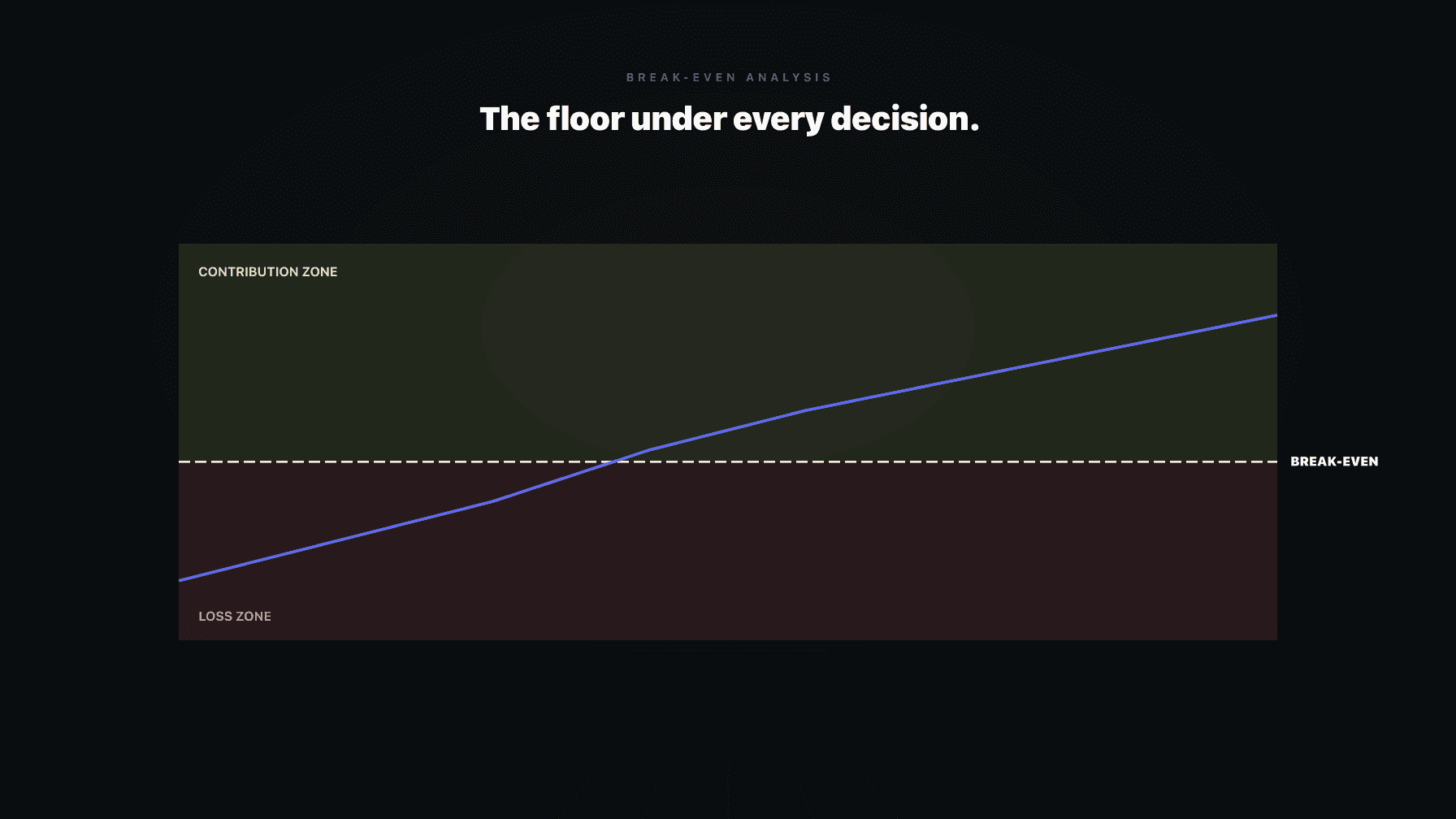
Your price floor is the lowest price at which a sale still makes money. Your bid floor is the most you can pay to win a sale before it goes negative. Both of them depend entirely on knowing what survives the waterfall, and both of them are wrong if you build them on COGS plus FBA.
Here is the failure mode. A repricer or a bidding tool with a floor set too high by a few dollars will defend a number that actually loses money, and it will do it confidently and automatically. A too-low floor is worse than no automation at all, because the system will chase volume straight into negative margin and you will not see it until the units are gone and the cash is not there. The full fee stack is the only correct input for the floor. Build the floor on the bottom of the waterfall, add the cushion you want, and let automation defend a number that is actually defensible.
This is why unit economics is not accounting. It is the operating system underneath every price and every bid. See Amazon unit economics for how the full stack feeds your contribution margin, contribution margin per unit for the number itself, and break-even analysis for how to set the floor.
Most repricers and most P&L tools run on COGS plus FBA. They use the two costs that are easy to pull and ignore the rest, which means the floor they defend is too high and the margin they report is overstated. That is the exact mistake this whole post is about, automated.
Profasee's pricing AI, Oracle, operates on the real landed COGS and the full fee stack, not COGS plus FBA. It loads referral fee by category, the size-and-weight FBA fee, freight and duty in the landed cost, a returns reserve based on each SKU's actual return rate, prorated storage, and blended ad cost per unit. The price floor it defends is the bottom of the waterfall, not a convenient halfway point. See how that works on the Amazon pricing software page and the pricing AI employee overview.
Bruno, the demand planner, works the inventory side of the same stack. Storage, long-term surcharges, removal, and the financing cost of stranded inventory all live in the demand planner view, so the reorder and the price decisions are made against the same full-stack truth instead of two tools each missing half the costs. See pricing for plans, or apply to see whether your catalog is a fit.
The core fees are the referral fee (a percentage of the sale price, around 15 percent for most categories), the FBA fulfillment fee (a flat per-unit charge based on size and weight), monthly storage fees (charged per cubic foot), and the professional selling plan subscription. On top of those sit situational fees: long-term and aged-inventory surcharges, inbound placement fees, low-inventory-level fees, removal and disposal fees, and returns processing fees on certain categories. The base fees apply to every sale. The situational fees apply when inventory sits, comes back, or has to be pulled.
The real cost is the full waterfall, not COGS plus FBA. It includes the referral fee, the FBA fulfillment fee, landed COGS (factory price plus freight, duty, prep, and inbound shipping), a returns reserve, prorated storage, and blended ad cost per unit. It also includes the forgotten costs: removal, the reimbursement gap on lost or damaged inventory, software, labor, and the financing cost of capital tied up in stock. Add the full stack and the money you keep is often less than half of what the COGS-plus-FBA shortcut suggests.
The referral fee is Amazon's commission on each sale, charged as a percentage of the total sale price. For most categories it is around 15 percent, but the rate varies by category and some categories use tiered rates that change above a price threshold. It is charged whether you use FBA or fulfill yourself, and many categories carry a minimum referral fee of around 30 cents, which hits low-priced items hardest because the floor does not scale down with the price.
Reserve based on the SKU's actual return rate, not a guess. If a product returns at 4 percent, allocate a per-unit returns cost across every unit sold to cover the lost or unsellable unit, the return shipping, and any returns processing fee. Categories like apparel and electronics return far more than consumables and need a heavier reserve. The reserve has to come out before you call anything margin, because returns are usually the loss of the full unit plus handling, not a clean reversal of the sale.
The costs that fire only when something goes wrong: long-term and aged-inventory storage surcharges, removal and disposal fees, the reimbursement gap on inventory Amazon loses or damages but does not fully repay, and inbound shipment shortages. Sellers also forget the recurring overhead: the selling plan subscription, software, labor, and the financing cost of capital sitting in inventory. None is large alone, but together they are the gap between modeled margin and the cash that actually arrives.
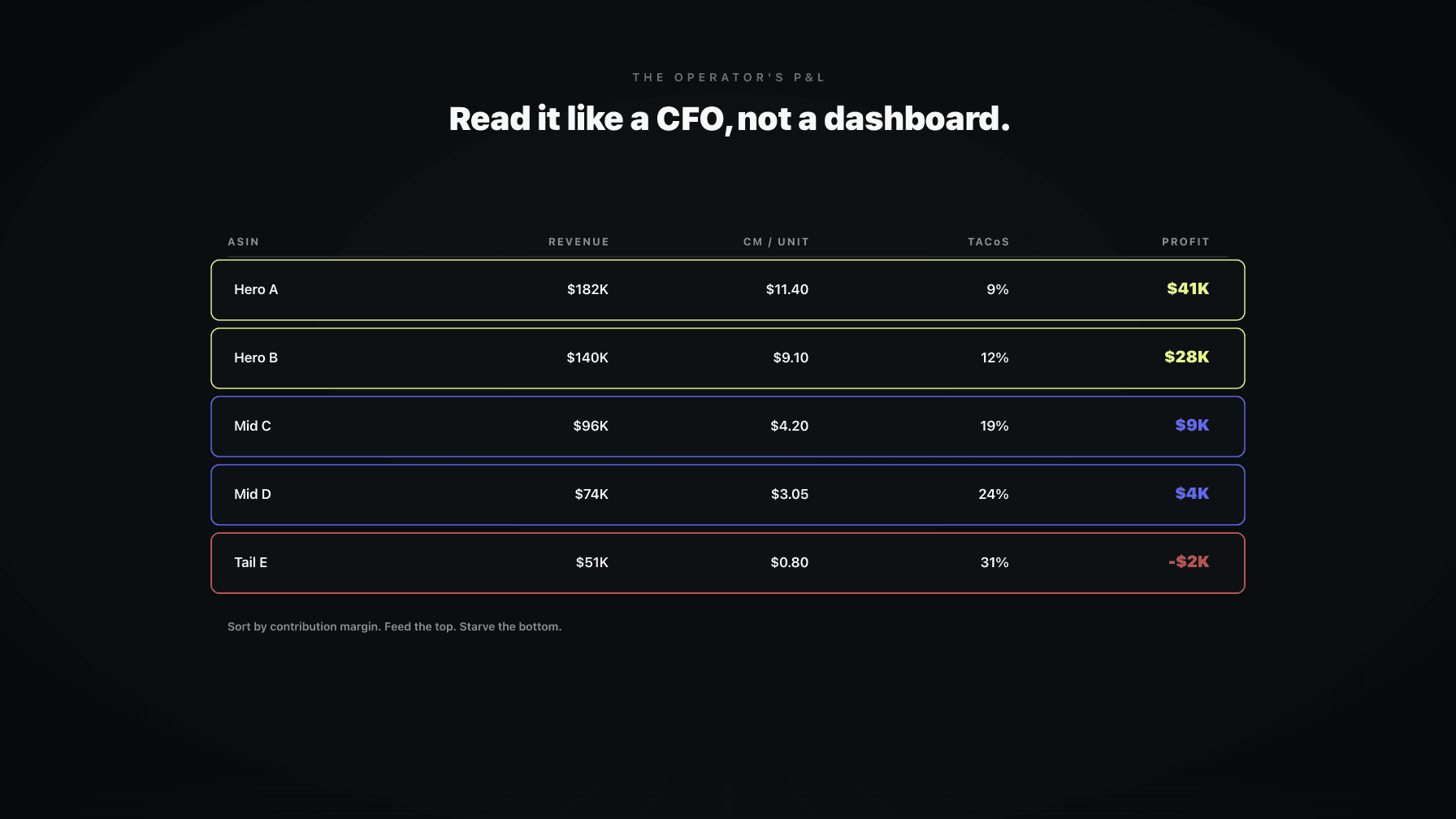
Start at the sale price and step down through every deduction in order: referral fee, FBA fulfillment fee, landed COGS, returns reserve, prorated storage, and blended ad cost per unit. Whatever remains is contribution margin. Then account separately for the situational costs (removal, reimbursement gaps, financing) that do not hit every unit but do hit the business. Do this per unit and per ASIN, not as a blended account average, because the average hides the SKUs that are quietly losing money.
Yes, more than the small per-cubic-foot rate suggests. Storage is billed by volume, so bulky, slow-moving products eat margin even when the unit count is low. Peak-season storage in the fourth quarter runs several times the off-season rate, and aged-inventory surcharges compound on units that sit for months. A slow mover can flip from low-margin to negative purely on storage, which is why storage belongs in the per-unit waterfall and not as an afterthought on the monthly invoice.