Chad Rubin
June 5, 2026 · 13 min read
Operator notes by email
Short, opinionated takes on AI agents, Amazon PPC, pricing, and inventory. No fluff. About once a week.
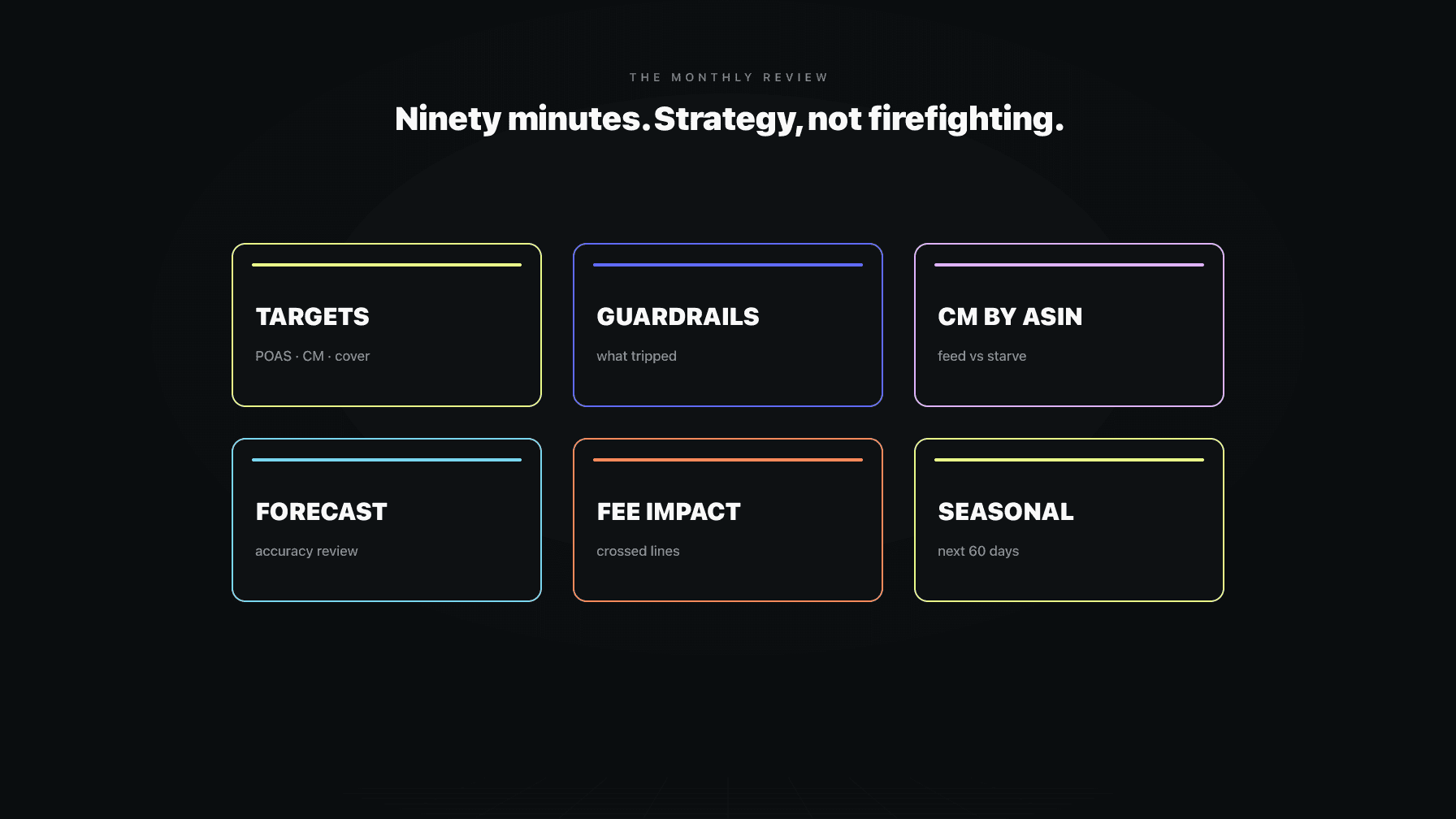
The daily review keeps the lights on. The weekly review fixes what is drifting. The monthly review is different. It is the one hour of the month where you stop being the operator and start acting like the owner.
I have run a seven-figure Amazon brand for more than a decade. For years my monthly check-in was a glorified version of my daily one: open a dozen tabs, react to whatever looked scary, close the tabs, feel busy, change nothing structural. That is not a review. That is firefighting on a slower clock. The fire was already out by the time I noticed it, and the things that actually moved the business (which ASINs deserved more money, which targets had gone stale, which guardrails kept tripping for the same dumb reason) never made it onto the list.
The monthly loop has one rule that the daily and weekly loops do not: no firefighting allowed. If something is on fire, it should have been caught in the daily review. If it is drifting, the weekly review owns it. The monthly review exists to ask the questions you cannot answer in the moment because they require a month of data to even be visible. Are my targets still right? What guardrails tripped over and over, and why? Which products are earning the right to be fed, and which are quietly bleeding me and need to be starved or cut?
This is a ninety-minute exercise. Not all day. Not a quarterly offsite. Ninety focused minutes once a month, run against the same agenda every time, with a CFO sitting on your shoulder asking where the money went and where it should go next. Below is the full agenda, in order, and the reasoning behind each section.
There are two jobs inside every Amazon business, and most of us do both badly because we never separate them. The operator runs the machine: answers the buyer messages, fixes the suppressed listing, reorders the unit that hit reorder point. The owner decides what the machine should be doing in the first place: which products to bet on, what margin is acceptable, how aggressive to be on price.
From reading to action
If the framework above sounds familiar, your Amazon account is probably carrying the same drag. Apply and we will show what Marko, Oracle, and Bruno would change in your first week.

Ran a 7-figure Amazon brand for a decade. Founded Skubana (acquired). Co-founded Prosper Show. 15+ years on Amazon.
Join the brands that replaced agencies and tools with AI employees.
The operator works in hours and days. The owner works in months and quarters. When you run your monthly review like a daily review, you are letting the operator make owner decisions, and the operator is too close to the noise to see the shape of the business. The operator sees a spike in returns on one ASIN and panics. The owner sees that the ASIN has been margin-negative for three months and asks why it is still in the catalog at all.
The monthly review forces the switch. For ninety minutes you are not allowed to fix anything. You are allowed to look, to measure, and to decide what changes next month. The fixing happens after, through your daily and weekly loops, which is where it belongs. If you want the full picture of how these loops nest together, the operations mission control framing lays out the daily, weekly, and monthly cadence as one system.
Targets are the numbers your whole operation aims at. Profit on ad spend (POAS), your contribution margin floor per ASIN, your days-of-cover for inventory. Most sellers set these once, usually under pressure, and then never touch them again. Then they wonder why the business feels like it is fighting itself.
Start the monthly review here. Pull each target and ask one question: is this still the right number given what I now know? Your POAS target was set when CPCs were lower and conversion was higher. If both have moved, the target is stale, and every decision downstream of it is slightly wrong. Your contribution margin floor was set before the last fee change. Your days-of-cover was set before your lead times got longer.
Do not change everything. Change deliberately. Pick the one or two targets where the gap between the number and reality is largest, and reset those. Write down why. Next month you check whether the reset moved the metric you cared about. This is the part most sellers skip, and it is the part that compounds. A target reviewed monthly and adjusted with intent is worth more than ten dashboards you glance at and ignore. If your targets sit on unit-level numbers you do not fully trust, fix that first with a clean read of your unit economics.
Guardrails are the limits that stop automation and people from doing something stupid: a price floor, a max bid, a reorder cap. They are supposed to fire occasionally. When one fires constantly, it is no longer protecting you. It is telling you something is wrong upstream.
In the monthly review, pull your guardrail-trip history for the full month. Not the individual trips (those belong to the daily and weekly loops) but the pattern. Which guardrail tripped most? On which ASINs? At what time of week?
A guardrail that trips once is doing its job. A guardrail that trips forty times on the same ASIN is a flashing sign that the target behind it is misset. If your price floor keeps catching a repricer trying to go lower, either your floor is too high for what the market will bear, or your repricer is chasing a competitor you should ignore. If your max-bid guardrail keeps catching the same campaign, your POAS target for that product is probably wrong. The trip is the symptom. The target is the disease. The monthly review is where you treat the disease instead of resetting the alarm. For the playbooks that govern when these limits hand a decision back to a human, see the escalation playbooks.
This is the heart of the monthly review, and it is the section most sellers never run properly because they look at revenue instead of contribution margin.
Revenue tells you what is busy. Contribution margin tells you what is profitable after the costs that scale with each unit: product cost, Amazon fees, fulfillment, returns, the ad spend it took to make the sale. A product can be your top seller by revenue and your worst by contribution dollars. If you feed it more inventory and more ad budget because it looks big, you are pouring money into a hole.
Lay out every ASIN by contribution margin, both as a percentage and in total dollars. Then sort. The products at the top, healthy margin and meaningful volume, are your feed candidates: they have earned more inventory, more ad spend, more pricing room. The products at the bottom, thin or negative margin, are your starve or cut candidates. The middle is where judgment lives, and where last month's trend matters more than this month's snapshot.
The feed-vs-starve decision is the single most valuable output of the monthly review. It is capital allocation. You have a finite amount of cash for inventory and a finite ad budget. The monthly review decides where it goes. Get this right and the business compounds. Get it wrong and you fund your losers with the profits from your winners, which is the slowest way to go broke that I know.
You made a plan last month. You forecast demand, you ordered against it, you set ad budgets against it. Before you trust this month's plan, you have to grade last month's.
Forecast accuracy is the gap between what you predicted and what happened, ASIN by ASIN. Pull it. Where were you badly wrong, and in which direction? Consistent over-forecasting means you are sitting on cash tied up in inventory that is not moving. Consistent under-forecasting means you are running out and feeding sales to competitors during the stockout.
The pattern matters more than any single miss. If one ASIN is always off in the same direction, your model has a bias you can correct. If your forecasts are accurate in steady months and wildly off around promotions or seasonality, the problem is not the baseline, it is how you handle the spikes. Reading forecast accuracy honestly is uncomfortable because it is a scorecard on your own judgment. It is also the only way next month's plan gets better than last month's. A dedicated demand planner makes this reckoning routine instead of something you dread.
Amazon changes fees constantly. Referral fees, fulfillment fees, storage fees, low-inventory fees, the surcharges that appear with a vague heading. Most sellers find out about a fee change when their margin quietly erodes and they cannot say why.
The monthly review is where you catch it on purpose. Pull the fee changes that hit in the last month and map them against your catalog. The question is not "did fees go up" (they did, they always do). The question is which specific ASINs crossed a line because of it. A dimensional weight change can push a borderline product over a fulfillment tier and turn a thin-margin item into a money loser overnight. A storage fee increase punishes your slow movers exactly when you can least afford it.
For every ASIN that crossed a line, you have a decision: raise the price to absorb the fee, change the packaging to drop a tier, or accept that the product is no longer viable and move it to the cut list. This ties straight back into your contribution margin work. A fee change is just an input cost change, and the monthly review is where you stop letting those changes happen to you and start responding to them with intent.
The monthly review is forward-looking, not just a postmortem. The last working section is posture: given where you are in the calendar, what do the next sixty days demand?
Sixty days, not thirty, because inventory has lead time. The decisions you make today about what to order land on the shelf weeks from now. If a peak is coming, the monthly review is where you decide to build cover for it, which means you are ordering before the daily review starts screaming about low stock. If a slow season is coming, this is where you decide to draw inventory down so you are not paying storage fees on dead weight.
Posture also covers pricing aggression and ad budget. Heading into a strong season you can afford to be more aggressive on price and spend, because volume covers it. Heading into a weak one you tighten up. This is a deliberate, season-aware stance you set once a month and let the daily and weekly loops execute against. Without it, your automation defends last month's posture into a season that has already changed.
Everything above feeds three lists. The monthly review is not done until these three lists exist and have names on them.
Feed: the ASINs that earned more. Healthy contribution margin, demand you can supply, room to grow. These get more inventory, more ad budget, and the freedom to push price where the market allows. This is where your growth comes from, so be generous here and specific.
Starve: the ASINs that are not dead but are not earning their keep. Thin margin, soft demand, or both. You do not kill them, but you stop feeding them. Less ad spend, leaner reorders, tighter price discipline. You give them a month or two to either recover or prove they belong on the cut list.
Cut: the ASINs that are losing money after a fair look at contribution margin, and have been for long enough that hope is not a strategy. Discontinue, liquidate the remaining units, free the cash and the catalog space for products that work. Cutting is the hardest discipline in this business because every dead SKU was somebody's good idea once, including yours. Cut anyway. The cash you free is the cash that funds your feed list.
Here is the whole thing as a runnable agenda. Same order every month.
Ninety minutes. If a section balloons, you are doing weekly work in the monthly slot, and the weekly review cadence is where that belongs.
The temptation is always to tune more often. You see a metric dip on Tuesday and you want to change the target right then. Resist it. Daily tweaking feels like control. It is actually noise.
A target needs a month of data to prove whether it is right. Conversion rates swing day to day for reasons that have nothing to do with your settings: a competitor went out of stock, a holiday, a weather pattern, an algorithm hiccup. If you change your POAS target every time you see a bad day, you are reacting to randomness, and you can never tell whether your change helped because you changed it again before the data came in. Tune monthly, hold the target steady through the month, and let the daily and weekly loops execute against it. Next month you read the result cleanly and decide whether to adjust. That is the difference between operating and fidgeting. The daily review routine handles the noise so the monthly review can focus on signal.
The monthly review breaks down when the data is scattered across a dozen tabs and you spend the first hour assembling it instead of deciding anything. Profasee's Mission Control is built to put the inputs in one place so the ninety minutes go to decisions.
It surfaces per-ASIN contribution margin so the feed-vs-starve sort is already done, not something you rebuild in a spreadsheet every month. It tracks forecast accuracy over time so you can read last month's misses and the bias behind them at a glance. It keeps a guardrail-trip history so the repeat offenders are visible as a pattern, not buried in individual alerts. The point is that the operator runs the loops while the owner sets the rules. You tune the targets, the floors, and the limits in the monthly review, and the AI employees operate against them all month: the pricing agent moves price within the margin floor you set, the demand planner orders to the days-of-cover you chose. You stay the owner. They stay the operator.
Review the things that need a month of data to be visible: your targets (POAS, contribution margin floors, days-of-cover), your guardrail-trip patterns, contribution margin by ASIN, forecast accuracy against last month's plan, Amazon's fee changes, and your seasonal posture for the next sixty days. The output is a feed, starve, and cut decision for your catalog. Skip anything that belongs to the daily or weekly loop. The monthly review is for strategy, not status.
About ninety minutes if your data is in one place. If it is stretching to half a day, you are almost certainly doing weekly or daily work in the monthly slot, or you are spending the time assembling data instead of deciding things. The agenda has seven sections with a time box on each. Hold the boxes and you finish in ninety minutes with three clear lists of what to feed, starve, and cut.
Review them monthly, change them deliberately. A target needs a full month of data to prove whether it is right, so changing it more often means you are reacting to daily noise rather than real signal. In any given month, reset only the one or two targets where the gap between the number and reality is largest, write down why, and check the result next month. Steady targets that you tune with intent beat targets you nudge every day.
Feed-vs-starve is the capital allocation decision at the center of the monthly review. You sort every ASIN by contribution margin and decide where your finite inventory cash and ad budget go. Feed the products with healthy margin and real demand: more inventory, more ad spend, more pricing room. Starve the ones that are thin or soft: leaner reorders and tighter spend. Cut the ones losing money after a fair look. It stops you from funding your losers with profits from your winners.
Because daily swings are mostly noise. Conversion and CPC move day to day for reasons that have nothing to do with your settings, and a target needs a month of data to show whether it is working. If you change a target every time you see a bad day, you are reacting to randomness and you can never tell whether your change helped, because you changed it again before the result came in. Tune monthly, hold steady through the month, and let your daily and weekly loops execute.
Compare what you predicted last month against what actually happened, ASIN by ASIN, and look for the pattern more than the single miss. Consistent over-forecasting means cash trapped in slow inventory. Consistent under-forecasting means stockouts and lost sales. If one ASIN is always off in the same direction, your model has a fixable bias. If accuracy falls apart only around promotions and seasonality, the problem is how you handle spikes, not your baseline. Read it honestly, then carry the corrections into this month's plan.
The weekly review fixes what is drifting: it works in days and weeks, catches problems before they become fires, and keeps the operation on track. The monthly review resets the strategy: it works in months, reviews and adjusts the targets the weekly loop executes against, and makes the capital allocation call on which products to feed, starve, or cut. Weekly is operator work. Monthly is owner work. Keep them separate or each one suffers.