Chad Rubin
June 2, 2026 · 9 min read
Operator notes by email
Short, opinionated takes on AI agents, Amazon PPC, pricing, and inventory. No fluff. About once a week.
Most Amazon operators run their business as a stream of interruptions. A Buy Box alert here. A budget question there. An inventory email that gets read three days late. A pricing decision made because someone happened to notice a competitor moved. The work feels busy and never feels finished, because there is no structure underneath it. Every decision arrives as a surprise and gets handled in isolation.
That is not operations. That is reaction. And reaction does not scale past a handful of ASINs.
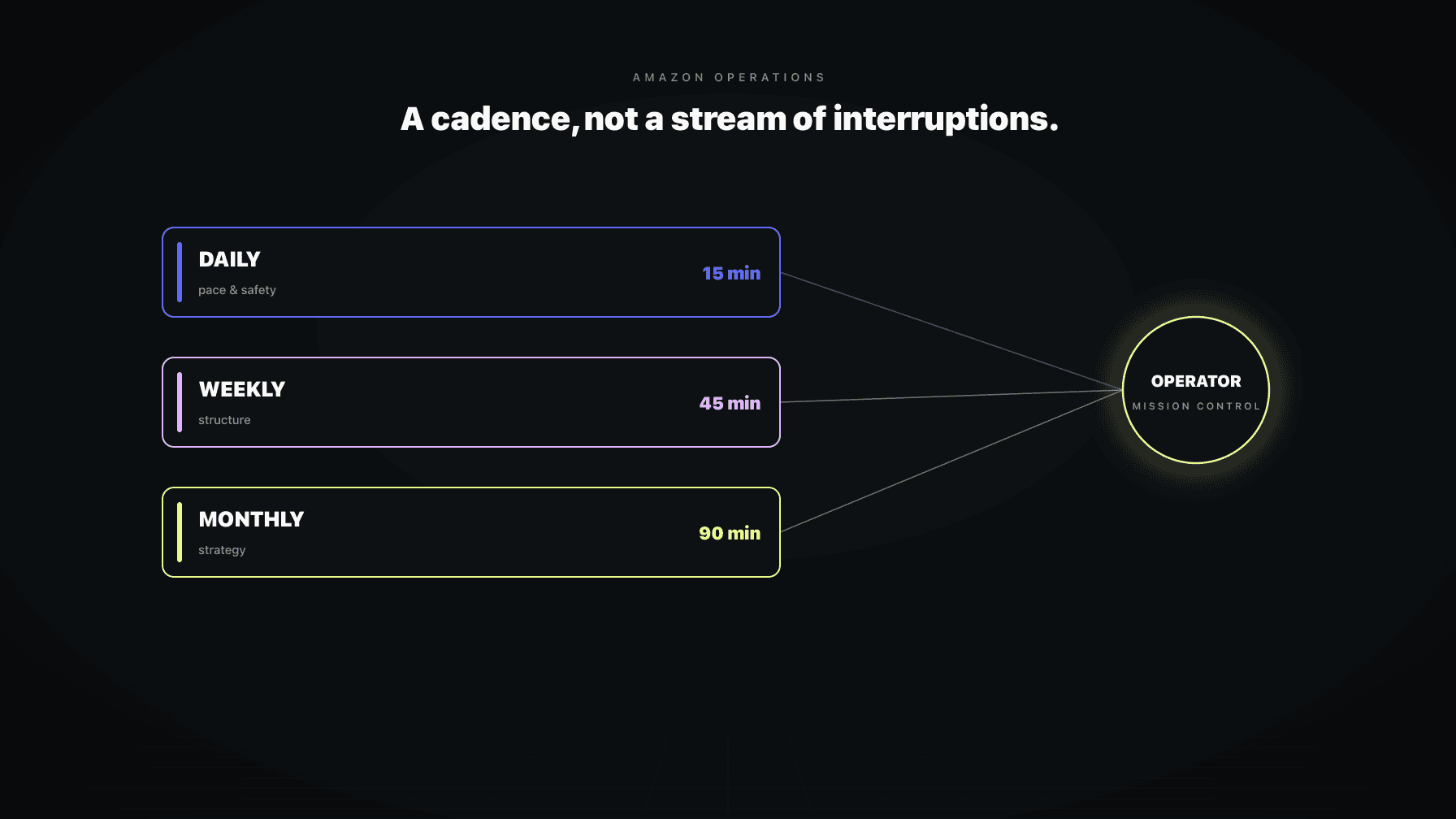
Real Amazon operations is a cadence. Some decisions belong to a daily loop, some to a weekly loop, some to a monthly loop. Each loop has a defined purpose, a defined set of questions, and a defined output. When you run the cadence, the surprises mostly disappear, because the things that used to surprise you are now things you check on a schedule before they become emergencies.
This is what Mission Control means. Not a prettier dashboard. A control room where an operator runs the entire account from one surface, on a cadence, with the routine decisions handled by agents and the structural decisions handled by the human. This playbook is the operator framework I run for myself and for the brands I work with.
## Key takeaways >- Amazon operations is a cadence, not a stream of interruptions. Decisions belong to daily, weekly, or monthly loops, each with a defined purpose.- The daily loop is about pace and safety: catch the things that move fast and cost money fast. It should take 15 minutes, not an hour.- The weekly loop is about structure: campaign roles, hero-vs-long-tail behavior, whether the targets still match reality.- The monthly loop is about strategy: targets, guardrails, what to feed and what to starve. Not firefighting.- Mission Control is the single operator surface that makes the cadence possible: targets, guardrails, pending approvals, audit log, all in one place.
The operator who runs on interruptions makes worse decisions than the one who runs on a cadence, for a simple reason. An interruption forces a decision with incomplete context, under time pressure, in isolation from the other systems. You see a Buy Box alert and react to it without knowing inventory is tight and a price drop would accelerate a stockout. You see an ACoS spike and cut a bid without knowing the spend was building organic rank on a launch.
The cadence solves this by giving each decision a home. The Buy Box question gets answered in the daily loop, with inventory and pricing context already on the screen. The campaign-role question gets answered in the weekly loop, where you have the structural view. The target question gets answered in the monthly loop, where you are thinking about the business, not the moment.
The cadence also solves the thing nobody admits: most operators do not actually review their account on any schedule. They review it when something breaks. By then the cost is already incurred. A cadence moves the review before the break.
From reading to action
If the framework above sounds familiar, your Amazon account is probably carrying the same drag. Apply and we will show what Marko, Oracle, and Bruno would change in your first week.

Ran a 7-figure Amazon brand for a decade. Founded Skubana (acquired). Co-founded Prosper Show. 15+ years on Amazon.
Join the brands that replaced agencies and tools with AI employees.
The daily loop: pace and safety. This is the 15-minute morning check. Did anything break overnight? Did a guardrail trip? Is any hero ASIN low on cover? Did spend run away on a campaign? The daily loop is not where you do strategy. It is where you catch the fast-moving, money-losing things before they compound. Most of it should be the AI surfacing exceptions, not you scrolling dashboards. The daily review routine post covers exactly what belongs here.
The weekly loop: structure. This is the 45-minute weekly review. Campaign-type performance. Hero versus long-tail behavior. Whether dayparting, audience, and B2B adjustments are still right. Whether the targets you set still match the business reality. The weekly loop is where structural decisions live, the ones too important for the daily loop and too frequent for the monthly. The weekly review cadence post details the agenda.
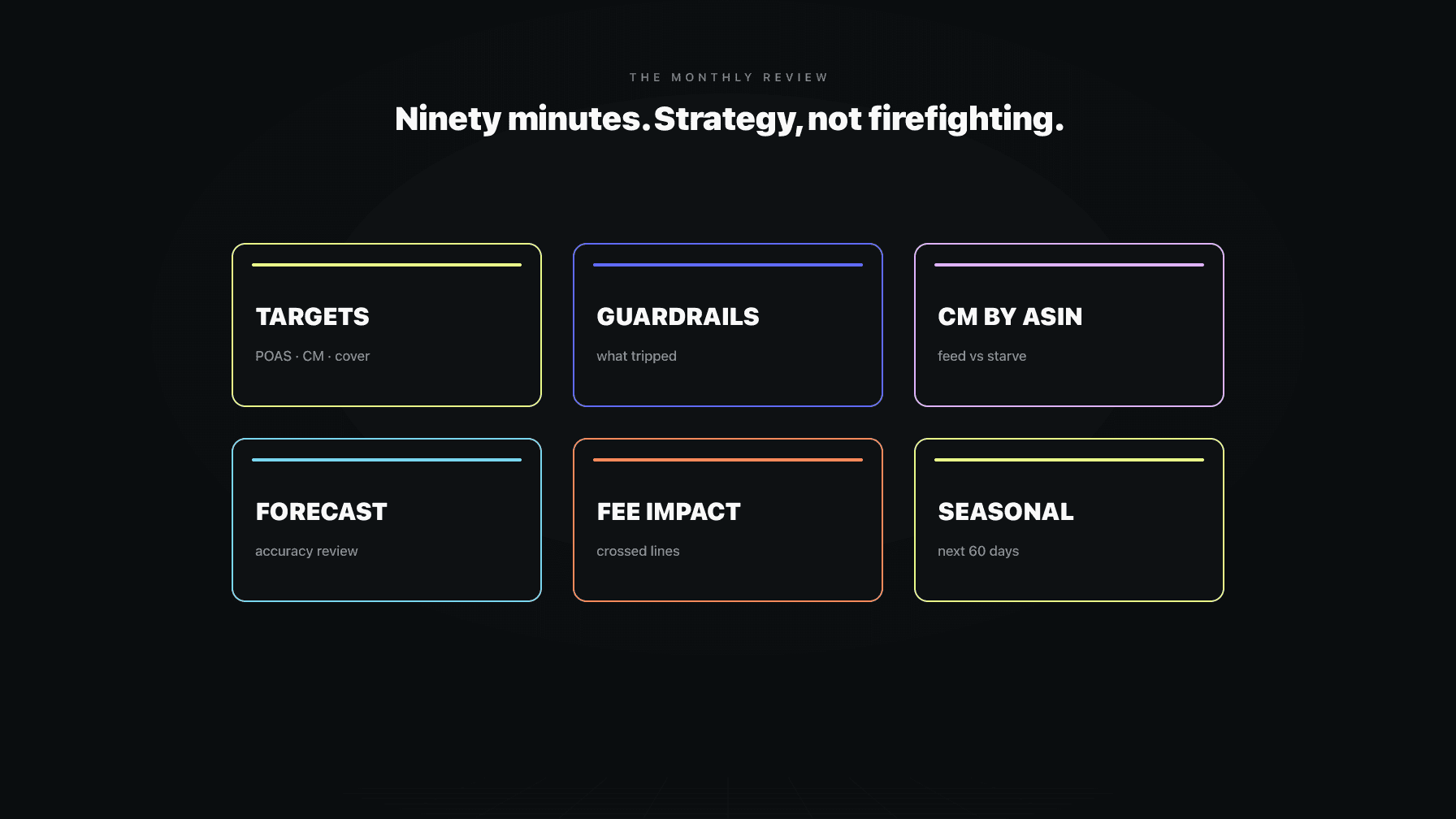
The monthly loop: strategy. This is the real review. Targets and guardrails. Contribution margin by ASIN. What to feed and what to starve. Forecast accuracy. The monthly loop is where you tune the settings the agents operate against, where you decide the direction, where you read the business like a CFO instead of an operator. The monthly review strategy post walks through it.
Three loops. Three purposes. The mistake most operators make is collapsing all three into one frantic everything-review that happens whenever they have time, which is never on a schedule and always under pressure.
The daily loop should take 15 minutes and answer five questions:
What does NOT belong in the daily loop: rewriting bullets, restructuring campaigns, retuning targets, analyzing trends. Those are weekly or monthly work. The daily loop is triage, not surgery. If your daily check takes an hour, you are doing weekly work daily, which means you are whiplashing the account and exhausting yourself.
The daily loop is also where the agent-vs-human split is sharpest. The agent should be surfacing the five things above as exceptions. You should not be hunting for them across six dashboards. If you are hunting, your Mission Control is wrong.
The weekly loop takes 45 minutes and covers structure:
The weekly loop is where you make the structural calls that the daily loop is too fast for and the monthly loop is too slow for. It is also where you sanity-check the agents: are their autonomous decisions matching what you would have done? If yes, trust deepens. If no, you tune.
The monthly loop is the strategy review, 90 minutes, no firefighting allowed:
The monthly loop is where the operator acts like the owner of the business, not the manager of the account. Daily and weekly keep the machine running. Monthly decides where the machine is going.
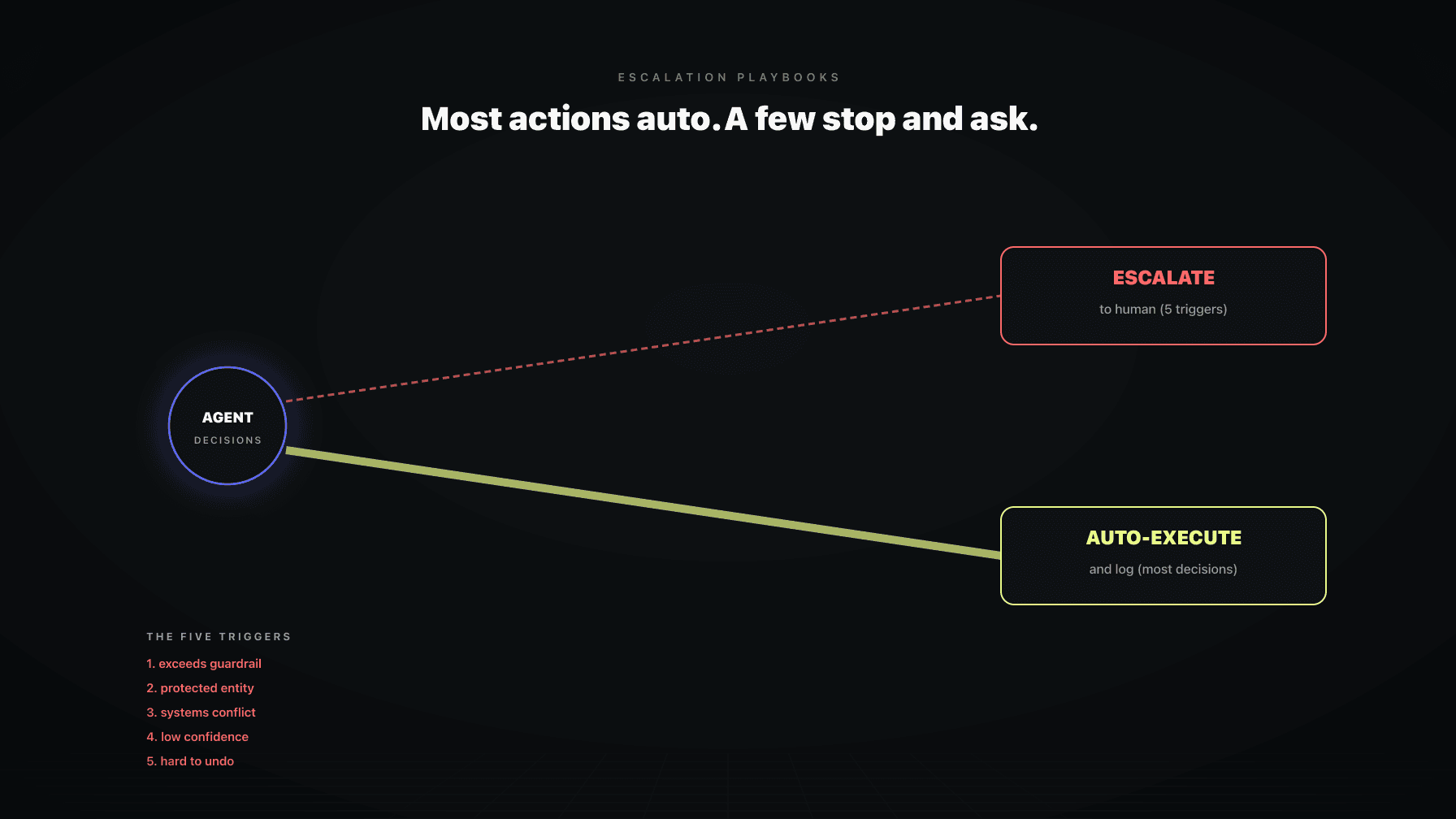
The cadence only works if the agents handle the routine and escalate the exceptions. An agent that asks about everything is useless. An agent that asks about nothing is dangerous. The art is in the escalation rules.
An agent should escalate when:
Everything else, the agent handles and logs. The escalation playbooks post covers how to set these rules so you get the right interruptions and none of the wrong ones.
This is the difference between an operator drowning in approvals and an operator who sees three meaningful decisions a day. Same agents. Different escalation design.
Here is the structural problem the cadence runs into: you cannot run a daily-weekly-monthly cadence across six separate tools. The repricer dashboard, the PPC dashboard, the inventory tool, the listing tool, the analytics tool, the spreadsheet. Each one shows part of the picture. None shows the operator what to do next.
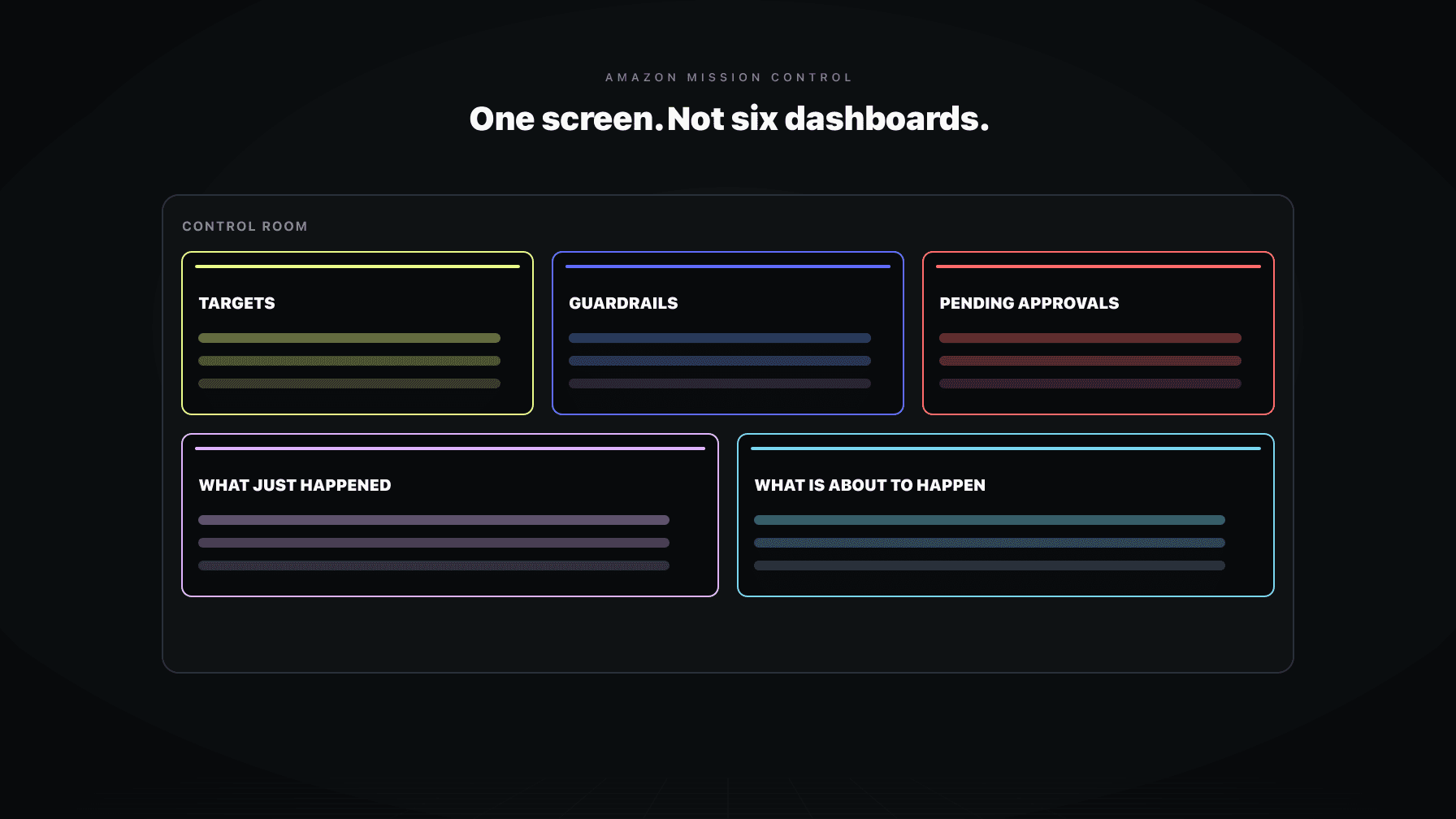
Mission Control is the single surface that makes the cadence executable. It shows:
The Mission Control dashboard post covers what the surface needs to do. The point is not the cosmetics. The point is that an operator can run the daily, weekly, and monthly loops from one screen, instead of stitching context across six.
The cadence assumes a division of labor that most brands have not made explicit. Write it down:
When this division is explicit, the cadence runs smoothly. When it is fuzzy, you get one of two failures: the human micromanages the agent (drowning in approvals) or the agent overreaches (autonomous decisions the human would not have made). The AI operating system framework makes the structural case. This post is the operating routine on top of it.
Failure 1: No cadence, only interruptions. Reviewing the account when something breaks instead of on a schedule. By the time you look, the cost is incurred.
Failure 2: Collapsing the loops. Doing weekly work daily (whiplashing the account) or deferring daily safety checks to the weekly review (missing fast-moving losses). Each loop has a frequency for a reason.
Failure 3: Six dashboards, no control room. Running the cadence across disconnected tools, so the operator spends the review stitching context instead of making decisions. Mission Control fixes this.
These are not edge cases. They are how most brands operate, and why operations does not scale for them past a few people.
Mission Control is the operator surface we built at Profasee. The agents (Marko for PPC, Oracle for pricing, Bruno for inventory, Brett for catalog) handle the routine decisions on a continuous basis and surface exceptions to the operator on the right cadence.
The daily loop is mostly the agents surfacing the five safety questions. The weekly loop is the structural review with all four agents' context on one screen. The monthly loop is where the operator tunes targets and guardrails that the agents then operate against. Escalation rules decide what reaches the human and what gets logged. One surface, three loops, the routine handled and the strategy retained.
That is the difference between running a brand on a cadence and running it on interruptions. The cadence is what lets a small team operate a large catalog without drowning.
Amazon operations is the work of running the account: pricing, PPC, inventory, catalog, and the decisions that connect them. Done well, it runs on a cadence (daily, weekly, monthly loops) rather than as a stream of interruptions. The daily loop is pace and safety, the weekly loop is structure, the monthly loop is strategy. Each has a defined purpose and output.
On three cadences. A 15-minute daily check for safety and pace (guardrail trips, low inventory, runaway spend, suppressions). A 45-minute weekly review for structure (campaign roles, hero performance, pricing posture). A 90-minute monthly review for strategy (targets, guardrails, contribution margin, feed-vs-starve). Reviewing only when something breaks means the cost is already incurred.
Five things: did any guardrail trip, is any hero ASIN low on inventory cover, did spend run away on a campaign, did any listing get suppressed, and is there anything in the approvals queue that needs a decision today. Daily is triage, not surgery. If it takes more than 15 minutes, you are doing weekly work daily.
Mission Control is a single operator surface that replaces six disconnected dashboards. It shows targets, guardrails, the pending-approvals queue, an audit timeline of recent agent actions, and upcoming scheduled automations. It is what makes a daily-weekly-monthly operating cadence executable, because the operator runs all three loops from one screen instead of stitching context across tools.
When a decision exceeds a guardrail threshold, touches a protected entity (hero ASIN, branded campaign, new launch), creates a conflict between two systems, has low confidence, or is expensive to undo. Everything else, the agent handles and logs. Good escalation design is the difference between drowning in approvals and seeing three meaningful decisions a day.
Agents handle the high-frequency, low-drama decisions: routine bids, negations, budget pacing within guardrails, repricing within the band, restock proposals, hygiene flags. Humans handle the low-frequency, high-stakes decisions: targets, guardrails, structural campaign changes, launches, anything escalated. Write the division down explicitly. Fuzzy division causes either micromanagement or agent overreach.
Yes, but only on a cadence with agents handling the routine layer. The reason operations does not scale for most brands is that they run on interruptions across disconnected tools, which forces every decision through a human. A cadence plus a control room plus agents handling the high-frequency decisions is what lets a small team operate a large catalog without drowning.