Chad Rubin
May 24, 2026 · 12 min read
Operator notes by email
Short, opinionated takes on AI agents, Amazon PPC, pricing, and inventory. No fluff. About once a week.
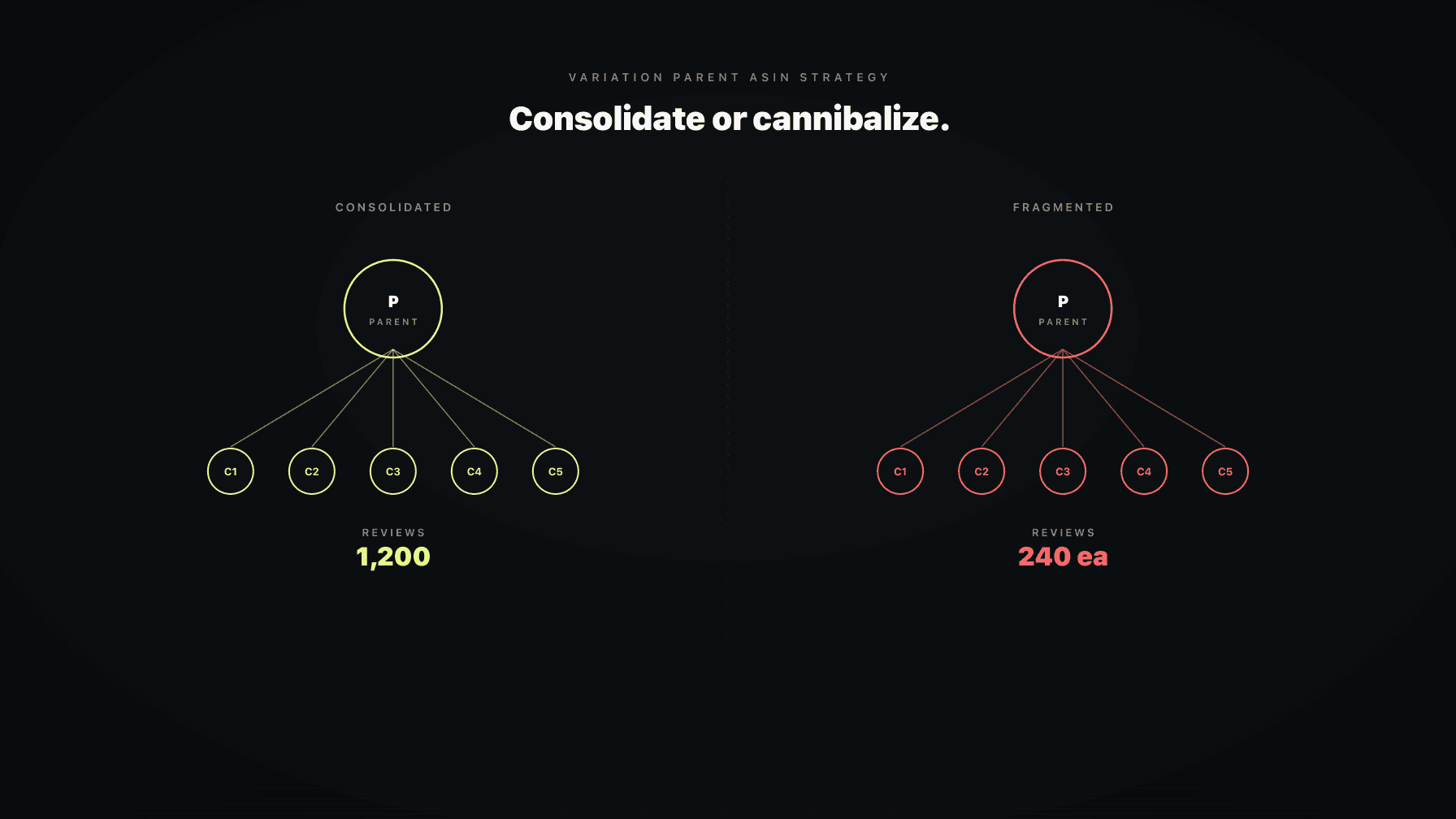
Variation parentage is the layer most operators get wrong by default. You set it up once at launch, you don't touch it for two years, and by the time you notice the damage, your reviews are spread across five orphan ASINs that each have 47 ratings instead of one parent with 235.
I have made every variation mistake there is. Created parents that should have been separate listings. Split products that belonged together. Watched a healthy family break overnight because someone on my team flipped a theme attribute in a flat file. And I have seen what happens when you finally fix it: rank consolidates, conversion lifts, and PPC efficiency follows.
The wrong variation call is silent. It does not show up as an error in Seller Central. It shows up as a ceiling on your growth that you cannot explain. You are spending more on ads, your listings look fine, your reviews are good, but you are stuck. Often the answer is the parentage layer underneath everything else.
This is the operator guide for when to consolidate, when to split, and how to fix the mistakes you have already made without losing reviews.
A variation family is a parent ASIN with one or more child ASINs underneath it. The parent is not a sellable listing. It is a container. It holds the title, the bullets, the A+ content, and the image stack that all the children share. Each child is a real, buyable SKU that differs from its siblings along a defined dimension. That dimension is the variation theme. Color. Size. Flavor. Count. Scent. Pattern.
From reading to action
If the framework above sounds familiar, your Amazon account is probably carrying the same drag. Apply and we will show what Marko, Oracle, and Bruno would change in your first week.

Ran a 7-figure Amazon brand for a decade. Founded Skubana (acquired). Co-founded Prosper Show. 15+ years on Amazon.
Join the brands that replaced agencies and tools with AI employees.
When a shopper lands on any child page, they see the shared parent content plus a variation picker that lets them switch between siblings without leaving the listing. From Amazon's side, the relationship signals that these SKUs are the same product with options, so it consolidates the things that matter for visibility.
The piece operators miss: a parent ASIN exists whether you set it up well or not. If you launch five color variants as five separate standalone ASINs, you have made a decision. You have decided to compete with yourself across five independent listings instead of stacking them. The default is almost never optimal.
Reviews pool to the parent for display purposes. A shopper on the red-color child sees the combined review count and average star rating from all children. This is the single most important consolidation effect. A parent with 1,200 reviews across 8 children outperforms 8 standalone listings each with 150 reviews, every time.
Rank is more nuanced. Each child has its own Best Sellers Rank in its category. But the variation family shares search relevance signals. When one child sells well off a keyword, the parent's overall authority on that keyword improves. New children launched into the family inherit some of that authority instead of starting at zero.
Search results show parent-level placement. When Amazon ranks your family for a query, it picks one child to display (usually the best-selling one or the one whose attributes best match the query). The other children ride along. This is why a strong "hero" child in a healthy variation family pulls weaker siblings into visibility they could not earn alone.
Sponsored Products ads target at the ASIN level, but variation relationships affect which child shows when you target the parent. Branded campaigns benefit because you are not bidding against your own splintered listings.
The test I use: would a returning customer expect to find these options on the same listing? If yes, consolidate.
Color is the cleanest case. A coffee mug in black, white, and navy is one product with three options. Three separate listings would frustrate shoppers who came back looking for the white one after buying the black one.
Size is the second cleanest. Small, medium, large, XL of the same shirt. Same product, different measurement.
Count works when the unit is identical and only quantity changes. A bottle of 60 capsules and a bottle of 120 capsules of the same supplement formulation. The customer is buying more of the same thing.
Scent and flavor consolidate well in consumables where the product is otherwise identical. Same hand soap, three scents. Same protein powder, four flavors. The customer expects to pick a flavor on the listing, not search separately for each one.
Pattern works for textiles and apparel. Same hoodie cut, different prints. Same throw pillow, different patterns.
The pattern across all of these: the functional product is the same. Only one attribute changes. The shopper's purchase decision is the same purchase decision with a preference selection on top.
If two SKUs serve different jobs, they belong on separate listings even if they share branding, packaging language, and your customer base.
A face moisturizer and a face serum are not variations. They are two products in the same routine. Different ingredients, different use cases, different price points, different repeat purchase cadences. Putting them under one parent forces them to share content that cannot accurately describe either product.
A 12-inch chef knife and an 8-inch paring knife from the same brand line are not variations. Knife enthusiasts buy multiple knives in the same line. Each one needs its own listing, its own keyword targeting, its own ranking journey.
A dog bed and a dog harness from the same brand are not variations even if your branding is consistent. Different categories, different keywords, different competitive sets.
The temptation to consolidate comes from wanting to share reviews. A new listing starts at zero. Glomming it onto a strong parent feels like a shortcut. It is not. Amazon's algorithm and customer reviews will both expose the mismatch. You will see suppressions, complaints about the wrong product showing up, and eventually a forced split that loses you the reviews you were trying to inherit.
Mistake one: variations across functional differences. Two products with different ingredients, scents, or intended uses, jammed under one parent because the packaging looks similar. This shows up most in supplements, beauty, and pet, where different formulations get grouped as flavors or variants.
Mistake two: missing variants that should exist. You launched three colors as three separate ASINs because you didn't know better. Each one has its own review history. Each one is competing for the same keywords. You are bidding against yourself in PPC. Conversion is lower because the social proof is fragmented.
Mistake three: multipacks as variants of single units. The single-pack and the three-pack glued together as a count variation. Category dependent. In some categories it works. In others, Amazon suppresses it because of pricing display issues. Worth testing, not worth assuming.
Mistake four: bundles attached to a parent that has nothing to do with them. A "starter kit" stitched onto a single-product parent as a variant. The bundle is its own product with its own demand curve. Putting it as a variation hides it from customers who specifically search for bundles.
If you have five orphan ASINs that should be one variation family, you can usually consolidate them through a flat file upload without losing reviews on any of them. The process is mechanical but unforgiving of mistakes.
Step one: pick the strongest existing ASIN to become your parent's identity anchor. The one with the most reviews, the cleanest content, the best-performing PPC history. Its content becomes the parent content.
Step two: create the parent in the flat file. The parent gets its own SKU and ASIN, marked as parentage_type "parent" with no buyable inventory. You set the variation_theme here (Color, Size, Count, etc.).
Step three: assign each existing child to the new parent in a second flat file row. Each child gets parentage_type "child", references the parent SKU, and gets its variation value (the actual color name, size, or count).
Step four: upload, wait for processing, verify in Seller Central that the family appears correctly. Reviews on each child should now display as a combined count across the parent's detail pages.
The catch: if you are pulling existing standalone ASINs into a new parent, the children keep their individual review histories but inherit shared display. If a child has wildly different reviews from its siblings (a 3.2-star child joining a 4.6-star family), you will pull the family average down. Audit star ratings before consolidating and consider deactivating problem children.
The reverse problem is harder. You have a parent that should be two or three separate listings. Splitting is a structural change Amazon does not love, and you will pay a tax on it.
The cleanest path: identify the children that don't belong and detach them from the parent through a flat file. Set their parentage_type to blank and remove their variation_theme value. They become standalone ASINs again. They keep their individual reviews but they lose the shared review count from the parent.
The harder path: the children that don't belong are also the children with the fewest individual reviews. They were riding on the parent's halo and have almost no standalone history. Detaching them is correct strategically but painful operationally. You are starting them closer to zero.
The decision is straightforward: if the wrong-fit children are hurting the right-fit children's performance (through confused customer reviews, returns, or content compromises), split. The short-term pain is worth the long-term clarity. If the wrong-fit children are quietly underperforming but not actively damaging the family, you can defer the split until you have inventory and PPC budget to relaunch them properly.
Variation families break. Children detach from parents without warning. Themes get changed. Sometimes Amazon does it. Sometimes a teammate does it. Sometimes a flat file with a stale value overwrites a working setup.
The most common breakage cause: a flat file upload where the variation_theme column is blank for an existing child. Amazon reads the blank as "remove this from the variation." The child detaches. You don't notice until you check the family or until traffic drops on the affected listing.
The second cause: variation_theme attribute values that conflict with the parent's theme. If the parent's theme is "Color" but a child's flat file row says "Size", the child gets kicked out.
The third cause: category-level theme changes by Amazon. Occasionally Amazon updates which themes are valid in a category. A theme that worked at launch stops being supported, and existing families either get migrated or break.
The fourth cause: catalog merges from manufacturer data. If your product matches a UPC or model number that exists elsewhere in Amazon's catalog, your listing can get pulled into a different parent through automated matching.
Prevention: lock down who can upload flat files. Keep a version history of every family's correct theme and child structure. Audit monthly.
PPC efficiency is downstream of variation strategy in a way most operators don't see until they fix it.
When you have a consolidated parent with eight children, your branded keyword campaigns target one family. Your category keyword campaigns send traffic to a single detail page that shows all eight options. Your conversion rate benefits from the larger review count and the shopper's ability to pick the variant that fits.
When you have eight standalone ASINs, you are bidding against yourself on branded terms. Your category keyword traffic gets fragmented across eight detail pages with thinner reviews. Each one converts worse. You spend more for less.
Pricing strategy is also cleaner inside a family. You can run different price points on different children based on cost structure and elasticity. Color X has cheaper dye, prices lower. Size XL costs more in materials, prices higher. The customer sees the price differential at the variation picker and self-selects. If those same SKUs were standalone listings, the price differences would create confusion and trigger "why is the red one cheaper than the blue one" questions.
The companion piece on listing optimization covers how parent content travels across children.
The "multipacks as count variations" question gets a different answer in every category.
In supplements and consumables: count variations work well. A 30-day supply, a 60-day supply, and a 90-day supply of the same formulation under one parent is the right call. The per-unit pricing logic is clear and category guidelines support it.
In groceries: count variations also work when the product is identical. A six-pack and a twelve-pack of the same sauce, same flavor, same bottle size.
In apparel: count variations almost never work. Sizes are not counts. A single shirt and a three-pack of the same shirt are usually better as separate listings because the customer intent is different.
In home and kitchen: it depends on whether the multipack is the same item bundled or different items bundled. Five identical drinking glasses? Count variation works. A four-piece knife set? Standalone listing, because the set is a different product from any single knife.
In beauty: count variations are risky. Pricing display issues and category-specific suppression rules trip up multipack variations more often here than anywhere else.
The general rule: if the multipack is the same single unit, just more of it, count variation usually works. If the multipack changes what the product is (a kit, a starter set, a curated collection), it should be its own listing.
Brett is the Profasee AI employee that audits your catalog structure. He maps every parent and child relationship, flags broken families, and proposes specific consolidation or split moves with rank and review impact estimated.
What Brett actually does: he pulls every variation family, checks each child against its siblings for content consistency, identifies orphan ASINs that should be inside a family, identifies misfit children that should be standalone, and surfaces theme breakages. He flags multipacks structured as count variations in categories where that triggers suppression. He catches the bundle-as-variant mistakes.
For each flagged family, Brett gives you the move: consolidate these orphans under a new parent, split this child off into a standalone, fix this broken theme by re-attaching this detached child. He estimates the review consolidation impact so you know what you are walking into before you upload the flat file.
See the full scope on the Catalog Auditor page, or look at the broader listing optimization solution for how he plugs into the rest of the catalog stack. Pricing and applying live where you'd expect.
A parent ASIN is a non-buyable container that groups related child ASINs into a variation family. The parent holds the shared title, bullets, A+ content, and image stack. The children are the actual buyable SKUs that differ along a defined dimension like color, size, or count. Shoppers see the parent's content and a variation picker to switch between children on the same detail page.
Use variations when the SKUs are the same product with one attribute changing. Color, size, flavor, scent, count, or pattern of an otherwise identical product. Do not use variations when the SKUs are functionally different products that happen to share a brand. The test: would a returning customer expect to pick this option on the same listing, or search for it separately.
Reviews stay attached to the specific child ASIN where they were left, but the combined review count and average star rating display across all children in the family. A shopper on any child page sees the family-level totals. This is the main reason consolidation under a parent lifts conversion: thin children inherit social proof from their siblings.
Most theme breakages come from flat file uploads that overwrote a working variation_theme value. Identify the detached child, prepare a flat file row that reattaches it to the correct parent with the correct theme value, and upload. The child's individual reviews stay attached. If the parent was deleted, you will need to recreate the parent first, then reattach all children. Audit the family afterward to confirm the structure is restored.
Category dependent. In supplements, food, and many consumables, count variations work well when the product is identical and only quantity changes. In apparel, kits, and curated bundles, multipacks usually belong as separate listings because they are functionally different products. When in doubt, separate ASINs are the safer default. You can always consolidate later if the data supports it.
Yes. Children keep their individual reviews when you detach them from a parent. You lose the combined display count across the family, which means the detached child reverts to showing only its own reviews. If the detached child had few individual reviews and was relying on the family's combined count for social proof, splitting will hurt its conversion rate in the short term. Plan the split with that tax in mind.
The most common causes: a flat file upload with a conflicting theme value, a category-level theme change by Amazon, or an automated catalog merge that pulled a child into a different parent based on UPC or model number matching. Less commonly, a customer complaint triggered a manual review that broke the family. Check your recent flat file uploads first, then open a case if you cannot identify the cause.