Chad Rubin
May 25, 2026 · 12 min read
Operator notes by email
Short, opinionated takes on AI agents, Amazon PPC, pricing, and inventory. No fluff. About once a week.
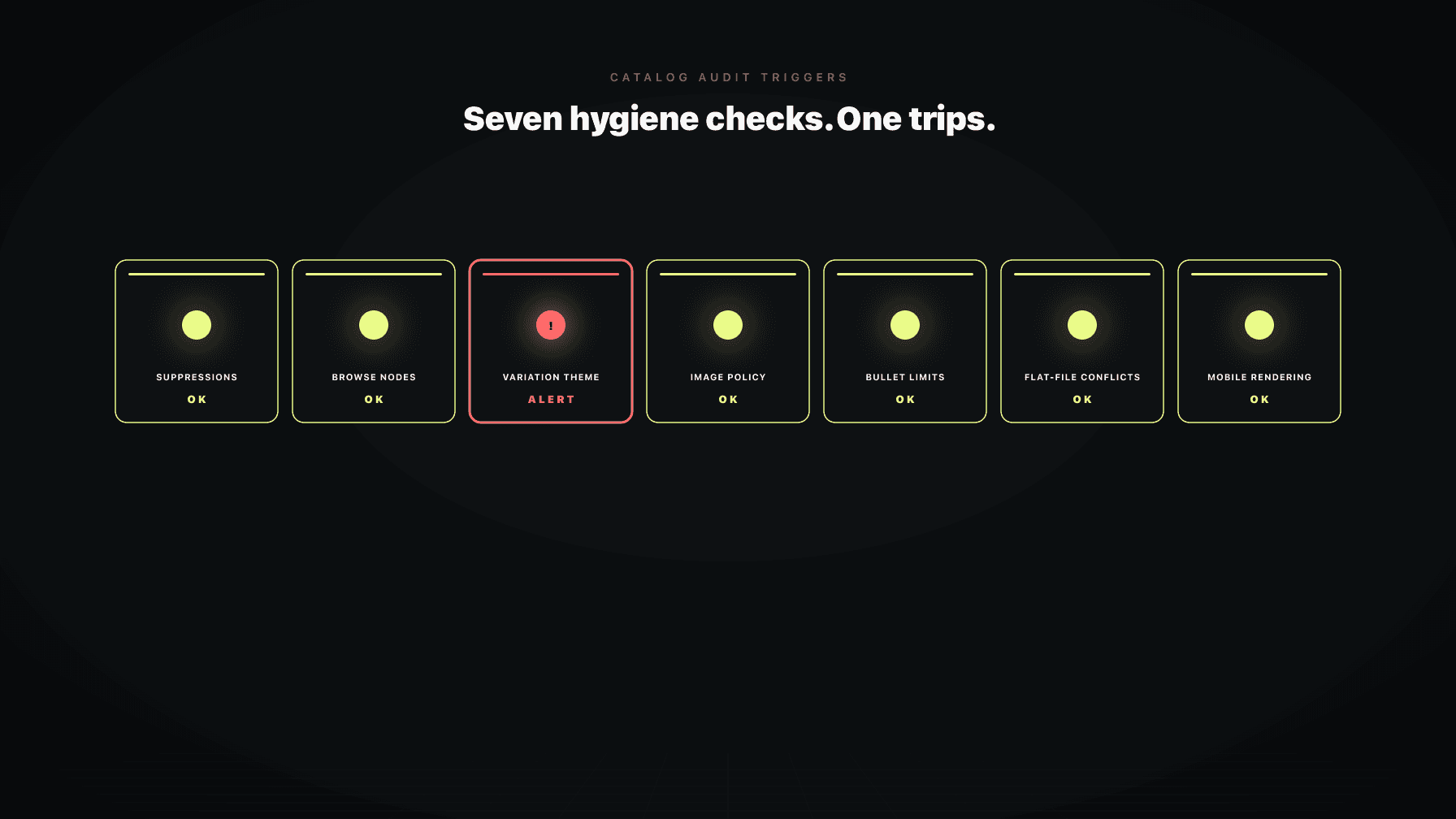
Catalog hygiene is the highest-ROI work most brands skip, because it is not creative. Nobody on your team is excited to spend a Tuesday afternoon checking whether your hero ASIN is still indexed in the right browse node, or whether a flat-file upload from six weeks ago quietly overwrote a bullet point you spent two months testing. So the work does not get done. The listing keeps earning, until one day it does not.
I have run this drill on my own brands for a decade. A single suppressed hero ASIN can cost more revenue in a week than three months of bullet rewrites can recover. A broken variation theme can split traffic across orphaned children that none of your ad spend will ever find. A stale flat-file upload can erase a working title and replace it with whatever was on a spreadsheet a junior assistant filled out in Q4. None of these failures show up in a creative review. They show up in the catalog.
This post is the inventory. Seven triggers, in priority order, with what to look for, what it costs you to miss it, and how to run the audit on a quarterly cadence without burning a week. The framing is defensive. We are not optimizing here. We are catching the silent failures that erode revenue while your team is in another tab. The cross-system guardrails post covers the PPC and pricing side. This one is the catalog side.
Here is the uncomfortable math. A new hero image, tested well, might lift conversion two to four percent on a winning ASIN. But a hero ASIN that goes suppressed for nine days costs you one hundred percent of that ASIN's revenue for nine days. The asymmetry is not close.
Most brands spend the majority of their listing budget on creative refreshes (new images, A+ modules, new copy) because those projects produce tangible artifacts. Hygiene produces no artifact. It produces the absence of a problem, which is hard to celebrate and harder to justify when the budget meeting comes around.
From reading to action
If the framework above sounds familiar, your Amazon account is probably carrying the same drag. Apply and we will show what Marko, Oracle, and Bruno would change in your first week.

Ran a 7-figure Amazon brand for a decade. Founded Skubana (acquired). Co-founded Prosper Show. 15+ years on Amazon.
Join the brands that replaced agencies and tools with AI employees.
The fix is to treat catalog hygiene as a recurring operational discipline, not a project. You do not "do" hygiene. You run hygiene checks the way you run a backup. Quietly, on schedule, with alerts when something fails. A useful test: if your hero ASIN went suppressed tomorrow morning at 6 a.m., how long until somebody on your team noticed? If the answer is more than four hours during business days, your hygiene system is not a system. It is a hope.
A suppressed listing is one Amazon has removed from search and browse results because of a policy or data quality issue. The detail page still loads if somebody has the direct URL, but organic discovery is zero, and ad placements usually degrade with it.
Common causes: missing required attributes (a hazmat field left blank, a category-specific data point Amazon decided to start enforcing), image dimensions below the minimum, title length over the category cap, missing main image white background, or a flagged claim in the bullets.
The detection path is the Manage Inventory view in Seller Central, filtered for the Suppressed tab, plus the listing quality dashboard. The problem is that nobody on your team has that filter as their browser homepage. So the suppression sits. Every day of suppression is one full day of revenue at zero on whichever ASIN got hit. The fix usually takes minutes once you know about it. The expensive part is the detection lag.
Build an alert that fires the moment any revenue-significant ASIN appears in the suppressed report. Daily, not weekly. The catalog auditor handles this continuously, but even a Tuesday morning manual check beats the alternative.
A browse node is the category path Amazon uses to file your listing. It is invisible to most operators because nobody looks at it after the initial setup. But the browse node controls whether your listing appears in category navigation, whether category-specific filters apply, and whether certain ad placements are even eligible for the ASIN.
Wrong browse nodes happen in three ways. First, the brand selected a generic node at launch and never refined it. Second, Amazon restructured the category tree (this happens more often than most operators realize) and the listing got reassigned to a parent that no longer makes sense. Third, a flat-file upload overwrote the node with whatever was in the spreadsheet, which was often nothing.
The cost of missing this one is harder to quantify because nobody sees the search you did not appear in. The signal is usually a slow decline in organic ordered units that does not match any pricing or competitive change. If your hero ASIN should be in node 12345678 (a specific sub-category) and it is sitting in node 12345 (the parent), you are missing the entire filtered traffic from the more specific node.
The audit is simple. Pull the browse node for every revenue-significant ASIN, compare against where the category leaders sit, and reclassify anything that drifted. Do this quarterly. The variation strategy post covers how this interacts with parent-child relationships, which is the next trigger.
Variation themes are the structure that ties parent ASINs to child ASINs (size, color, count, flavor, scent, whatever the category supports). When the theme works, customers see all variants on one page and Amazon treats reviews, ranking, and ad eligibility coherently across the family.
When the theme breaks, you get orphan children: child ASINs that have lost their parent reference and now exist as standalone listings. Orphan children inherit none of the parent's reviews, rank, or A+ content. They are functionally dead listings that still draw ad budget if your campaigns are set at the parent level and Amazon resolves them through.
Breakage happens because somebody uploaded a flat file that disrupted the parentage, an ASIN was unmerged during a brand registry change, or a new variant was added without correctly inheriting the theme. The brand often does not notice for weeks because the parent listing still works fine. It is the orphans that are bleeding.
The cost is twofold. First, the orphan child's organic traffic drops to near zero because it lost the social proof of the parent's reviews. Second, any ad spend that lands on the orphan converts at the orphan's rate, which is much lower than the family rate. You are paying for clicks that go to a listing your customer perceives as new and untested.
Audit by pulling the full variation report, flagging any child without a parent and any parent with fewer children than your SKU count implies. Reattach, do not recreate. Recreating starts the reviews back at zero. Reattaching restores the family.
Amazon's image policy is specific. The main image must be on a pure white background (RGB 255-255-255), the product must occupy at least 85 percent of the frame, the image must be at least 1000 pixels on the longest side to enable zoom, and the main image cannot contain text, logos, watermarks, or accessory items not included in the purchase.
Secondary images allow more creative freedom (infographics, lifestyle shots, comparison charts), but they have their own rules: no nudity, no promotional language, no pricing claims, no competitor references.
Violations of these rules do not always trigger immediate suppression. They often trigger a quieter penalty: throttled visibility in mobile carousels, downgraded placement in certain ad units, or a flag in the listing quality dashboard that escalates if not addressed. By the time the listing is actually suppressed, you have usually been bleeding traffic for weeks.
The audit is mechanical. Pull every main image, run it through a checker for pixel dimensions and background purity, scan for text overlay using OCR. The image optimization post covers the creative side. This trigger is purely about compliance.
What it costs you: the throttle is usually ten to twenty percent of organic impressions on the affected ASIN. Multiply by your conversion rate and AOV. It adds up to numbers that justify the audit on a single hero ASIN, never mind the catalog.
Bullets have category-specific character limits (typically 200 to 500 characters per bullet, with five bullets total), and a list of prohibited claims that grows every year. Health claims, environmental claims, certification claims, and competitor comparisons are the most commonly flagged.
The character limit failure mode is sneaky. If your bullet exceeds the limit, Amazon will often display the bullet truncated on desktop, hidden on mobile, or omitted from the indexed text that powers search ranking. The bullet is still in your listing, but it is doing none of the work you wrote it to do.
The prohibited claim failure mode is louder. Amazon flags the listing, sometimes suppresses it, and the resolution path involves a case with seller support that can take days.
The audit is two passes. First, programmatic check of every bullet against the category character limit, flagging anything over. Second, scan against a maintained list of prohibited language patterns (claims about disease treatment, claims about specific competitors by name, claims that imply Amazon-prohibited marketing structures like multilevel programs).
The title optimization post covers the related discipline on titles, which have their own character ceilings that differ by category.
This is the single most common cause of regressions in mature catalogs. Somebody on the team (often a contractor, often well-meaning) uploads a flat file to update one field on one ASIN. The flat file contains a hundred other fields, most of them left blank or filled with outdated values from an export run three months ago. The upload processes. Every field on every ASIN in that file gets overwritten with whatever was in the spreadsheet.
The damage is rarely visible immediately. Titles get truncated, bullets revert to old copy, browse nodes shift, search terms vanish. The brand discovers the regression weeks later when a performance review surfaces a decline that nobody can explain.
The defensive move is version control on flat files. Every upload gets logged, every upload gets a diff against the current catalog state, and any upload that changes more fields than the operator intended gets flagged before it processes. This is not a feature most brands have. It is a discipline most brands need.
If you cannot build the diff tooling, the next best thing is a written rule: nobody uploads a flat file without a senior operator reviewing the row count and field count first. Slow, but it prevents the worst category of damage.
The listing optimization post discusses what good listing data looks like. This trigger is about preserving good data once you have it.
The majority of Amazon traffic now shops on mobile. The majority of operators still review their listings on desktop. The gap between those two facts is where catalog quality dies.
Mobile rendering failures fall into several categories. Hero images that look great in a 2000-pixel preview but get cropped awkwardly in the mobile carousel because the product is not centered. A+ content modules that render cleanly on desktop and stack into unreadable walls on mobile. Bullets that get hidden behind a "see more" expansion that most mobile shoppers never tap. Titles that get truncated at the eighty-character mark on mobile even though the desktop preview shows the full string.
The audit requires actually viewing each revenue-significant ASIN on a phone. Not a desktop responsive preview. An actual phone. The Amazon mobile app renders differently than the mobile web, and both render differently than the desktop responsive view. Triangulate across all three.
What you are checking: does the hero image read at thumbnail size, are the first two bullets the ones that matter (because they are often the only ones visible without expansion), does the A+ content stack legibly, is the title's first sixty characters carrying the conversion weight. The A+ content playbook covers the module-level decisions. This trigger is the rendering check on top of the creative work.
The seven triggers above are the inventory. The cadence is quarterly, with daily monitoring for Trigger 1 (suppressions) and Trigger 7 (mobile rendering on hero ASINs).
The quarterly run, in order:
Budget a week for the first quarterly run. Subsequent runs should compress to two or three days once the baseline is clean and the remediation is incremental.
Priority is set by revenue at risk, not by how visually annoying the issue is.
Fix immediately: any suppression on a revenue-significant ASIN, any orphan child on a hero variant, any browse node misclassification on a top-ten ASIN, any image compliance failure on a main image.
Fix this quarter: bullet character overruns on revenue-significant ASINs, A+ module rendering failures on mobile, flat-file regressions where rollback is still possible, secondary image compliance issues.
Defer: cosmetic improvements to listings that are already converting well, A+ refreshes not driven by a measured conversion issue, browse node tuning on long-tail ASINs. Write the priority list down before you start fixing, so the urgent does not crowd out the important.
The seven triggers are not work a human operator wants to do every day. They are work an operator does well for a quarter, then forgets to run, then rediscovers in a crisis.
Brett is the Profasee AI employee that runs the seven triggers continuously, not on a quarterly cadence. Every day. The suppression report gets pulled and checked. The variation theme integrity gets verified. The flat-file uploads get logged and diffed against the prior state. Image compliance gets scanned. Mobile rendering gets sampled.
When Brett finds a violation, it does two things. First, it surfaces the issue with the revenue at risk attached, so the operator can prioritize. A suppression on a hero ASIN gets escalated immediately. A bullet character overrun on a long-tail ASIN goes into the queue. Second, Brett proposes the fix, with the exact change required and the expected recovery, so the operator can approve or modify rather than diagnose from scratch.
Continuous monitoring, prioritized by revenue impact, with the fix already drafted by the time the operator looks at it. See pricing for how Brett fits into the operating system, or apply to start. The listing optimization solution page covers the full scope.
Catalog hygiene is the recurring discipline of checking your Amazon listings for data quality failures that erode revenue silently. It covers suppressions, browse node assignments, variation theme integrity, image compliance, bullet character and claim rules, flat-file regressions, and mobile rendering. It is not creative optimization. It is the operational work that keeps the creative work from leaking value.
In Seller Central, go to Manage Inventory, then filter by the Suppressed tab. Also check the listing quality dashboard, which surfaces the reason codes. Build an alert that fires when any revenue-significant ASIN enters the suppressed state, so detection lag does not turn a minor data issue into a multi-day revenue loss.
The three most common causes are flat-file uploads that disrupt the parent-child relationships, brand registry changes that unmerge ASINs, and new variant additions that fail to inherit the existing theme correctly. The result is orphan child ASINs that have lost the parent's reviews, rank, and A+ content, while still drawing ad spend.
For main images: pure white background (RGB 255-255-255), product occupies at least 85 percent of the frame, longest side at least 1000 pixels for zoom eligibility, no text, no logos, no watermarks, no accessory items not included in the purchase. Secondary images allow lifestyle and infographic content, but still cannot include nudity, promotional language, pricing claims, or competitor references.
The full seven-trigger audit runs quarterly. Suppression checks and hero ASIN monitoring run daily. The first quarterly run takes about a week. Subsequent runs compress to two or three days once your baseline is clean and remediation is incremental rather than cumulative.
A flat-file is a spreadsheet upload that updates listing data in bulk. It causes problems because it overwrites every field included in the file, not just the field the operator intended to change. A flat-file with a hundred fields per row will overwrite a hundred fields per ASIN, including any blank cells, which can wipe out titles, bullets, browse nodes, and search terms. Version your uploads and diff them against the current catalog before processing.
The most common causes are a missing or incorrect browse node, an active suppression, an image compliance failure that throttled visibility, or a search term field that was overwritten by a stale flat-file upload. Run the seven-trigger audit on that ASIN in priority order. The browse node and suppression checks resolve the majority of category search visibility issues.