Chad Rubin
May 9, 2026 · Updated May 11, 2026 · 12 min read
Operator notes by email
Short, opinionated takes on AI agents, Amazon PPC, pricing, and inventory. No fluff. About once a week.
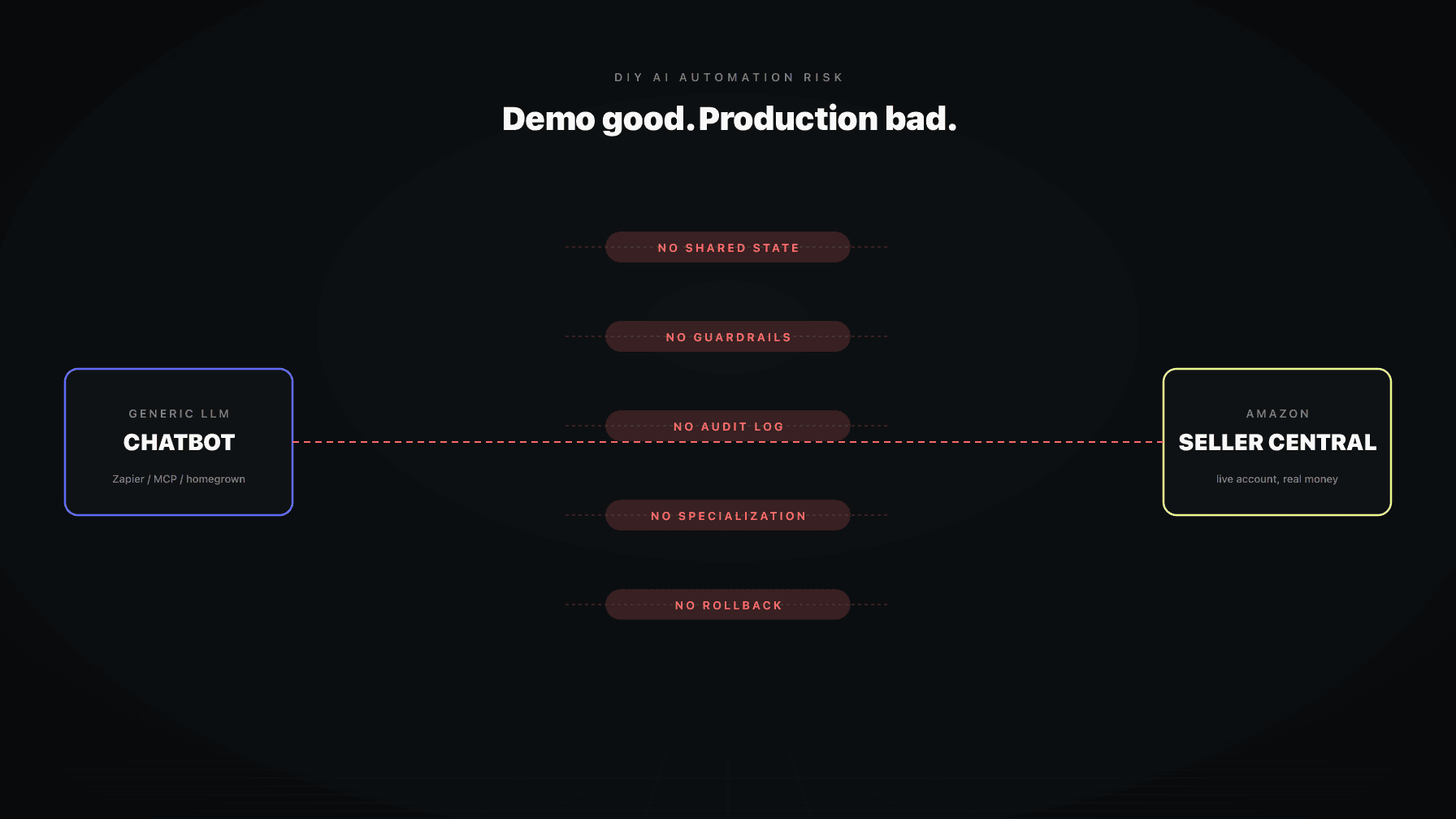
The most common path I see right now is this: a seller hooks GPT or Claude up to Seller Central. The wiring is Zapier, n8n, an MCP server, or a custom Python script that someone on the team wrote in a weekend. The first demo looks magical. The agent reads a report, suggests a bid change, sometimes pushes the bid change. Slack lights up. The team feels ten feet tall.
Then production happens. The agent doubles a bid because it misread a column. It drops a price below floor because cost of goods lives in a different sheet. It pauses the only campaign protecting a hero ASIN. Nobody catches it until inventory sells through at a loss or a top keyword tanks.
This is the gap between LLM demos and Amazon operations. A demo is a single prompt. Amazon is a thousand decisions a day across PPC, pricing, inventory, content, reviews, and listings, under constraints that change every hour. The wiring that makes the demo look fast is the wiring that makes production unsafe.
I am not anti-AI. I run an AI operating system company for Amazon brands. I am writing this because DIY builders deserve a straight answer about what they are taking on. Here is the honest risk profile and what safe automation actually requires.
The demo is the trap.
You give Claude or GPT a tool that calls the Amazon Ads API, hand it a Google Sheet of yesterday's search term report, write a system prompt that says "you are a PPC manager, optimize for ACoS," and run it on one campaign. The agent picks three negatives, lowers two bids, raises one. ACoS drops the next day. Ship it.
You have not built an automation. You have built a one-shot. The agent has no memory of yesterday, no awareness of pricing or inventory, no enforcement on its own actions, and no record outside a chat history nobody will read. Give it a thousand decisions instead of one and the failure rate compounds.
The team usually knows this. They add a Slack approval step. Approvals queue up. The team starts auto-approving. Two weeks later the agent does something nobody catches. This pattern is consistent across every DIY rig I have seen.
From reading to action
If the framework above sounds familiar, your Amazon account is probably carrying the same drag. Apply and we will show what Marko, Oracle, and Bruno would change in your first week.

Ran a 7-figure Amazon brand for a decade. Founded Skubana (acquired). Co-founded Prosper Show. 15+ years on Amazon.
Join the brands that replaced agencies and tools with AI employees.
"At first, I thought Profasee was just another repricer, but their AI puts you ahead of everyone else in the game."
When you authorize an LLM tool to talk to Seller Central or the Ads API, you usually grant a token that can do everything in that scope. Read reports, modify campaigns, modify bids, add negatives, pause campaigns. Everything.
The agent does not need most of those rights for most of its tasks. But the wiring is built for convenience, not principle of least privilege. When the model hallucinates a tool call (which it does), it hallucinates inside the full blast radius of your access.
A proper rig issues a scoped credential per task. The bid agent gets a credential that can only change bids inside a defined range. The negatives agent can add but not delete. The pricing agent has a hard floor. DIY rigs almost never do this. It is more code than the actual agent.
If you are running DIY today, audit what your token can do, then ask whether you are comfortable with the model triggering any of those actions on a bad night. The honest answer is usually no.
What makes Amazon work hard is that decisions are connected.
A bid is wrong if you do not know the price. A price is wrong if you do not know inventory cover. A negative keyword is wrong if you do not know the listing was rewritten yesterday and the search term might convert next week.
A DIY agent has no shared state. Each call starts from zero. The PPC agent does not see the pricing agent's last move. The pricing agent does not see the inventory snapshot. They all make locally reasonable decisions that add up to a globally bad outcome.
This is not a model size problem. You can put it on the biggest model and it still happens, because the context never enters the prompt. Shared state is a system design choice, not a prompt engineering choice. DIY rigs skip it because it is the unglamorous part.
The result: a brand running DIY AI ends up with three or four agents that look smart alone and dumb together. The team spends more time reconciling agent decisions than they used to spend making them.
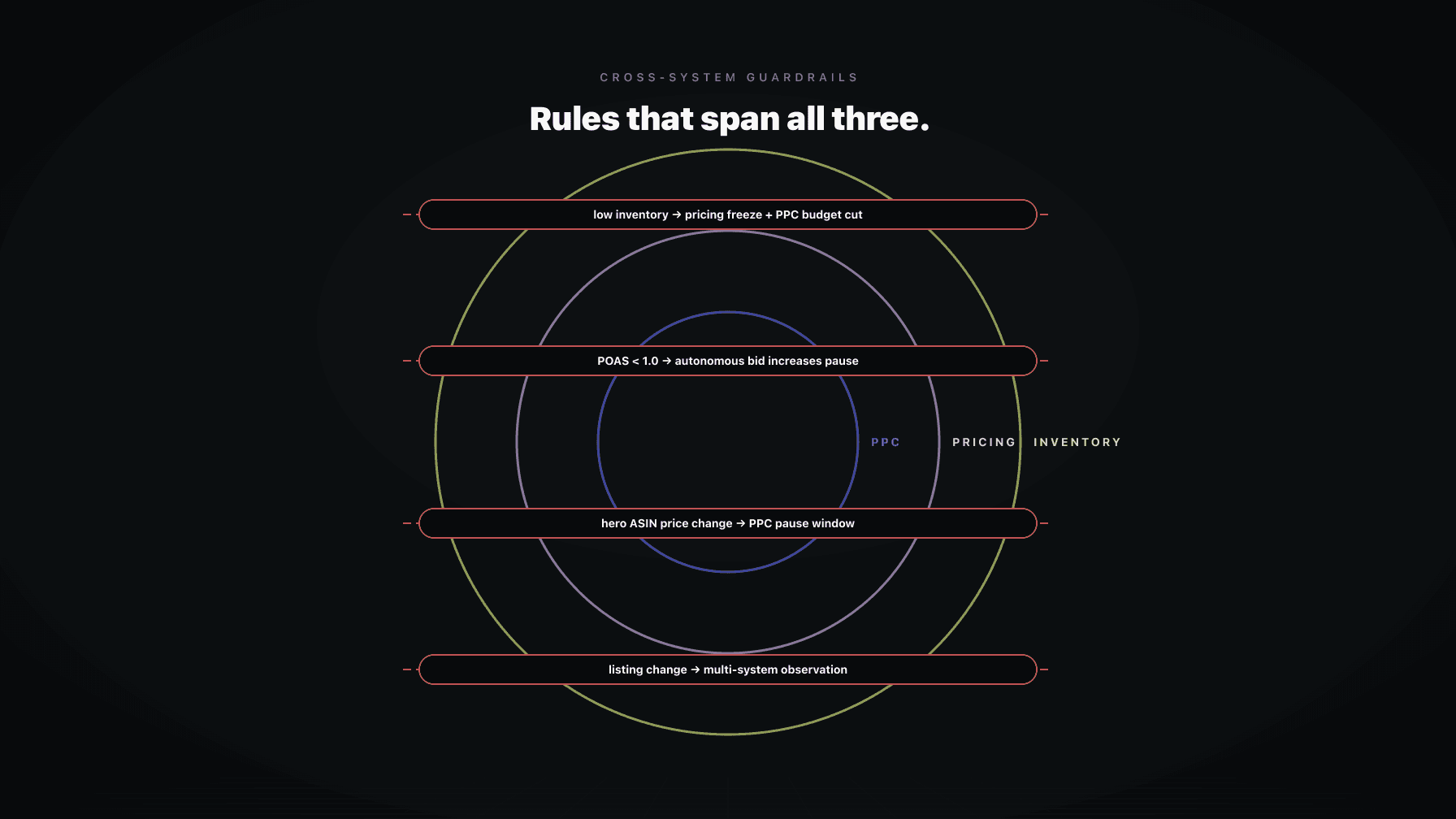
A guardrail is a rule the agent cannot violate, regardless of what the model decides.
Examples of guardrails that should be non-negotiable on an Amazon account:
A DIY rig does not have these by default. The system prompt asks the model to "be careful." That is not a guardrail. A guardrail is enforced in code, outside the model, before the API call leaves your system. If the model produces a 4x bid jump, the guardrail rejects it. If the model tries to drop price below floor, the guardrail rejects it.
DIY rigs lose this twice. First, the team does not write guardrails in the heat of building. Second, even when they do, guardrails live inside the same script the agent controls, so a clever model can route around them. Real guardrails sit in a separate process the agent cannot edit.
Three weeks in, something goes wrong. ACoS spiked, a top campaign got paused, a bestseller went unprofitable for a day. The team asks the agent why.
The agent makes up an answer. Models are good at producing a plausible postmortem that has no relationship to what actually happened, because the event lives in a token window that closed two weeks ago.
The team digs through Zapier logs, n8n history, Slack, Sheets revisions, the Ads console. They piece together a partial story, lose two days, and make peace with not knowing.
This is the moment most DIY rigs get quietly deprecated. Not because the agent was bad, but because the team cannot defend its decisions to leadership or to themselves.
A real audit log records every decision: inputs at decision time, the rule that approved or rejected the action, the API call that fired, the response, and the outcome over the next N days. Queryable per ASIN, per campaign, per agent. Without it, you have a black box.
There is a fantasy that one super-agent will run Amazon. Drop in a frontier model, give it tools, watch it cook.
Generalist agents fail at Amazon because Amazon is not one job. Bid management, search term mining, budget pacing, dayparting, pricing, repricing, inventory forecasting, listing optimization, A+ content, review monitoring, case management, and policy compliance are different jobs. Each has its own KPI, data shape, failure modes, and recovery path.
A generalist agent is a 6 out of 10 at all of them. A specialist that does one job and shares state with its peers can be a 9. The cost of specialization is engineering, not model spend.
DIY rigs start as one giant prompt with one giant tool list. They hit 6 out of 10 fast and never get past it. The team mistakes "the model is not smart enough" for "we built one agent where we needed seven." Switching models will not fix it.
If you want a sense of how this looks done right, the AI operating system pattern is the alternative: specialized agents that own a job, share state, and route work to each other.
The agent paused 14 campaigns by mistake. How do you undo it?
In a DIY rig, you go into Seller Central, find the campaigns, unpause them one by one, hope the original budget is intact, hope the daypart schedule was not lost. Twenty minutes of manual work, plus the time the campaigns were dark, plus rank loss you may not recover.
Worse, if the agent applied a thousand bid changes overnight and they were all wrong, undoing them is not really an option. You did not record the prior bids in a way that lets you replay. You eat the loss.
Rollback is not a feature you add later. It is a property of the system from day one. Every action has to be reversible by one click that restores prior state, which means the system records prior state on the way in. DIY rigs skip this because it doubles the engineering work. Then a bad night happens.
A few security risks the DIY crowd does not talk about enough:
Token storage. Where is your Amazon Ads API refresh token? In a .env on a developer's laptop, a Zapier dashboard, or an n8n workflow other people can clone? Tokens that move through chat tools can end up in provider logs depending on how you wired it.
PII in prompts. If your agent reads buyer messages, return reasons, or case content, you are sending customer PII to a third-party model provider. Some providers retain that for training depending on plan. Most DIY rigs are not on a zero retention plan.
Policy boundaries. Amazon has rules about automated activity. Unusual API patterns or activity that looks like buyer impersonation can trigger account-level action. A model that decides to "respond to all negative reviews" can cross that line in an afternoon.
Auditability. If Amazon asks why an action happened, "the model decided" is not an answer. Your DIY rig probably cannot produce a defensible record. A real system can.
Strip the DIY rigs and build for production, the requirements are not exotic. They are just absent from most weekend builds.
If your DIY rig has none of these, it is a prototype, not a system. That is fine for one campaign. It is not fine for your business.
"Unlike basic repricers, Profasee's data-driven approach focuses on maximizing net profit rather than just racing to the bottom. It's hands-off, effective, and the support team is top-notch."
Do not get sucked into model branding when comparing options. The model is the cheapest part. Evaluate the system around it.
Questions worth asking of any vendor or internal build:
A DIY setup fails most of these. A real operating system passes them. That gap is the buying decision.
I run Profasee Ultra. Bias acknowledged. Here is what we built and why it maps to the list above.
Specialized agents. Marko runs PPC. Oracle runs pricing. Bruno runs the deeper Amazon work that does not fit into a single category. Brett runs the operator-side coordination across them. They are not one prompt with a tool list. They are different agents with different KPIs, different rules, and different recovery paths. See Marko, the AI PPC manager and Oracle, the AI pricing software.
Shared state. The agents do not start fresh. They read from a common store that holds inventory cover, pricing posture, ad pacing, listing version, recent decisions. A bid change considers the price. A price change considers the ad pacing. The decisions stop fighting each other.
Cross-system guardrails. Change limits, floors, ceilings, freeze windows, protected campaigns, and event-mode rules are enforced outside the agents. The agents cannot edit them. Read the PPC guardrails post and the cross-system guardrails post for the structure.
Audit log per decision. Every action records inputs, rule outcomes, API calls, response, and downstream KPI movement. Queryable by ASIN, by campaign, by agent, by date. When something breaks, you do not ask the model. You read the log.
Mission Control. The operator surface. One place to see what every agent did, approve borderline actions, run a freeze, and roll anything back. The no-employee Amazon business post covers how lean teams operate from this surface.
Rollback. One click. The system recorded the prior state on the way in. The recovery is real, not theoretical.
If the failure modes here sound familiar, you have two paths. Build all of the above yourself (twelve months of engineering), or use a system that already has it. The PPC software page has the breakdown, pricing has the cost, apply is the way in. The agency replacement post and PPC management playbook cover the broader shift.
Technically yes. Through Zapier, n8n, an MCP server, or a custom script with the Amazon Ads API and SP-API, you can have an LLM read and write to your account. The wiring takes an afternoon. The risk is full write access without the structural protections (guardrails, audit log, rollback, scoped credentials) that production work requires. Direct connections are fine for read-only analysis. For writes, treat them as prototypes, not systems.
Not the model. The absence of structure around the model: no shared state across agents, no guardrails enforced outside the prompt, no audit log, no rollback. One bad night can pause campaigns, drop prices below floor, or apply hundreds of bid changes you cannot reverse. The system around the model is the failure point.
Fine for read-only flows: pulling reports, sending alerts, summarizing data. Risky when you grant write access to the Amazon Ads API or SP-API and let an LLM make decisions inside that flow. The platforms are reliable. The architecture you build on top of them rarely includes the guardrails, audit log, scoped credentials, and rollback production automation needs. Use them for plumbing, not for the brain.
Depends on scope. The Amazon Ads API can read reports and modify campaigns, ad groups, bids, keywords, negatives, and budgets. SP-API can read orders, inventory, listings, and write listing updates, pricing, and FBA shipments. Most DIY setups grant a token that can do everything in scope, so a hallucinated tool call has full blast radius. Best practice is narrow per-task credentials with hard limits.
Pick one decision the agent made yesterday. Try to answer in under five minutes: what inputs did it have, what rule approved or rejected the action, what API call fired, what was the prior state, how do I roll it back. If you can answer all five with timestamps, you are in reasonable shape. If not, you have a black box.
A chatbot answers questions in a conversation. An AI operating system runs the account: specialized agents per job, shared state, guardrails enforced in code, an audit log per action, a rollback path, an operator surface, and a trust ladder for autonomy. The chatbot is a tool a human uses. The operating system is the layer the business runs on.
In extreme cases, yes. An agent that fires unusual API patterns, sends mass buyer messages, manipulates reviews, or behaves like a policy violation can trigger account-level enforcement. The risk is highest when agents touch buyer-facing surfaces (messaging, reviews, returns) without guardrails. Read-only analysis carries minimal risk. Aggressive automation without scoped credentials and policy-aware guardrails is where sellers get hurt.