Chad Rubin
June 11, 2026 · 12 min read
Operator notes by email
Short, opinionated takes on AI agents, Amazon PPC, pricing, and inventory. No fluff. About once a week.
Here is how most brands get caught. Two years ago someone on the team set up a post-purchase email sequence inside a third-party tool. It had a friendly subject line, a brand logo, a thank-you note, and a soft ask for a review at the end. It worked. Reviews came in. Nobody touched it again.
That sequence is still running. It is still going out to every buyer. And every single message is, by Amazon's current Communication Guidelines, a violation. The brand does not know because Amazon does not send a real-time alert when a message crosses the line. It logs the violation, it does not warn you, it does not stop the message. It just sits in the file and waits.
One day the file gets pulled. It happens during a routine account health review, or after a competitor reports you, or because the account triggered some threshold inside Seller Performance. You get a notice. You have 72 hours to respond. The notice does not say "your buyer messaging is non-compliant." It says your account is under review for Communication Guidelines violations and your listings are at risk.
That is the silent-suspension trap. The violation is not loud. The enforcement is.
I have been operating on Amazon for over a decade and I have watched dozens of brands get hit by this. Not bad brands. Not blackhat sellers. Real operators with real products who set up automation in 2022, never revisited it, and got blindsided when policy enforcement caught up. The rules around buyer-seller messaging have tightened every year since 2020, and the messages that were fine three years ago are bannable now. The automation does not know that. The automation just keeps sending.
This post is the operator-grade rulebook. What the Communication Guidelines actually forbid, what is allowed, what the compliant post-purchase sequence looks like in 2026, and the violations operators do not recognize as violations. If you have an active messaging sequence and you have not audited it in the last six months, you need to read this and then go look at what you are actually sending. For the bigger picture on reviews and reputation, the reviews and reputation playbook is the parent post.
Amazon's Communication Guidelines are written in plain language and most operators have never read them. They are public. They are searchable inside Seller Central. They are also strictly enforced. Here is what they actually forbid, in operator language.
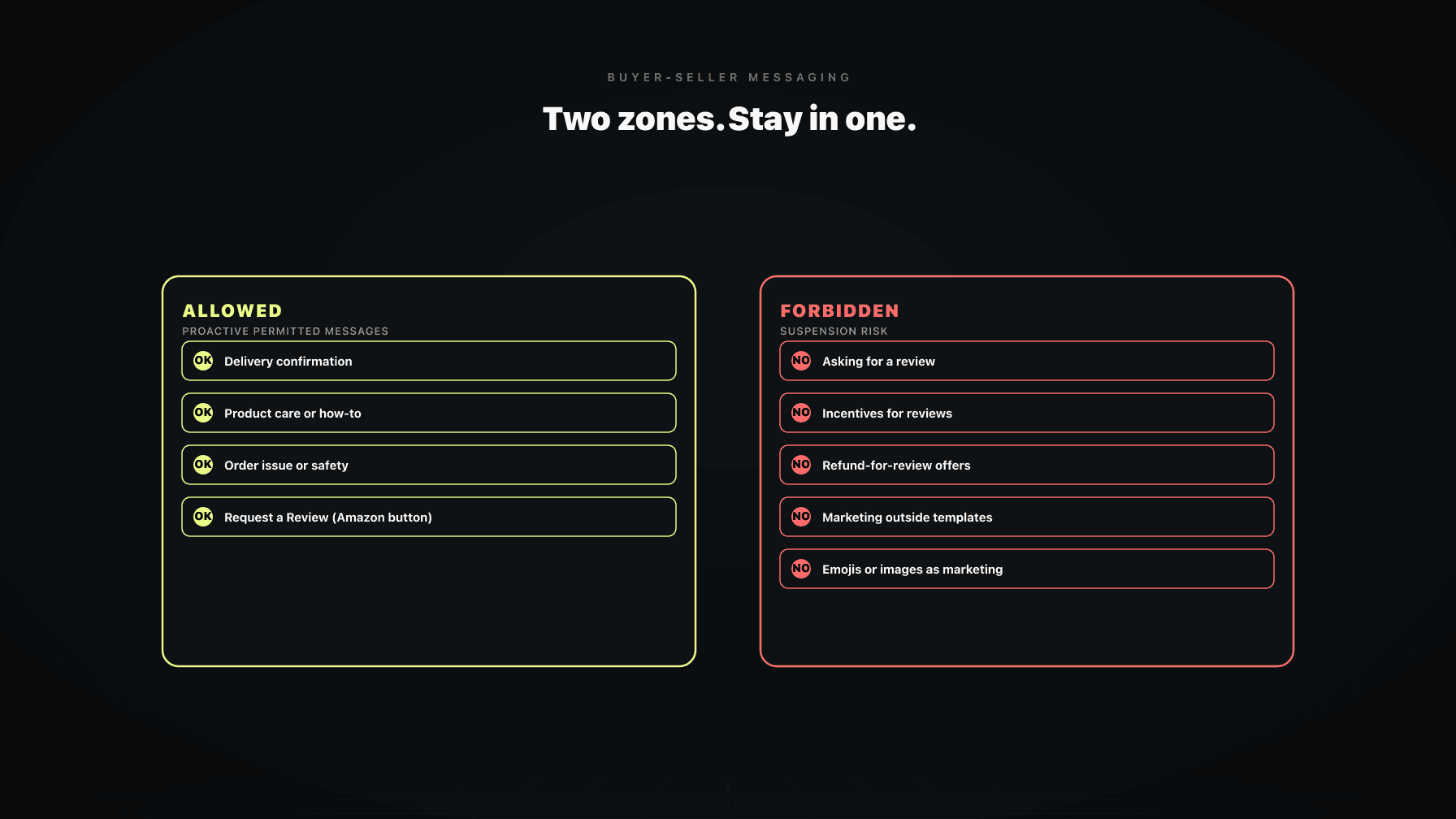
No solicitation of reviews outside Amazon's tools. You cannot ask for a review in a buyer-seller message. Not directly, not indirectly, not as a soft suggestion, not at the end of a thank-you note. The Request a Review button inside Manage Orders is the only compliant way to ask a buyer for a review, and we will cover it in the next section.
From reading to action
If the framework above sounds familiar, your Amazon account is probably carrying the same drag. Apply and we will show what Marko, Oracle, and Bruno would change in your first week.

Ran a 7-figure Amazon brand for a decade. Founded Skubana (acquired). Co-founded Prosper Show. 15+ years on Amazon.
Join the brands that replaced agencies and tools with AI employees.
No incentives for reviews. You cannot offer a discount, a free product, a gift card, a refund, an extended warranty, or anything else in exchange for a review. You also cannot offer these things in exchange for a positive review, an updated review, or a review removal. The incentive itself is the violation, not the outcome of the review.
No requests to update or change reviews. This one trips up brands trying to do the right thing. A buyer leaves a 1-star review for a product defect. You fix the defect, send a replacement, and ask them to update their review to reflect the resolution. That is a violation. You can communicate to resolve the issue. You cannot ask for the review to change as part of that resolution. We unpack this in the negative review response post.
No marketing language outside permitted templates. Buyer-seller messages are for transactional purposes. They are not for upselling, cross-selling, promoting other products, building an email list, driving traffic off Amazon, or any other marketing activity. A message that includes "check out our other products" or "subscribe to our newsletter" is non-compliant.
No external links except for product safety. You cannot link to your own website, your social channels, your Shopify store, a survey, a registration form, a coupon page, or anything else. The only links permitted are to Amazon URLs, to image assets necessary for the message, and in limited cases to product safety information.
No emojis, no logos, no images that read as marketing. Buyer-seller messages are supposed to look transactional. Decorative emojis, brand logos used as design elements, lifestyle imagery, and other marketing visuals are not permitted. Functional images, like a diagram showing how to assemble a product, are allowed when relevant to the message.
No requests for feedback that route around Amazon. "If you have any issues, please email us at support@brand.com before leaving a review" is one of the most common violations and one of the most flagged. It is intercept language. It tries to route problems away from Amazon's review system to your inbox. Amazon treats this as review manipulation.
No misleading subject lines. A subject line that says "Important: Your Order" when the message is actually a review request is a violation on two counts. It is deceptive, and the underlying message is a review solicitation.
The pattern across all of these: anything that influences a review, anything that markets to a buyer, anything that routes communication off Amazon, anything that is not strictly transactional. If you are unsure, the answer is almost always do not send it.
Amazon defines a category called Proactive Permitted Messages. These are the messages you, as a seller, are explicitly allowed to send to a buyer without them initiating the conversation. The list is short.
Resolving an order issue. If something went wrong with the order, you can reach out. Damaged in transit, missing components, wrong item shipped, delivery delay, address verification. The message must be specific to the order issue, not a general check-in.
Requesting additional information needed to complete the order. If you need a customization detail, a shipping clarification, or anything else that is genuinely required to fulfill the order, you can ask.
Sending an invoice. Permitted. For B2B and tax purposes.
Asking a product customization question. If the listing supports customization and you need input from the buyer to produce it, you can message.
Scheduling delivery of a heavy or bulky item. Permitted for large items requiring delivery coordination.
Scheduling Home Services appointments. Permitted for the Home Services category.
Sending a product safety or recall notice. Permitted and, in many cases, required.
Notifying the buyer of a sweepstakes or contest winner status. Permitted if applicable.
Sending a Request a Review. This is done through the Request a Review button inside Manage Orders, not through a custom message.
That is the full list. Notice what is not on it: thank-you notes, brand introductions, how-to guides sent unprompted, newsletter signups, social follows, anything that is not directly transactional.
The Request a Review button. This is Amazon's official, compliant, one-click review solicitation. You open an order inside Manage Orders, you click the button, and Amazon sends a templated request in the buyer's preferred language asking for both a product review and a seller feedback rating. You cannot edit the template. You cannot add anything to it. You cannot brand it. That is what makes it compliant. The button is available between 5 and 30 days after delivery. We go deep on how to use it in the review velocity and Vine post, but for compliance purposes the rule is simple: the button is the only review ask you should be sending.
Most brands run three to five message post-purchase sequences. The compliant version is one or two messages. Here is what it looks like.
Day 0, delivery confirmation. A message that confirms the order has been delivered and opens the door for the buyer to report a problem. It is not required, but it serves a real purpose: it surfaces issues before they become negative reviews. The message should be plain, transactional, and contain a single line acknowledging delivery and a single line inviting the buyer to reach out if anything is wrong. No marketing, no upsell, no review ask.
Example compliant copy:
Subject: Your [product name] order has been delivered >Your order has been delivered. If anything is not right with the product, including damage in transit or missing components, reply to this message and we will resolve it within 24 hours.
That is it. Eighteen words of body copy. No logo, no emoji, no link, no review ask.
Day 3 to 5, product care or how-to-use. If your product has a use case that benefits from instruction, like assembly, first-time setup, or care instructions, you can send a single message with that information. The message must be genuinely useful and tied to the product. A how-to-use message for a phone case is not compliant because a phone case does not require instruction. A how-to-use message for a kitchen appliance with a specific cleaning protocol is compliant.
The message must not contain a review ask. It must not contain marketing copy. It must not link off Amazon except to product safety information.
The review ask is the Request a Review button. Trigger it between day 5 and day 30 after delivery, ideally around day 7 to 14 when satisfaction is high and the experience is fresh. This can be automated through approved tools that use Amazon's official Selling Partner API integration with the button. Make sure your tool actually triggers the button and is not sending a custom message that mimics it. Some older tools still send custom review requests, which is a violation.
That is the full compliant sequence. Two messages and one button trigger. If your current sequence has more than that, you have work to do. For more on the orchestration layer that runs this and other workflows, see the operations mission control post.
These are the ones I see most often, in the wild, on real accounts that get suspended.
"If you loved it, please consider leaving a review." This is a review solicitation. The conditional softens the ask but does not change what it is. Violation.
"If there is any problem, please contact us before leaving a negative review." Intercept language. Routes problems away from Amazon. This is one of the most flagged violation patterns. Violation.
Thank-you cards with QR codes in packaging. Even if the card is physical and not a buyer-seller message, the QR code routes the buyer to a survey, a registration form, an extended warranty signup, or a review request. Amazon treats this as off-platform communication that violates the Communication Guidelines and brand registry policies. If the QR code or URL on the card asks for a review or offers an incentive, you are in violation. The fact that it is paper does not protect you. Brands have been suspended over this. We cover the brand-side angle in the hijacker defense post.
"We will refund you if you remove your negative review." Direct incentive for review removal. This is one of the cleanest, fastest paths to account suspension that exists on Amazon. Buyers screenshot these and report them. Violation.
"Leave us a 5-star review and we will send you a free [product]." Direct incentive for a positive review. Same as above.
"Reply to this message and we will send you our care guide / discount code / newsletter signup." Marketing language inside a buyer-seller message. Violation.
Emojis in subject lines. A sparkle emoji or a heart in the subject line of a buyer-seller message is a violation. Yes, really. The subject line is supposed to be plain and transactional.
Lifestyle product photography in the message body. Marketing imagery. The message body should be text-first. If you include an image, it should be functional, like a diagram or a setup illustration.
"Click here to register your product for an extended warranty." Extended warranty registration that captures the buyer's email outside Amazon is a violation. It is data harvesting through a transactional channel. Violation.
Multiple thank-you messages. Some sequences send a thank-you on day 0, a thank-you on day 3, and a thank-you on day 7. Each one is a non-permitted message. Even if the language is "compliant," the message itself is not on the proactive permitted list. Violation by category.
The pattern: if the message exists to make the buyer feel good about your brand, it is not permitted. If the message exists to solve a transactional problem, it is permitted. The Communication Guidelines do not care about your customer experience strategy. They care about the buyer's inbox not turning into a marketing channel.
Amazon's enforcement of buyer-seller messaging follows a rough escalation pattern, but the pattern is not guaranteed. A first-time violation might trigger a warning. It might also trigger immediate account health damage. It depends on the severity of the violation, the volume of non-compliant messages sent, the category, and your account history.
The escalation typically looks like this. First, a Communication Guidelines warning lands in your performance notifications. It cites the rule violated and asks you to acknowledge and remediate. Second, repeated or unaddressed violations cause an account health rating drop. Your AHR score takes a hit, and the violation appears in your account health dashboard. Third, sustained non-compliance triggers an enforcement action: messaging restrictions, listing suspensions, or full account suspension.
Incentive-based violations (refund for review, free product for review) often skip the warning stage and go directly to enforcement. Amazon treats those as review manipulation, not as Communication Guidelines issues, and review manipulation enforcement is faster and harsher.
Ignorance does not protect you. The fact that the violation came from a third-party tool you set up two years ago does not protect you. The fact that the language seemed friendly and customer-first does not protect you. Amazon's position is that you are responsible for every message sent from your seller account, regardless of what tool sent it.
This is why a quarterly compliance audit of your active messaging is not optional. It is one of the highest-leverage maintenance tasks an operator can do. See the listing optimization post for the broader cadence on what to audit when.
The Profasee catalog-auditor agent scans your active buyer-seller messaging on a monthly cadence. It pulls the templates from your connected messaging tools, parses every active sequence, and flags non-compliant language against the current Communication Guidelines.
The output is a compliance report. It tells you which message in which sequence has which violation, with the offending phrase highlighted and the specific guideline cited. It also flags messages that are technically compliant today but are at risk based on recent policy enforcement patterns, like extended warranty language or any phrasing that routes communication off Amazon.
The agent does not stop there. It tracks every change in your messaging over time, so if someone on the team edits a template and introduces a violation, the next audit catches it inside 30 days rather than two years later. It also monitors the Communication Guidelines themselves for updates and re-audits your active messaging against the new rules whenever Amazon ships a change.
This is the kind of work that no operator does manually because it is tedious and easy to defer. It is also the kind of work that, when skipped, costs accounts. A messaging audit takes the agent under an hour. The brand sees the report and clears the violations the same day.
For how the catalog-auditor fits into the broader agent stack, see the operations mission control post and the deep-dive on the AI operating system for Amazon brands.
If you are running an automated post-purchase sequence and you have not audited it in the last six months, the odds that you are sending non-compliant messages right now are high. You can apply to work with Profasee and the catalog-auditor will be running on your account inside a week.
Not in a buyer-seller message. The only compliant way to ask for a review is through the Request a Review button inside Manage Orders, which sends an Amazon-templated request you cannot edit or brand. Any custom message asking for a review, even softly, is a violation of the Communication Guidelines.
The Request a Review button is Amazon's official, one-click review solicitation. It is available inside Manage Orders for each order between 5 and 30 days after delivery. It sends a templated request asking for a product review and a seller feedback rating in the buyer's preferred language. It is fully compliant because Amazon controls the message content. It is also the only review ask you should be sending.
A plain thank-you card with no QR code, no URL, no review ask, and no incentive is generally acceptable as in-package material. A thank-you card with a QR code that routes to a survey, a review request, an extended warranty signup, or a newsletter is a violation of brand registry and Communication Guidelines policies. Brands have been suspended over QR codes in packaging. If the card asks for a review or offers anything in exchange for one, it is non-compliant.
Decorative emojis are not permitted in buyer-seller messages, including subject lines. Buyer-seller messages are supposed to be plain and transactional. Logos, lifestyle photography, and other marketing visuals are also not permitted. Functional images, like an assembly diagram tied to the product, are allowed when relevant.
You can message a buyer to resolve an order issue, which is a proactive permitted message. You cannot ask the buyer to update, change, or remove the review as part of that resolution. The communication must focus on solving the problem. If the buyer chooses to update the review after the issue is resolved, that is their decision. Asking them to do so is a violation.
Amazon's policy is 24 hours, including weekends and holidays. Response time is a Seller Performance metric and it directly affects your account health. Late responses accumulate and can trigger account-level warnings. The 24-hour clock applies to all buyer-initiated messages, even when the message does not appear to require a response.
Amazon scans every buyer-seller message through automated systems that flag language patterns associated with violations: review solicitation phrases, incentive offers, external URLs, off-Amazon contact information, and others. A flagged message can trigger a Communication Guidelines warning. Human review happens when the flag is severe or when an account is under broader review. The takeaway is that you should assume every message is read and indexed against the guidelines, because in practical terms, it is.