Chad Rubin
June 10, 2026 · 11 min read
Operator notes by email
Short, opinionated takes on AI agents, Amazon PPC, pricing, and inventory. No fluff. About once a week.
Most brands obsess over the wrong number. They want a 4.8. They will hold a launch back another month to chase a 4.8. Meanwhile the listing sitting next to them has a 4.4 with 50 reviews and is eating their lunch on conversion.
Volume beats perfection on Amazon. It is not close. A 4.4 with 50 reviews will out-convert a 4.6 with 8 reviews almost every time, and the math is not subtle. Shoppers do not read every review. They glance at the star rating, scan the review count, and decide whether the listing is "real." Eight reviews does not feel real. Fifty does. Two hundred is even better. The star rating only matters once you have crossed the trust threshold of review count, and below that threshold no amount of polish on the product page is going to save you.
This is why review velocity, the rate at which new reviews are landing on the listing, is the metric we actually manage. Not the star average. Velocity. A listing with 50 reviews and one new review every two weeks reads as alive and selling. A listing with 200 reviews and nothing new in four months reads as stale, even if the average is higher. Amazon's algorithm appears to agree. Listings that keep accumulating reviews tend to hold rank better, recover from negative reviews faster, and respond to ad spend more efficiently.
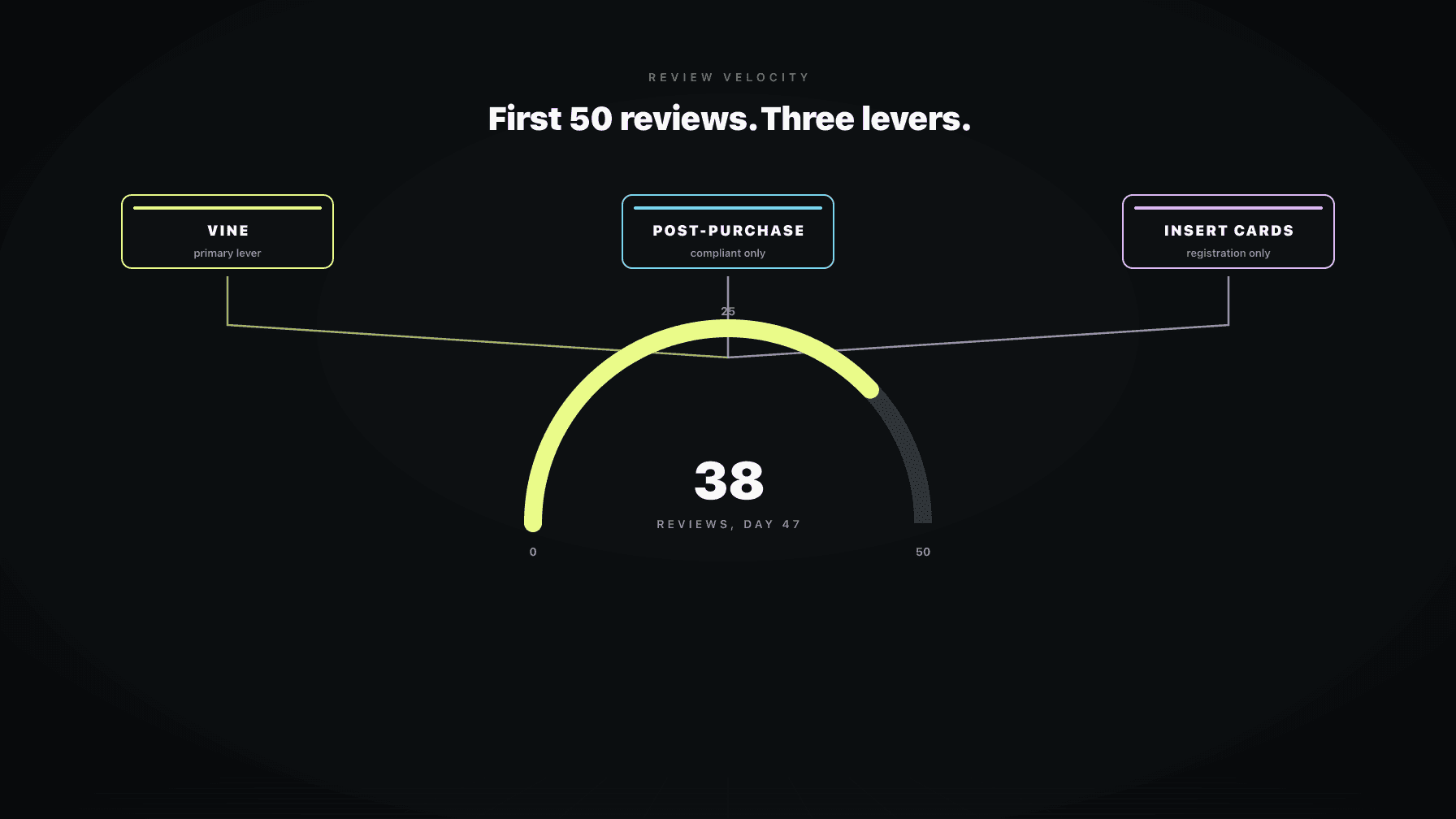
This post is the operator playbook for the first 50 reviews. Vine, compliant post-purchase messaging, what insert cards can and cannot say, and how to keep the velocity lever pulled long after launch. It is the companion to our reviews and reputation playbook, zoomed in on the lever that matters most early.
There are four reasons the first 50 reviews disproportionately drive everything that happens later.
The first is the trust threshold. Conversion rate on a listing climbs fastest in the zero-to-50 range, then flattens. Going from 5 reviews to 50 might double your conversion rate. Going from 50 to 500 might add another 10 percent. The first 50 are by far the most expensive reviews to acquire and by far the highest return.
The second is ad efficiency. Amazon's ad auction is a conversion-weighted auction. Sponsored Products bids do not just buy clicks, they buy the right to compete for clicks against listings that convert. A listing with 8 reviews loses that auction to a listing with 50, even if the bid is higher, because Amazon's system models the click-to-sale probability and discounts the low-review listing. You will pay a 2x to 3x ACOS premium until you cross the review threshold. Every dollar of ad spend on a 5-review listing is partially wasted, and the only way to fix it is to get the review count up.
The third is organic rank. Amazon's organic algorithm rewards listings that convert. Reviews drive conversion. Conversion drives rank. Rank drives more sessions. More sessions drive more reviews. This is the launch flywheel, and it does not start spinning until you have enough reviews to convert the traffic you are paying for. Most failed launches are failed flywheels. The brand spent on ads, did not get reviews, did not convert, did not rank, and the ASIN died.
From reading to action
If the framework above sounds familiar, your Amazon account is probably carrying the same drag. Apply and we will show what Marko, Oracle, and Bruno would change in your first week.

Ran a 7-figure Amazon brand for a decade. Founded Skubana (acquired). Co-founded Prosper Show. 15+ years on Amazon.
Join the brands that replaced agencies and tools with AI employees.
The fourth is the cost of going backwards. A new product that takes one early one-star review when it only has three total reviews is sitting at a 3.0 average. That listing is now structurally hard to recover. You cannot dilute a one-star fast enough at low volume. But a one-star on a listing with 50 reviews barely moves the needle. Volume is also defense.
Amazon Vine is the only review program Amazon endorses, and for new launches it is the single biggest lever you have. Use it. Most brands either do not use it, use it wrong, or use it once and forget about it.
Here is how Vine actually works. You enroll a parent ASIN, commit a number of free units (currently up to 30 per parent), and pay an enrollment fee of around $200 per parent ASIN. Amazon ships the units to Vine Voices, who are vetted reviewers on the platform. They are not paid by you. They are not allowed to coordinate with you. They get the product, they use it, they review it. The reviews carry a "Vine Voice" badge that shoppers recognize as a vetted reviewer, which has its own credibility signal.
Timing. Enroll Vine the day your inventory hits FBA and is sellable. Not before. Vine units come out of available inventory, so if you enroll before the product is live, you are paying for a program that cannot ship. Enroll the same day you go live and you can have your first Vine reviews landing within 14 to 30 days. Vine reviewers are not fast, but they are reliable.
How many units to commit. Commit the full 30 on every new parent unless the unit economics are brutal. A $40 product committed at 30 units is $1,200 of inventory plus a $200 fee. For that, you usually get 10 to 25 reviews landing inside the first 60 days. There is no cheaper way to buy real reviews from real customers. If your COGS make 30 units too painful, commit 10 and accept that you will get 4 to 8 reviews. Skip Vine entirely only if your product is unit-economically incapable of supporting it, which usually means it is also incapable of supporting Amazon at all.
What Vine reviewers actually write. They write long reviews. They include photos. They use the product, often for weeks. They critique honestly. A Vine review that gives you four stars and tells the truth about a small flaw is far more valuable than the same review at five stars, because shoppers read the four-star Vine reviews to decide if the flaws are dealbreakers. Vine reviewers are also harsh. They will dock a star for packaging. They will dock a star for instructions that are not bilingual. They will dock a star for a smell. That is fine. Volume of honest reviews wins.
Categories where Vine works hardest. Consumables, home goods, beauty, kitchen, electronics with a clear use case, anything where someone can form a real opinion in a week or two. Vine is weaker for highly technical B2B products where the reviewer pool may not be representative, and weaker for seasonal items where the timing window matters.
When Vine reviews hurt. They hurt when the product is not actually good. Vine is brutal on bad products. A product with a 30 percent return rate from regular customers will get a 2.5 average from Vine, and you have just published that 2.5 across 20 reviews you cannot delete. Do not Vine a product you have not personally tested. Do not Vine a new formulation you have not validated. Vine is amplification. If the product is good, it amplifies that. If it is not, it amplifies that too. We have seen launches die at Vine because the brand was using Vine to find out if the product worked, instead of using a small sample of friendly testers first to confirm it did.
After Vine, the second lever is post-purchase messaging. This is where most brands either underuse the lever or get themselves suspended.
What is allowed. Amazon permits seller-initiated messaging for legitimate order-related purposes. Delivery confirmation, product-care instructions, problem help if something is wrong, and one Request a Review button click per order through Seller Central. The Brand Builder Brand Approved templates inside the system are pre-approved language you can send without legal risk.
What gets brands suspended. Asking for a positive review. Offering anything in exchange for a review. Linking to off-Amazon channels. Sending more than the minimum necessary messages. Using emojis or images in a way Amazon classifies as promotional. The rules are stricter than most brands realize, and Amazon has been increasingly aggressive about enforcement. We covered the exact rules in our buyer-seller messaging compliance post, and it is worth reading before you write a single template.
The biggest unlock is the Request a Review button. It is built into Seller Central, it is compliant by definition because Amazon wrote the message, and it asks for both a seller feedback and a product review in one ping. Triggered between day 5 and day 30 after delivery, it lifts review rate by roughly 2x over doing nothing. Most brands do not click it on every eligible order. That is the easiest fix in the playbook.
Beyond Request a Review, the only messaging worth sending is genuinely useful: a product-care guide that helps the customer get value from the product, or a problem-help message that catches issues before they become negative reviews. If a customer has a problem and you solve it before they leave a one-star, you have saved a review. That is harder to systematize but it is the operator move. Pair it with the negative review response playbook and you have both sides covered.
Insert cards inside the package are where most brands cross the line without realizing it.
What you cannot do. You cannot say "leave us a 5-star review." You cannot say "leave us a review and we will send you a free product." You cannot say "if you had a bad experience, contact us before leaving a review" because that is conditioning negative feedback. You cannot include a QR code that links to a review request. All of these are bannable. Amazon's TOS on insert cards is explicit, and they read the cards. Brands have lost their accounts over insert wording.
What you can do. You can include a registration card for warranty. You can include a customer support contact. You can include product care or assembly instructions. You can include a thank you note that does not condition or incentivize anything. You can invite the customer to follow you on Amazon's Brand Follow feature, because that is on-platform.
The rule, simply stated. Do not condition feedback. Do not incentivize feedback. Do not redirect negative feedback off-platform. Inserts can be useful for warranty registration and product education, which builds the brand and reduces returns. They cannot be your review acquisition strategy. If you are tempted to push the line, do not. The downside is total loss of selling privileges, and the upside is marginal compared to Vine.
Most brands run Vine once at launch and then forget about it. This is the largest unforced error we see.
Vine is not just a launch tool. It is a velocity tool you can pull whenever you need new reviews. The triggers we use:
Refresh after a velocity drop. If an ASIN has not had a new review in 60 days and your sales are still strong, you have a velocity problem that will start affecting rank. Re-enroll Vine on the parent for 10 to 30 units and get the velocity going again.
New variations. Every new size, color, or scent variation can be Vine enrolled separately. Reviews from Vine on a new variation will also pool into the parent ASIN family, which means the new variation does not launch from zero. This compounds with the variation review pooling strategy, where the parent-child structure itself becomes a review acquisition vehicle.
Formulation changes. If you change a formula, ingredient, or design, your old reviews may no longer reflect the current product. Re-Vining the refreshed product gives you a fresh cohort of reviews on the new version, which insulates you from "this is not what I remembered" complaints from older customers.
Major listing relaunches. If you have rewritten the title, swapped the hero image, and overhauled the bullets per the listing optimization playbook, Vine reviews from the relaunch help validate the new positioning with reviewers who are reading the new copy.
The mental model: Vine is a monthly lever, not a launch event. We schedule Vine cohorts on a calendar, the same way an ad manager schedules budget flights. Every 30 to 60 days, the question is which ASINs need new reviews this cycle. If the answer is "none," fine. But most catalogs of any size have at least one or two ASINs every month where Vine would move the needle.
Review velocity is the kind of metric that humans miss because nothing alerts on it. Sales drop, you see it the next day. Inventory dries up, the dashboard yells. Reviews stop landing, no one notices for three months.
That is the gap our Catalog Auditor agent closes. It watches review velocity by ASIN, by parent, and by variation. The alerts that fire:
Velocity dropped to zero. Any ASIN with strong sales and zero new reviews in 30 days. The fix is usually Request a Review hygiene, Vine re-enrollment, or both.
Days since last review by ASIN. A weekly digest of the catalog sorted by how stale the review feed is. Pairs with the Operations Mission Control view so you are looking at the same staleness signal alongside everything else.
Vine cohort scheduling. Once a month, the agent proposes which ASINs to re-Vine and which to skip. It looks at current review count, velocity, sales rate, recent rating trend, and whether the listing has been refreshed since the last Vine cohort.
Negative review velocity spike. If an ASIN starts taking one-stars at an elevated rate, the alert fires before the average drops, so we can investigate the product cause (defect batch, listing accuracy issue, packaging change) before it tanks the rating.
Variation review imbalance. When a parent's reviews are concentrated on one variation, the agent flags the underweighted children so they can be Vined or otherwise pushed. This is the kind of pattern that takes a human an hour to find and the agent reports in a sentence.
This is the operating model we describe in the AI operating system post. Reviews are too important to leave to whoever happens to check the seller account this week. They need a watcher, and the watcher needs to be looking at the same dashboard every day with the same definitions.
If you want this running on your account inside 30 days, apply here. We will set the velocity watcher, the Vine cadence, and the compliant post-purchase template stack as part of the deployment.
First Vine reviews typically land 14 to 30 days after enrollment. The full cohort plays out over 60 to 90 days. About 30 to 70 percent of Vine reviewers who claim a unit actually post a review, so a 30-unit commitment usually yields 10 to 25 published reviews.
Commit the maximum 30 on every new parent ASIN unless unit economics make it impossible. The marginal cost of going from 10 units to 30 is small relative to the marginal reviews gained, and reviews are the gating constraint on the entire launch. Below 10 units the program is rarely worth the $200 fee.
Generally no. Vine reviews are protected like any other product review and Amazon will not remove them for being negative. They will remove a Vine review only if it violates Community Guidelines (profanity, off-topic, reviewing the seller instead of the product). This is why Vine is dangerous for unvalidated products.
Yes, but the math gets stark. A $200 product committed at 30 units is $6,000 of inventory at cost plus the $200 fee. For high-priced products we usually commit 10 to 15 units and accept a smaller cohort. The credibility uplift from Vine on a high-consideration product is often worth more than the inventory cost.
Roughly one new review per 100 units sold for most categories, higher for consumables, lower for industrial or B2B. The absolute number matters less than the trend. If your velocity is falling while sales are stable, you have a Request a Review hygiene problem or a customer satisfaction problem. Either is fixable, but you have to notice it first.
Insert cards themselves are allowed. Insert cards that ask for reviews, condition reviews, incentivize reviews, or redirect negative feedback off-platform are against policy and can result in suspension. Warranty registration, product care, and customer support contact information are all permitted on inserts.
For most catalogs, yes. New variations launch from a weaker position than the parent because reviews are still pooling. Vining each new variation accelerates that pooling and prevents the new SKU from looking thin on the listing. Skip Vine on a new variation only if it is a minor SKU you do not expect to drive meaningful volume.